RadioCodeAuto

Dacia Radio Code Generator: Get Your Unlock Code Online by VIN or Serial

Locked out of your vehicle's entertainment system after a battery change or repair? Our Dacia radio code generator provides a fast, 100% accurate solution to bypass the "Enter Code" screen. By using your vehicle's VIN or the radio serial number, you can access our comprehensive Dacia code list to retrieve the unique 4-digit PIN for your specific unit.

Dacia Radio Code Generator

Enter the 4-character precode (e.g. A105)

YOUR CODE IS:
----

Help this site stay online! 🚀

Buy Me A Coffee

Happy? Help us with a review! 😄

REVIEW US ON TRUSTPILOT ★★★★★

How to Find Your Dacia Radio Code

If your Dacia radio is displaying "CODE" or "0000" after a battery change, you’ll need a 4-digit PIN to reactivate it. To use our Dacia radio code generator, you first need to identify your unit's specific identification numbers. Follow the two methods below to retrieve the data required to unlock your device.

Method 1: Using the Radio Serial Number (The "Pre-Code")
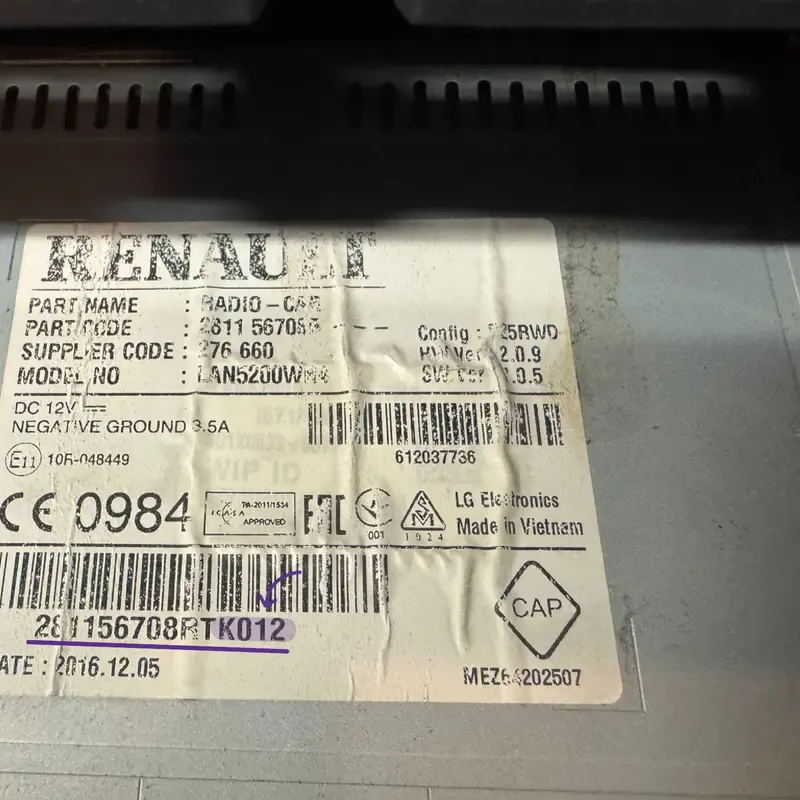
Dacia radio serial number location on the side sticker label showing pre-code

Example: The 'Pre-code' is usually found on the side or back sticker.

This is the most reliable method for all Dacia models, including the Duster, Sandero, Logan, and Lodgy. Every Dacia radio has a "Security Code" or "Pre-code" printed on a sticker.

  • Remove the radio: Use radio removal tools (or four thin nails) to gently pull the unit out. You don’t need to disconnect the wires.
  • Locate the sticker: Look for a label on the top, side, or back of the metal casing.
  • Identify the Pre-Code: Look for a code starting with a letter followed by 3 digits (e.g., K012). It’s often at the end of a long barcode or labeled as "Security."

SEO Tip: Using a Dacia radio code generator by serial number is the fastest way to get your code instantly without visiting a dealership.

Example: 281156708RT K012-SECURITY
Get Code by Serial

Supports: Blaupunkt, LG, Daewoo, and Continental

NEW FEATURE

Method 2: Using the Vehicle Identification Number (VIN)
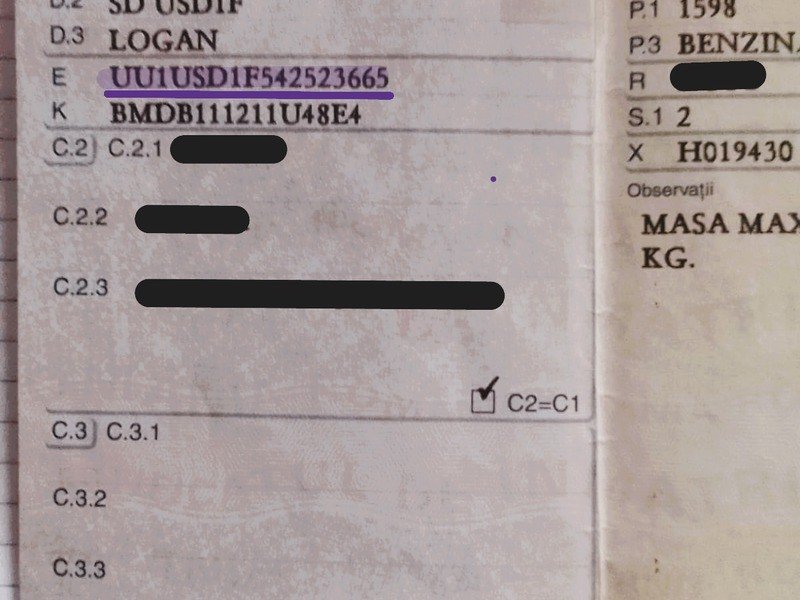
Dacia VIN number location on car registration documents

Find your 17-digit Dacia VIN on the dashboard or registration docs.

If you cannot remove the radio, we can retrieve your Dacia radio unlock code online using your vehicle’s VIN. This works specifically for original, factory-installed units.

  • Windshield: Look at the bottom corner of the driver’s side windshield.
  • Door Pillar: Check the sticker on the driver’s side door frame.
  • Registration Documents: The VIN is always listed on your vehicle's logbook (V5C) or insurance papers.
  • What it looks like: A unique 17-digit string. For Dacia, it typically starts with UU1 or VF1.

Once you have this number, our Dacia radio code by VIN service can cross-reference the database for your original PIN.

Example VIN: UU1USD1F542XXXXXX
Get Code by VIN Online

Recommended for: MediaNav & Factory Systems

By VIN

Supported Models & Units

Our Dacia radio code generator works with all factory-installed audio and navigation systems. Whether you have a classic CD player or the latest touchscreen interface, we can recover your PIN.

📻

Supported Radio Units

  • MediaNav & MediaNav Evolution (Touchscreen)
  • Media Display & Media Receiver (2021+ Models)
  • Dacia Plug & Radio (Daewoo/LG Units)
  • Blaupunkt & Philips (Single DIN Classic)
  • Renault-Dacia Continental (Bluetooth/CD)
🛠️

Original Manufacturers

We generate codes for units manufactured by the world's leading automotive audio brands found in Dacia & Renault vehicles:

LGDaewooBlaupunktContinentalHumaxVisteon

How to Enter Your Dacia Radio Code: A Step-by-Step Guide

Once you have recovered your 4-digit PIN using our Dacia radio code generator, you must input it correctly to unlock the unit. Depending on your model (Duster, Logan, Sandero, or Lodgy), follow the specific method for your dashboard system.

Method 1

For Standard Radios (Physical Buttons)

This method is for classic Dacia units (Blaupunkt, LG, or Daewoo) that have a small monochrome screen and numbered buttons (1 to 6).

  • Turn on the ignition: The radio should display "0000" or "CODE".
  • Input the first digit: Press Button 1 repeatedly until the first digit of your PIN appears.
  • Input the second digit: Press Button 2 repeatedly for the second digit.
  • Input the third digit: Press Button 3 repeatedly for the third digit.
  • Input the fourth digit: Press Button 4 repeatedly for the fourth digit.
  • Confirm the code: Once the screen shows your correct 4-digit PIN, press and hold Button 6 for 5 to 10 seconds until you hear a confirmation beep.
Note: On some older units, you may need to use Button 5 to confirm.
Method 2

For MediaNav Touchscreen Systems

This applies to 2012–2026 Dacia models equipped with the large touchscreen navigation (MediaNav, MediaNav Evolution, or Media Display).

  • Power on the unit: The screen will display the message "Enter Authentication Key".
  • Use the digital keypad: A numeric keypad will appear on the screen. Tap the 4 digits of your Dacia radio unlock code.
  • Validate: After typing the last digit, tap the "OK" or "Done" button on the touchscreen.
  • Instant Access: The system will immediately unlock and return to the home screen or radio station.

Troubleshooting: Why is my Dacia Radio Code not working?

If you followed the steps above and the radio is still locked, check these common issues:

"WAIT" or "Unit Locked" Message:

This happens if the wrong code was entered multiple times. You must leave the radio turned ON for the duration of the countdown (usually 20–30 minutes). Do not turn off the engine or the radio, or the timer will reset.

Wrong Serial Number:

Double-check your Dacia radio pre-code. Ensure you didn't mistake a "5" for an "S" or an "0" for an "O" on the sticker.

Replacement Unit:

If the radio was swapped from another car, the Dacia VIN method might not work. In this case, always use the Radio Serial Number found on the casing sticker.

Expert Tip: Entering the wrong code several times will double the waiting time. After 10 failed attempts, some units may lock permanently, requiring a visit to a specialist. Always verify your Dacia security code before confirming.

Need a visual guide?

Watch our step-by-step video on how to find and enter your Dacia radio code.

Watch on YouTube

Dacia Radio Code List: Common Pre-code Examples

Searching for a specific Dacia radio PIN? Below is a partial list of radio serial numbers (Pre-codes) and their corresponding unlock codes. This Dacia radio code list helps you verify the format of your security data.

Radio Pre-code (Serial)Unlock PIN (Code)Status
A1000070Verified
A1010041Verified
A1020012Verified
A1030082Verified
A1040053Verified
A1050024Verified
A1060094Verified
A1070065Verified
A1080036Verified
A1090007Verified
A1100077Verified
A1110048Verified
A1120019Verified
A1130089Verified
A1140050Verified
A1150021Verified
A1160091Verified
A1170062Verified
A1180033Verified
A1190004Verified

+ Thousands more codes available in our database...

Get Your Unique Code Now

Don't see your code in the list?

The table above shows only a fraction of our Dacia security database. There are over 10,000 possible combinations for Dacia and Renault audio units (Blaupunkt, LG, Daewoo, Continental). If your pre-code starts with any letter from A to Z followed by 3 digits, our generator can retrieve it instantly.

Common Issues: Fixing Dacia Radio Errors

Sometimes, getting your Dacia radio code is only half the battle. If your screen is frozen or showing a countdown, here is how to fix the most common MediaNav and radio problems.
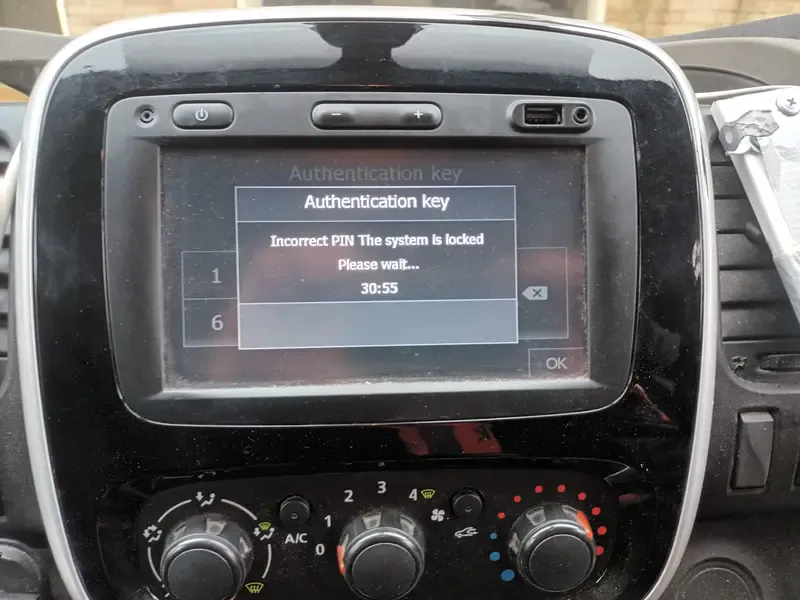
Dacia MediaNav showing System Locked Please Wait 30 minutes message
Error: System Locked

"Please Wait 30 Minutes" (or more)

If your Dacia MediaNav displays a countdown like "Please wait 30 min", it means the wrong PIN was entered too many times.

  • The Fix: You must leave the radio and the ignition turned ON.
  • Crucial: Do not turn off the engine or the unit, or the timer will reset to the beginning.
  • Wait Time: The more wrong attempts you make, the longer the wait (up to several hours).

Radio showing "0000" but won't let me type

This usually happens if the system is still processing a previous attempt. Try pressing and holding the Power button for 10 seconds to force a reboot of the MediaNav system.

"Unit Locked" - Permanent Lock

After 10-12 incorrect attempts, some Dacia radios may lock permanently. If your screen says "Locked" and no timer appears, you might need a specialist to reset the EEPROM chip manually.

Serial Number not found?

If our Dacia radio code generator doesn't recognize your serial, ensure you are reading the Pre-Code correctly (last 4 characters of the barcode, e.g., V123).

FAQ

Dacia Radio Code: Common Questions

1. How can I get my Dacia radio code for free?

To get a free Dacia radio code, you can check your vehicle’s original warranty booklet or the “Maintenance & Service” guide provided at purchase. The code is often handwritten as “C.A.R.” (Code Auto Radio). If you don’t have the original documents, you can use our Dacia radio code generator with your pre-code. While some dealerships might charge a fee, our online tool offers a fast and affordable alternative to recover your 4-digit PIN.

The Dacia radio serial number is located on a sticker on the back or side of the radio unit. To see it, you must partially remove the radio using extraction keys. Look for a barcode; the pre-code is always the last four characters of the serial number, consisting of one letter followed by three digits (e.g., V123, T456, or A882). On newer Dacia MediaNav systems, you can sometimes find the pre-code by pressing the “Setup” and “Audio” buttons simultaneously on the touchscreen.

Yes, it is possible to retrieve a Dacia radio code by VIN (Vehicle Identification Number), but this usually requires access to the official Dacia/Renault manufacturer database. If your radio is the original one installed in the factory, the VIN method is 100% accurate. However, if the radio has been replaced by a previous owner, the VIN method won’t work. In that case, using the radio serial number (pre-code) is the only guaranteed way to unlock the unit.

If your dashboard displays “WAIT” or “ERROR”, it means too many incorrect 4-digit PINs were entered. To reset the system, turn on the ignition and leave the radio powered ON without interruption. The countdown (usually 30 minutes) will begin. Do not turn off the engine or the radio, as the timer will reset. Once the countdown ends, the screen will allow you to enter the correct Dacia unlock code again.

Yes, for security reasons, every time you disconnect the car battery or if the battery dies, the Dacia MediaNav or Radio will reset and ask for the authentication key. It is highly recommended to save your 4-digit code in your phone or on a sticker inside the glovebox. If you lose it again, you can always return to our Dacia radio code recovery tool to retrieve it using your serial number.
