Renault • Instant with serial number • VIN by email
Unlock Your Renault Radio Code.
By VIN or Serial Number.
If your Renault radio is asking for a 4-digit security code, don't panic. Get your original factory code for Clio, Megane, Scenic, and Trafic.
Renault Radio Code — by Serial Number
Enter your radio's serial number — get the code instantly.
Leave a review on Trustpilot
Renault Radio Code — by VIN
No need to remove the radio — your code comes by email.
⚠️ VF6 = Renault Trucks
A truck VIN won't give you the radio code. You need the 16-character serial from the barcode on the radio's label. It starts with 89F, e.g. 89FKCZB210355188.
Usually a few hours.
How do I find my VIN?
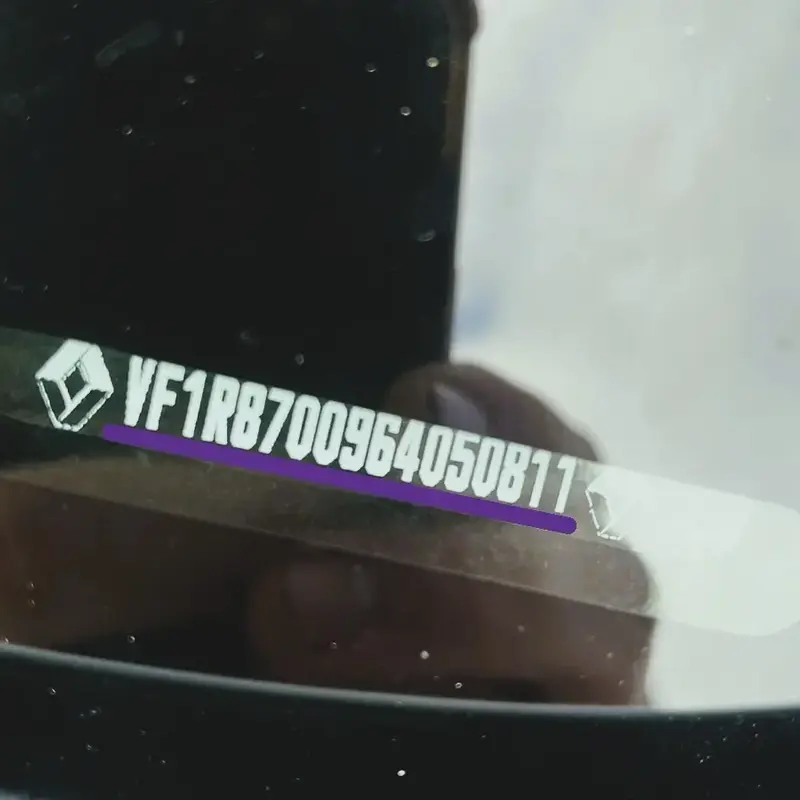
Option 1: Find Renault Radio Code by VIN
Unlock your car stereo without removing the radio from the dashboard. Using the Vehicle Identification Number (VIN) is the recommended method for most Renault and Dacia models manufactured between 2010 and 2026.
- 📍 Where to find it: Check the corner of the windshield, the driver's side door pillar, or your Vehicle Registration Document (V5C/Logbook).
- 🆔 VIN Example: VF1RB700964050811
- ⚙️ How it works: Enter your VIN and we send your original factory authentication key to your email.
Option 2: Unlock via Radio Serial (Precode)
This is the classic method for Philips, Blaupunkt, and Bosch units found in Clio, Megane, Scenic, or commercial vans like Trafic and Master.
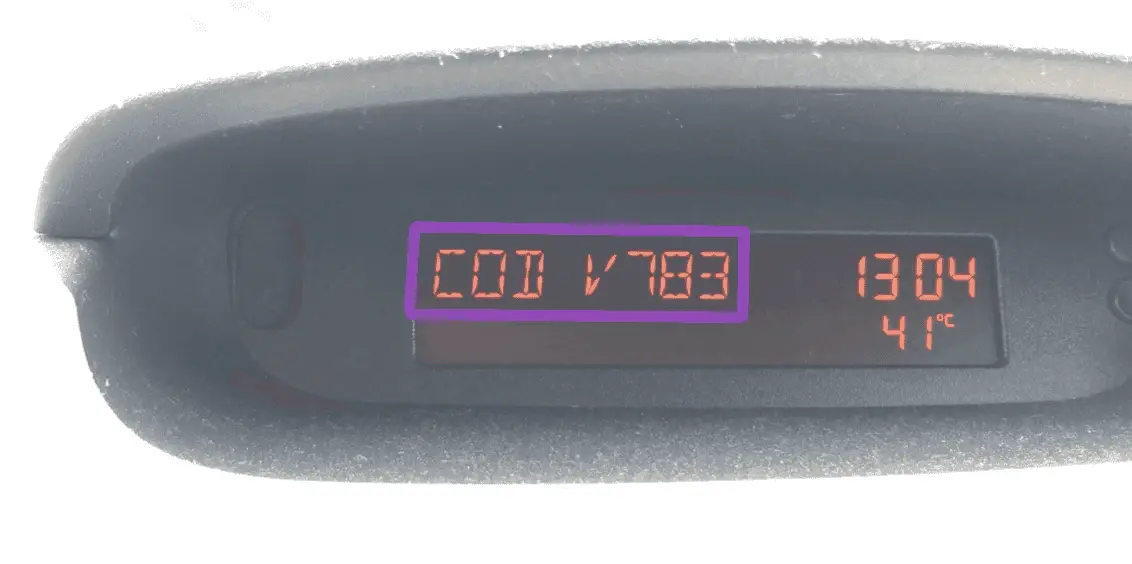
A. Screen Method (No Removal Required)
Perfect for Update List or Tuner List radios. If you've disconnected the battery, follow these steps:
- Turn on the radio (it should display "0000" or "CODE").
- Press and hold buttons 1 and 6 simultaneously for a few seconds.
- The Renault Precode will appear on the display (one letter + 3 digits).
- 🆔 Precode Example: T123 or V783.
ℹ️ Have a touchscreen display instead? The 1 & 6 button combination does not work on navigation units. Go straight to our dedicated MediaNav Radio Code Generator to find your PIN.
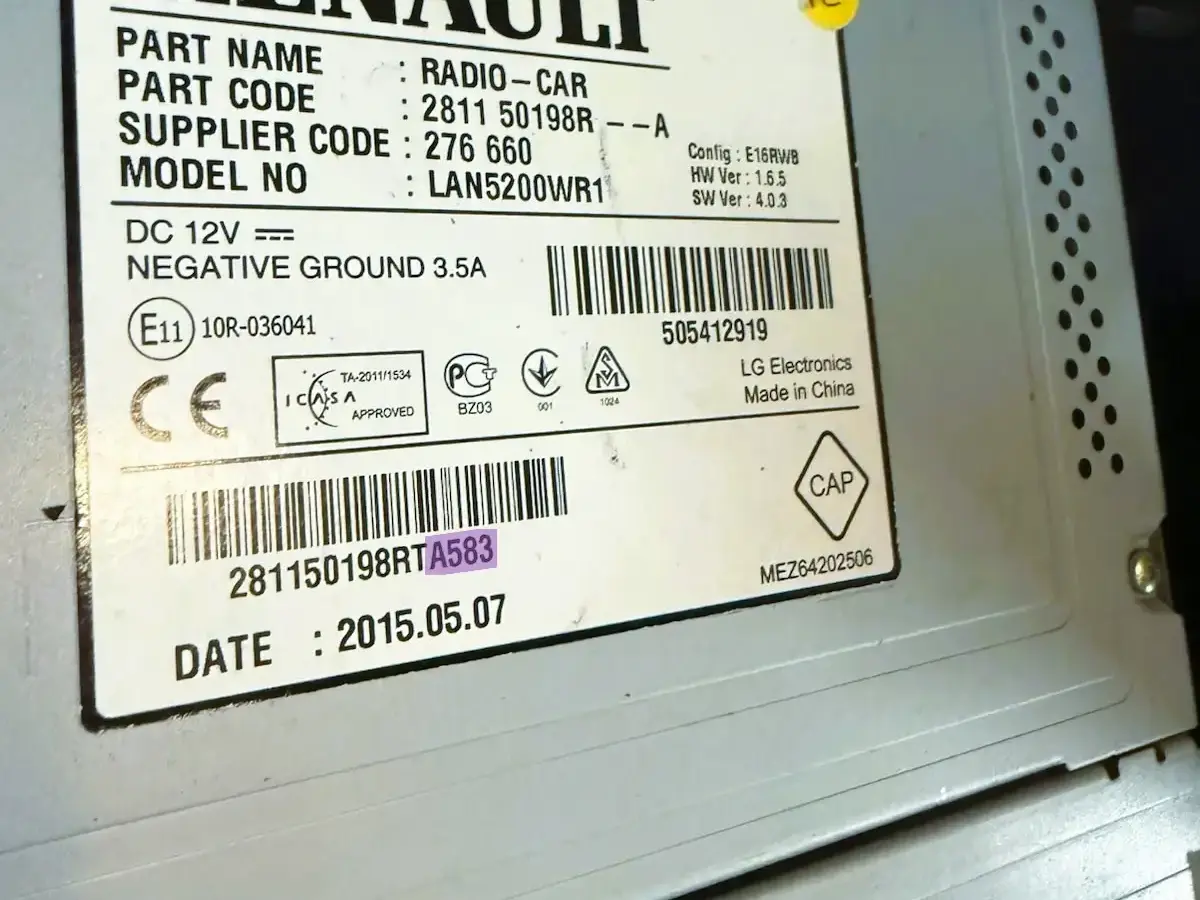
B. Label Method (If 1&6 Doesn't Work)
If the radio doesn't show the precode on screen, you'll need to remove it using extraction keys. Look for the white sticker on the metal casing.
- 🔍 What to look for: A barcode ending in "Security" or a long string of characters.
- 🆔 Security Code Example: 281150198RT A583 (You only need the last 4 characters: A583).
Supported Renault Models
How to Enter Your Renault Radio Code
Lost your audio access? Follow this guide to enter your 4-digit Renault unlock code across all models, including Clio, Megane, Captur, and Duster.
1. Dashboard Buttons
Commonly used for Tuner List and Update List head units with numbered keys 1 to 6.
- 1st Digit: Press Button 1 repeatedly until the correct digit appears.
- 2nd Digit: Press Button 2 to set the second number.
- 3rd Digit: Press Button 3 for the third number.
- 4th Digit: Press Button 4 for the final number.
- Validation: Press and hold Button 6 for a few seconds until you hear a beep.
2. Touchscreen Systems
Standard on Renault MediaNav Evolution and R-Link touchscreen displays.
- The system will automatically display a digital keypad when powered on.
- Type your 4-digit security PIN directly on the screen.
- Tap "OK" or "Accept" to authorize the code.
- If the screen says "Unit Locked," wait 30 to 60 minutes for the timer to reset.
3. Steering Wheel Controls
The fastest way to enter your code using the stalk/lever behind the steering wheel.
- Scroll: Use the thumbwheel (rotary dial) to change the numbers on the display.
- Next: Press the bottom button on the stalk to move to the next digit.
- Confirm: Once all 4 digits are set, press and hold the bottom button until the radio activates.
Faq