
RadioCodeAuto

Supporting all Clio generations from 1998 to 2024.

Renault Clio Radio Code Unlock: Get Your Code via VIN or Serial Number

Locked out of your Renault Clio radio? Get your 4-digit unlock code instantly using your VIN or Serial Number. Supports all Clio 2, 3, 4, and 5 models, including MediaNav and Tuner List. No radio removal needed with our VIN service. 100% Guaranteed!

Renault Clio Radio Code

Enter the 4-character precode (e.g. A105)

YOUR CODE IS:
----

Happy? Help us with a review! 😄

REVIEW US ON TRUSTPILOT ★★★★★

Step-by-Step Guide: How to Find Your Renault Clio Radio Serial or VIN

Lost your 4-digit security code after a battery change? Whether you drive a Renault Clio 2, 3, 4, or 5, follow this detailed guide to retrieve your authentic unlock code using the VIN method or the Radio Serial (Pre-code).

Option 1: Using the Radio Pre-code (Serial Number)
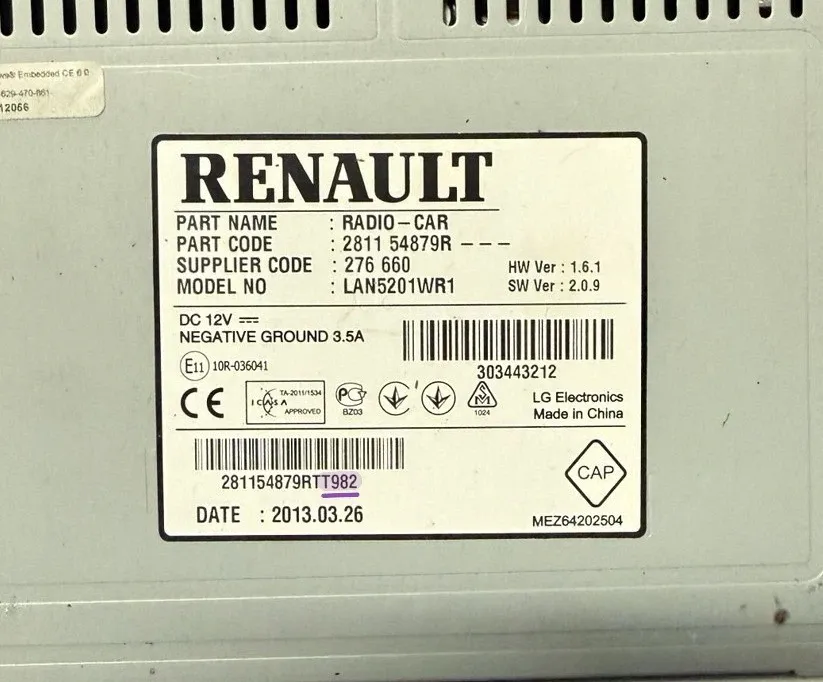
Renault radio sticker showing security pre-code example like V123

Example: The 'Security' code is located at the end of the barcode.

The Renault Clio radio serial number (also known as the Pre-code) is a 4-character identifier. It always starts with a letter followed by three digits (e.g., A123, V456, S999).

  • Digital Method (Screen): Turn on the radio and hold buttons 1 and 6 for 5 seconds. This works on most Clio 2 Tuner List and Clio 3 Update List units. The pre-code will flash briefly on the display.
  • Physical Method (Label): If the screen is dead or locked, use radio removal tools to slide the unit out. Look for a barcode sticker on the casing. The code is found under the heading 'Security' or as the last 4 digits of the long serial number (e.g., 281154879RTT982).
Get Code by Serial Compatible with: Philips, Blaupunkt, Daewoo, VDO

Option 2: Using the VIN Number (No Removal)
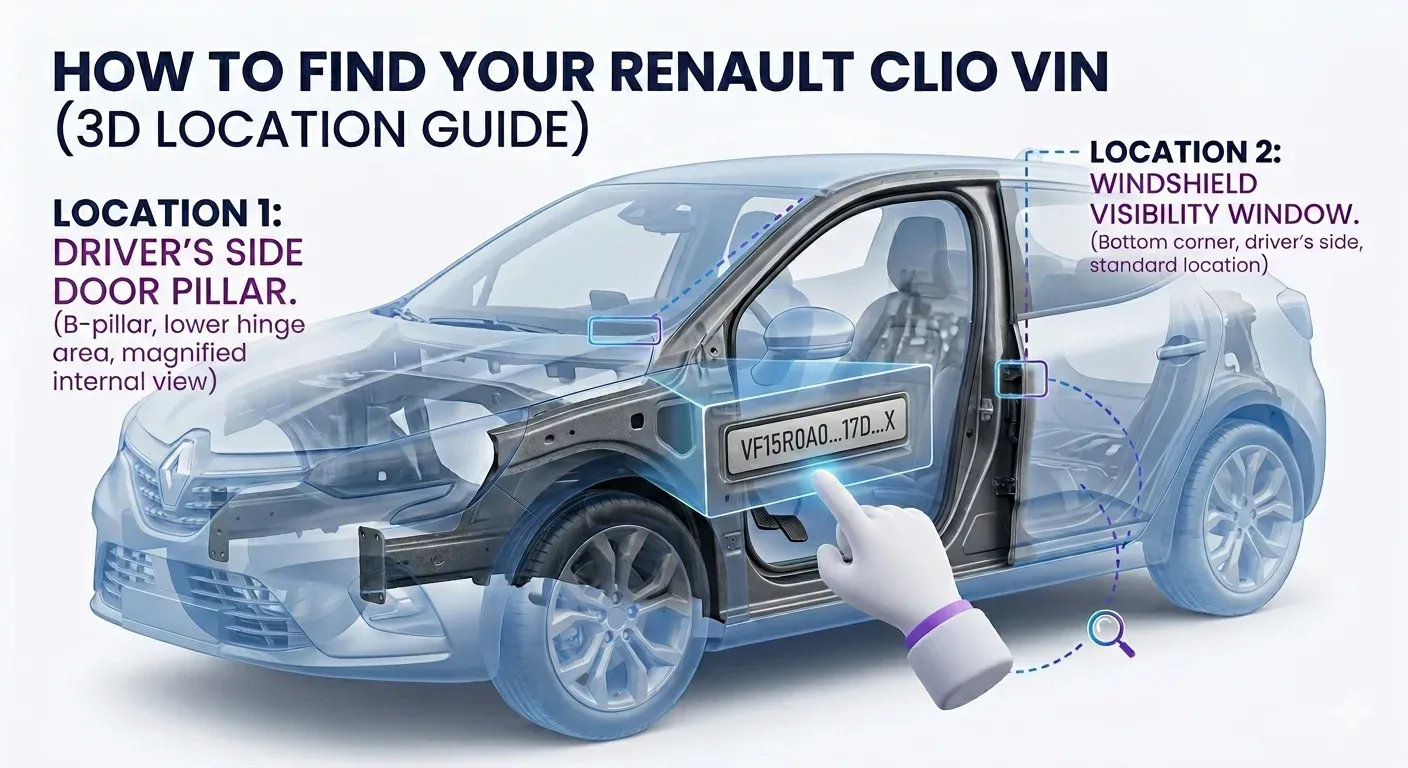
Renault Clio 17-digit VIN location on lower windshield driver side

Example: Find your 17-digit VIN on the windshield or registration papers.

The VIN (Vehicle Identification Number) method is the best solution for Clio 4 and Clio 5 owners with MediaNav or R-Link touchscreens. This allows you to get the code without removing any dashboard panels.

  • Check the Windshield: Look at the lower-left corner of your windshield (driver's side). You will see a 17-character string starting with 'VF1'. This is your unique chassis number.
  • Check the Door Pillar: Open the driver’s door and check the black sticker on the B-pillar. The VIN is printed clearly there.
  • Official Documents: You can find the VIN on your V5C Logbook, Insurance Certificate, or the service history book. Tip: Ensure you copy all 17 characters correctly to avoid errors.
Get Code by VIN Recommended for: Clio 4, 5, and RS models
By VIN

How to Enter Your Renault Clio Radio Code: Step-by-Step Instructions

Received your 4-digit unlock code? Great! Now follow these specific steps for your unit type. Incorrect attempts may lead to a "Unit Locked" or "WAIT" message, so be careful!

Method 1: Radios with Physical Buttons (1-6)

Use the numeric keys 1, 2, 3, and 4 on your dashboard to enter the digits. This is the standard procedure for Tuner List, Update List, and Cabasse units found in Clio 2 and Clio 3.

  • Digit 1: Press Button 1 repeatedly until the first digit of your code appears.
  • Digit 2: Press Button 2 repeatedly for the second digit.
  • Digit 3: Press Button 3 repeatedly for the third digit.
  • Digit 4: Press Button 4 repeatedly for the fourth digit.
  • To Confirm: Press and hold Button 6 (or Button 5 on some models) for 5-10 seconds until you hear a beep.
Troubleshooting Tip: If you see "ERROR" or "WAIT" on the display, leave the radio ON for 30-60 minutes to reset the lockout timer. Do not turn the ignition off.

Method 2: MediaNav & R-Link Touchscreens

Modern Renault MediaNav Evolution systems (standard in Clio 4 and Clio 5) will automatically prompt you with a digital keypad on the screen:

  • Simply type your 4-digit PIN code directly on the screen using the virtual keyboard.
  • Once the 4 digits are entered, press the "OK" or "Accept" button on the display.
  • If the "Authenticate" button is greyed out, re-check that you have entered all 4 digits correctly.
Compatibility: This digital entry method works for all LG MediaNav and TomTom R-Link touchscreen systems.
FAQ

Renault Clio Radio Code Recovery

How to fix Renault Clio radio "WAIT" or "ERROR" message after entering the wrong code?

If your Renault Clio radio display says WAIT or ERROR, it means the security lockout has been triggered due to incorrect PIN attempts. To reset this, you must leave the radio switched ON for 30 to 60 minutes without turning off the engine or ignition. Once the lockout timer expires, the screen will revert to ‘0000’, allowing you to enter the correct 4-digit Renault security code. Avoid disconnecting the battery during this time, as it will simply restart the waiting period

The easiest way to retrieve a Clio 4 or Clio 5 radio code without using radio removal tools is the VIN method. Unlike older Tuner List models, modern Renault MediaNav and R-Link systems store the authentic 4-digit PIN linked to your 17-character VIN (Vehicle Identification Number). You can find your VIN in the lower-left corner of the windshield or on your V5C logbook. Using an official Renault VIN-to-Code service ensures you get the correct security digits without risking damage to your dashboard panels.

You can retrieve your Renault Clio radio pre-code (security serial) without removing the unit by using a simple button combination. Turn on your radio and press and hold buttons 1 and 6 simultaneously for about 5 seconds. The display will show a 4-character code starting with one letter followed by three digits (e.g., V123 or A456). This pre-code is exactly what you need to generate your original Renault 4-digit unlock PIN.

If the button method doesn’t work, you can find the Renault radio serial number on the barcode sticker located on the side or back of the casing. You will need radio removal keys to slide the unit out. Look for a 4-character code labeled as ‘Security’ or the last four digits of the long barcode (e.g., 8200607918TS432). The letter and three digits (like S432) are your radio pre-code. This is the only way to recover your authentic Renault security code if your screen is blank or showing ‘Unit Locked’.

The Renault Clio radio code is typically found on the Pre-Delivery Inspection (PDI) sheet or the original service book labeled as ‘CAR’ (Registration Authentication Code). If you don’t have the physical books, you can recover the authentic 4-digit PIN instantly using your VIN or Radio Serial through an online recovery service.