Unlock Your Renault Trafic Radio Code.
Instant Pre-code & VIN Recovery.
Restore audio to your Renault Trafic II or III in seconds. Enter your security pre-code found on the radio's label to generate your unlock 4-digit PIN instant.
Trafic Radio Generator
Enter the 4-character precode (e.g. V123)
How to Find Your Renault Trafic Radio Serial or VIN
Depending on your Trafic generation and head unit type, there are two ways to recover your radio code. Whether you have the classic 1DIN radio or the newer touchscreen MediaNav, follow the steps below.
Option 1: The Security Pre-code
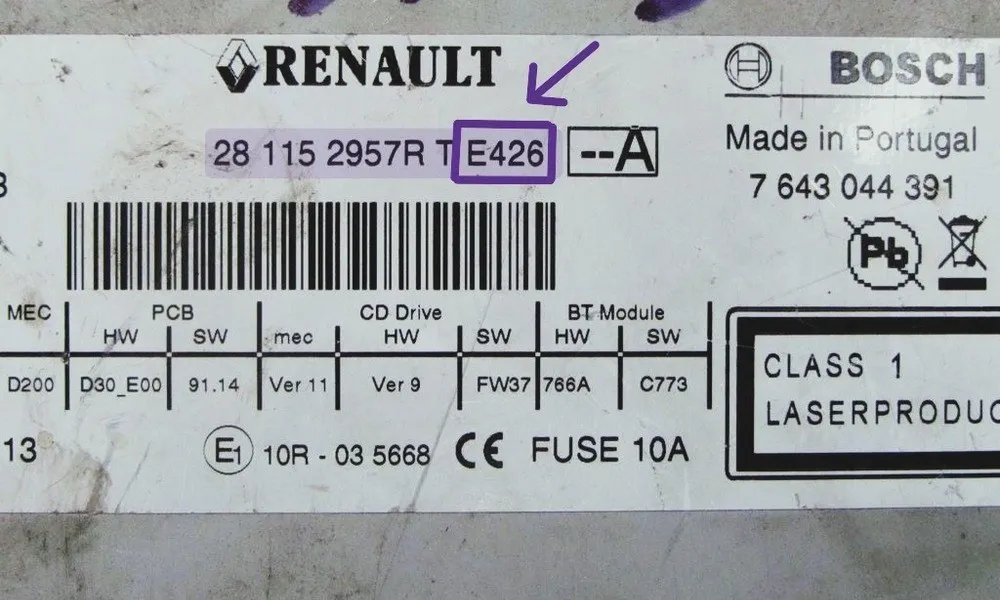
For Renault Trafic II (2001-2014) and early Trafic III models, the most reliable way to get your code is using the Security Pre-code. This is a 4-character code (one letter followed by three digits) located on the manufacturer's label.
- On the side or top casing of the radio unit (requires removal).
- Look for a barcode followed by a sequence starting with 2811, 8200, or RENR.
- Example: If you see "Security E426", your pre-code is E426.
Example of Trafic Radio Label with Pre-code highlighted*Tip: On some models, you can press and hold buttons 1 and 6 simultaneously to display the pre-code directly on the screen without removing the unit.*
Option 2: The VIN Number
If you drive a modern Renault Trafic III (2014-2026) equipped with MediaNav Evolution or R-Link, the VIN method is the easiest. You don't need tools to remove the dashboard trim or risk scratching the plastics.
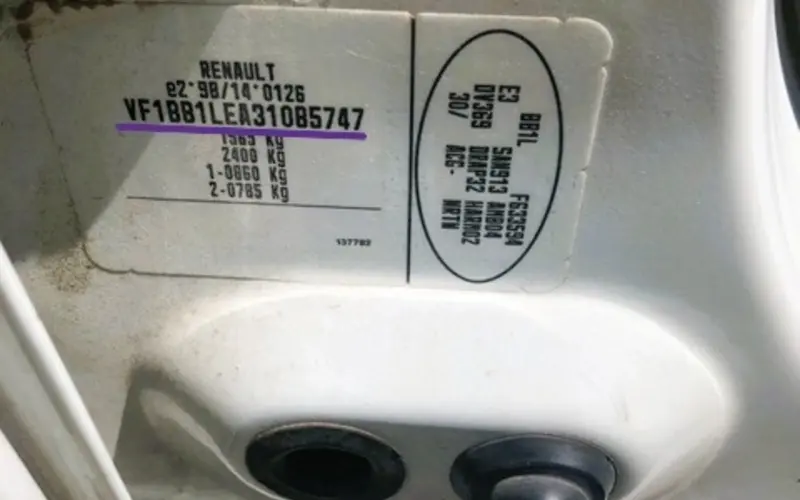
- Door Pillar: Check the manufacturer's sticker on the driver's side door frame (B-pillar). It’s the fastest way to read the 17-digit code.
- Windshield: Visible from the outside at the base of the glass.
- Example: A Renault VIN starts with VF1... (e.g., VF1BB1LEA...).
VIN number identification plate on the Trafic B-pillar*This method queries the factory database and is essential for smart units where the serial number is hidden within the software.*
How to Enter Your Renault Trafic Radio Code
Once you have your 4-digit Renault radio code, the entry method depends on the unit installed in your van. Whether you’re driving a Trafic II with a standard CD player or a Trafic III with a MediaNav touchscreen, here is exactly how to bypass the "CODE" prompt and restore your audio.
Standard Radio (Physical Buttons)
Common on Renault Trafic (2001-2014). You don't have a dedicated "Enter" button, so you must use the preset keys:
- Button 1: Press repeatedly until the first digit is correct.
- Button 2: Press repeatedly for the second digit.
- Button 3: Press repeatedly for the third digit.
- Button 4: Press repeatedly for the fourth digit.
- To Confirm: Press and hold Button 6 for 5 seconds. A beep will signal the radio is unlocked.
MediaNav & R-Link Touchscreens
On newer Renault Trafic III models, the system will automatically display a numeric keypad when it detects a power loss.
- Type the 4-digit PIN directly onto the touchscreen.
- Verify the numbers match your security card or generated code.
- Tap "OK" or "Accept".
- The system will initialize and return to the main menu instantly.
If you entered a wrong code, the system locks for security. You must leave the ignition ON. The wait time starts at 2 minutes and doubles with every failed attempt.
Common Renault Trafic Radio Issues
What does "WAIT" on the display mean?
It means too many wrong codes were entered. The radio is temporarily locked. You must leave the ignition ON and wait. The timer won't countdown if the radio is off. It starts at 2 minutes and can go up to 32 minutes.
Can I get my code for free from a Renault dealer?
Sometimes, but it’s a hassle. Most dealers will ask you to book an appointment and bring the vehicle logbook (V5C) and ID. They often charge between £15-£40 for the service. Our tool provides the same factory code instantly.
My radio is completely dead (no "CODE" prompt).
Check the 15A fuse. On most Trafic II models, the fuse box is under the dashboard on the driver’s side. On Trafic III, check the glovebox area. If the fuse is fine, the unit might have an internal hardware fault.
Will disconnecting the battery reset the "WAIT" timer?
No. In fact, it might restart the timer. The only way to clear the "WAIT" message is to leave the unit powered on until it asks for the code again.
Supported Renault Trafic Audio Units
Our database covers 99% of all head units installed in the Renault Trafic range from 2001 to 2026.
Still having trouble?
Our database recovers 99% of Renault Trafic II & III codes. If your system displays "Unit Blocked", our specialists are here to help via live chat.