MediaNav & CD Players • Serial or VIN
Dacia Logan Radio Code Generator
Recover your lost Dacia Logan radio code. Enter your unit's 4-character security precode or serial number below to instantly generate the original unlock PIN for any MediaNav touchscreen, Daewoo, or Blaupunkt stereo across all Logan 1, 2, and MCV models.
Dacia Logan Radio Code – by Serial Number
Enter your radio's serial number – get the code instantly.
Leave a review on Trustpilot
Dacia Logan Radio Code – by VIN
No need to remove the radio — your code comes by email.
⚠️ VF6 = Renault Trucks
A truck VIN won't give you the radio code. You need the 16-character serial from the barcode on the radio's label. It starts with 89F, e.g. 89FKCZB210355188.
Usually a few hours.
How do I find my VIN?
How to Find Your Dacia Logan Radio PIN Code
If your Dacia Logan audio system is locked after a battery change, you can easily retrieve your factory PIN. Whether your car has a classic Tuner List / Update List stereo, a standard Daewoo unit, or a touchscreen MediaNav system, use one of the two straightforward methods below to unlock it.
Method 1: Find the Logan Radio Code by VIN
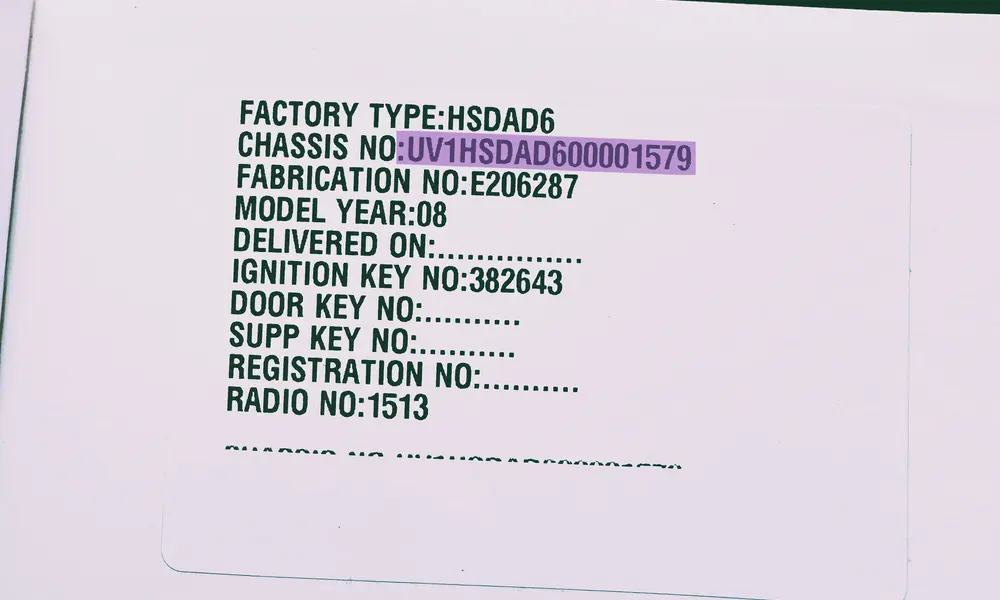
Example: The 17-character vehicle identification number printed on your official registration papers or logbook.
The simplest path to generate your original radio code without pulling apart your dashboard trim is to use the 17-character Vehicle Identification Number (VIN). This layout works across all Logan 1, Logan 2, and MCV models, provided the radio is the native unit mounted during vehicle assembly.
- Driver's Side B-Pillar: Open the driver's door and look at the lower frame pillar. You'll find a black or silver structured sticker containing the technical data.
- Windshield Lower Margin: Look from the outside through the lower corner of the front windscreen on the driver's side.
- Vehicle Registration Papers: Check your official registration certificate, insurance invoice, or physical logbook where the identity code is listed.
- Prefix Validation: For any Dacia Logan chassis, the sequence invariably starts with the international manufacturer prefixes UU1 or VF1.
Perfect for: Factory Touchscreen Media Nav, Media Display & Logan MCV
Method 2: Find the 4-Digit Security Precode
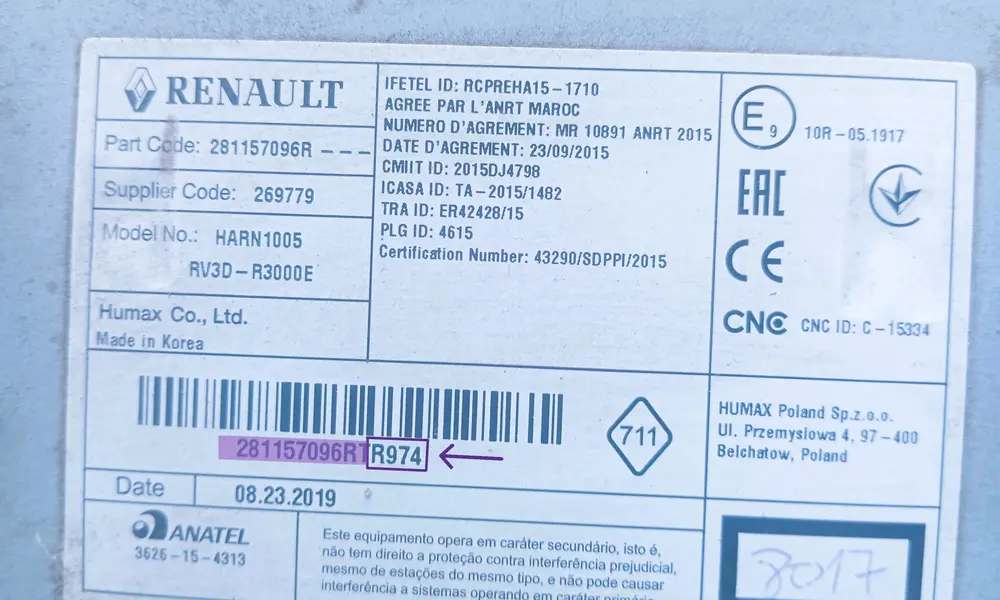
Example: The barcode label on the metal casing containing the security identifier.
If the chassis identification method isn't available, you can uncover the authentication data directly from the stereo unit's enclosure. Once you note this parameter, you can type it straight into our live online generator to see your security PIN instantly.
- Standard Radios: Press and hold buttons 1 and 6 simultaneously on your radio dashboard faceplate. For early button models, the precode will display directly on the screen.
- Extract the Audio Unit: If the screen buttons do not respond, gently pop off the plastic dashboard console surrounding the media slot and slide the radio module forward. You don't need to detach any rear wiring configurations.
- Find the Precode Key: Scan the label stuck on the sheet metal housing. Look for a code made of one letter followed by three numbers (e.g., V762, A105) near the "SECURITY" string.
Logan Tech Tip: On early Blaupunkt, Daewoo AGC-1220RF, or Continental audio housings, the required precode is simply the last four characters of the factory serial number.
Supports: Logan Phase 1 Blaupunkt CD, Phase 2 MediaNav Evolution, Daewoo 2-DIN
How to Enter the Radio Code on a Dacia Logan
Once you have retrieved your 4-digit authentication PIN, you need to input it correctly into your dashboard system. Depending on your Dacia Logan generation (Phase 1, Phase 2, or MCV), you will either use the physical stereo buttons or the touchscreen interface. Follow the steps below to unlock your media deck safely.
Standard CD Players & Daewoo Radios
Fits: Logan Phase 1 (2004-2012) & Phase 2 Standard Facelift Decks
Classic factory head units do not have a direct confirmation button. Instead, you must use the preset station keys 1 through 4 to cycle through the digits, and button 6 to validate the entry:
- First Digit: Press button 1 repeatedly until the correct first number of your security code appears on the display panel.
- Second Digit: Press button 2 repeatedly to cycle to your second code digit.
- Third Digit: Press button 3 sequentially to input the third character.
- Fourth Digit: Press button 4 repeatedly until the final number is set.
- Validation: Once the screen displays your complete 4-digit code (e.g., 5312), press and hold button 6 (or the central dial button on some Blaupunkt variants) for a few seconds. A continuous confirmation beep will sound, and your tuner functions will activate.
LG MediaNav Touchscreen Systems
Fits: Dacia Logan 2, Logan 3 & Logan MCV Evolution Displays
Modern infotainment system dashboards guide you through the code entry on the touchscreen:
- Turn your ignition key to the accessory position to power up the screen.
- The system will automatically initialize and display the warning message: "Authentication required. Please enter security code."
- Tap the digits directly on the digital keypad overlay. If you make a mistake, use the backspace key on the keypad to delete.
- Double-check that the code perfectly matches your generated credentials.
- Tap the green "OK" or "Accept" soft-key on the screen. The device will immediately load the main homepage interface.
Dacia Logan "CODE ERROR" System Cooldown Penalty
If you enter an incorrect combination sequence, the stereo will display "ERROR" or "WAIT" and freeze completely. Every wrong attempt increases the waiting time. It starts at 1 minute and doubles: 2, 4, 8, 16, 32 minutes and so on. To get through the countdown, leave the ignition ON and the radio powered. Do not disconnect the battery during the lockout, as the countdown will start over.
Still having trouble unlocking your stereo?
With the serial number, your Dacia Logan radio code appears instantly. If your radio shows a hardware error, or the code is rejected, write to us and we'll help.