VIN requests handled by email
Renault Espace Radio Code Generator VIN-Based Unlock
Get your original Renault Espace radio code without the need for manual radio extraction. By using your 17-character VIN, we retrieve your unique security PIN. With the VIN, the code arrives by email, usually within a few hours.
Renault Espace Radio Code – by Serial Number
Enter your radio's serial number – get the code instantly.
Leave a review on Trustpilot
Renault Espace Radio Code – by VIN
No need to remove the radio — your code comes by email.
⚠️ VF6 = Renault Trucks
A truck VIN won't give you the radio code. You need the 16-character serial from the barcode on the radio's label. It starts with 89F, e.g. 89FKCZB210355188.
Usually a few hours.
Get Your Renault Espace Radio Code Without Removing the Dashboard
If you’ve lost your Renault Espace radio PIN after a battery change or electrical repair, the VIN method is the simplest solution. Unlike smaller Renault models, the Espace features a complex, decentralized infotainment architecture.
The "Hidden Radio" Problem: Espace IV & V
The Renault Espace IV (2002–2014) often uses the Cabasse Auditorium Tronic system. The unit in the dashboard is only a CD changer; the actual Tuner Amp is hidden in the right-rear side of the boot or behind the glovebox.
For the Espace V (2015–Present) with R-Link 2, there is no physical serial visible. Our VIN-based generator sends you the code by email, so you don't have to take the dashboard apart.
Why use the VIN Retrieval Service?
- Bose Surround & R-Link Support: Covers systems that don't support button shortcuts.
- Preserve Dashboard Integrity: Lower risk of damaging fragile leather or soft-touch panels.
- Original Factory PIN: Your original 4-digit code.
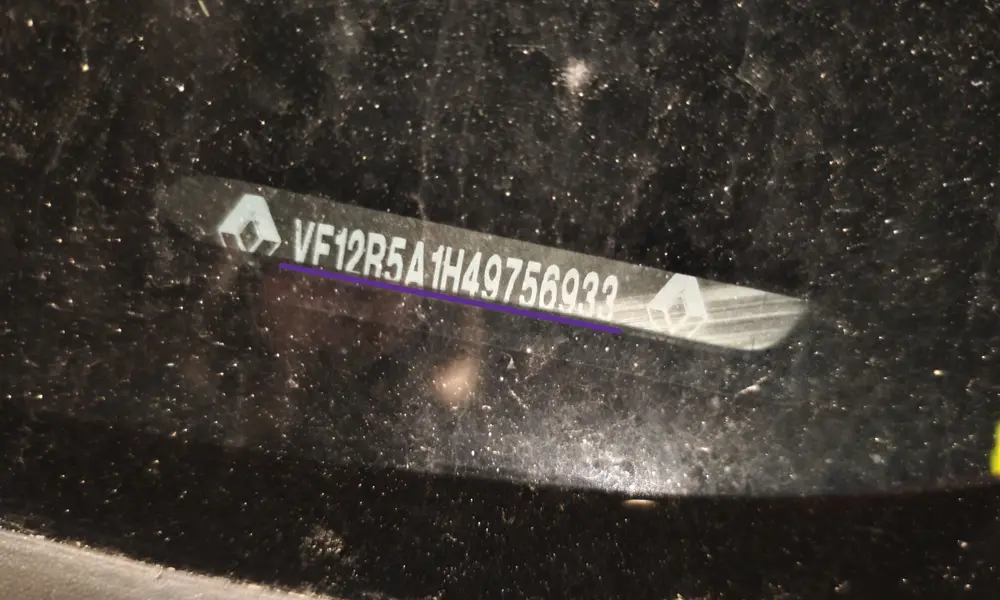
Your Espace VIN is 17 characters (starts with "VF1"). Find it on your V5C logbook or at the base of the windshield.
How to Enter Renault Espace Radio Code
Reactivating your Renault Espace radio after a battery change is simple. Use the steering wheel controls or dashboard buttons to input your 4-digit PIN into the Cabasse Auditorium, Update List, or R-Link system.
Option 1: Steering Wheel Stalk (Thumbwheel)
- Rotate the thumbwheel on the back of the stalk to select the first digit.
- Press the bottom button on the stalk to confirm and move to the next digit.
- Once the 4th digit is set, press and hold the bottom button until the radio activates.
Option 2: Dashboard Number Keys
- Repeatedly press Button 1 until the first digit of the code appears.
- Follow the same process with Buttons 2, 3, and 4.
- Press and hold Button 6 (or Button 5 on older units) for a few seconds to save.
Video: Renault Espace Radio Code Input
 Watch Tutorial