
RadioCodeAuto

Laguna Specialist Database Update 2026 Instant PIN

Renault Laguna Radio Code Generator.

Get your 4-digit security PIN for Laguna II & III systems including Carminat, Cabasse, and Bose. Simply enter your pre-code to restore your audio instantly.

Unlock Radio Now

Enter your 4-character security precode (e.g. T123)

Works for Laguna 2 & 3 • Cabasse • Carminat TomTom

Renault Laguna Radio Code Online: Get Your 4-Digit PIN

If your Renault Laguna radio is locked after a battery change, you can recover the authentication key using the pre-code or the VIN (Vehicle Identification Number). This database supports all Laguna Phase 1, 2, and 3 audio systems from 2001 to 2015.

Laguna 2 & 3 • Serial Method

How to find Laguna Pre-code
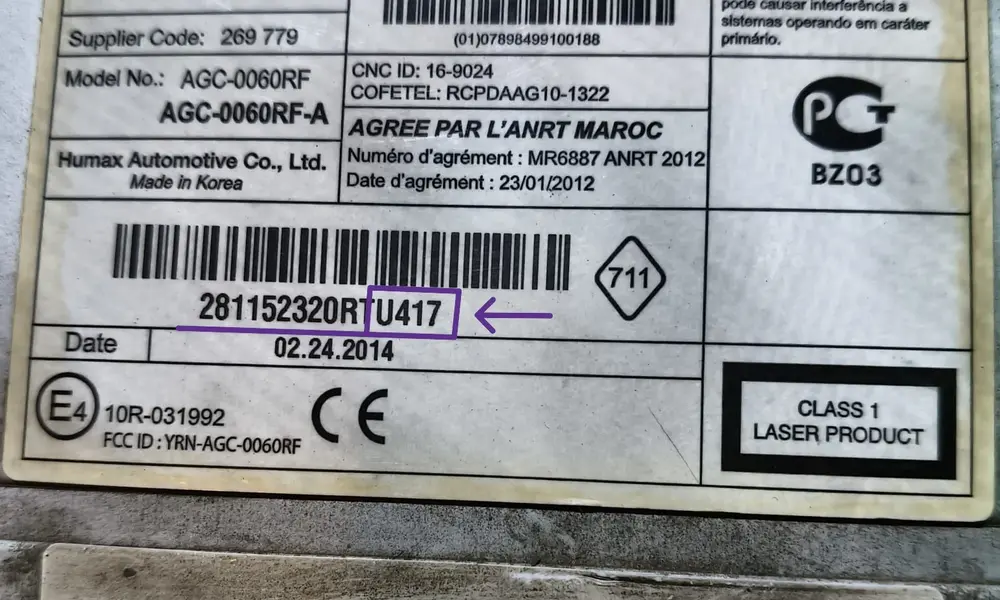
The security pre-code is the standard way to unlock Tuner List units. If the software shortcut fails, you must remove the radio to find the serial.

  • Try Shortcut: Hold buttons 1 and 6. A code like V123 should appear. If it doesn't, the radio must be pulled out using extraction keys.
  • Full Serial Identification: Check the sticker for a long string like 8200300858TJ902. The pre-code is the last 4 characters: J902.
  • Barcode Example: You might see a barcode with 281150038RTW102. In this specific case, your required pre-code for the generator is W102.
  • Other Label Formats: Look for a small box labeled SECURITY containing a letter and 3 digits (e.g. F102) located at the end of the 15-digit serial number.
Generate with Pre-code
Laguna 3 • VIN Method

Unlock Laguna Radio by VIN
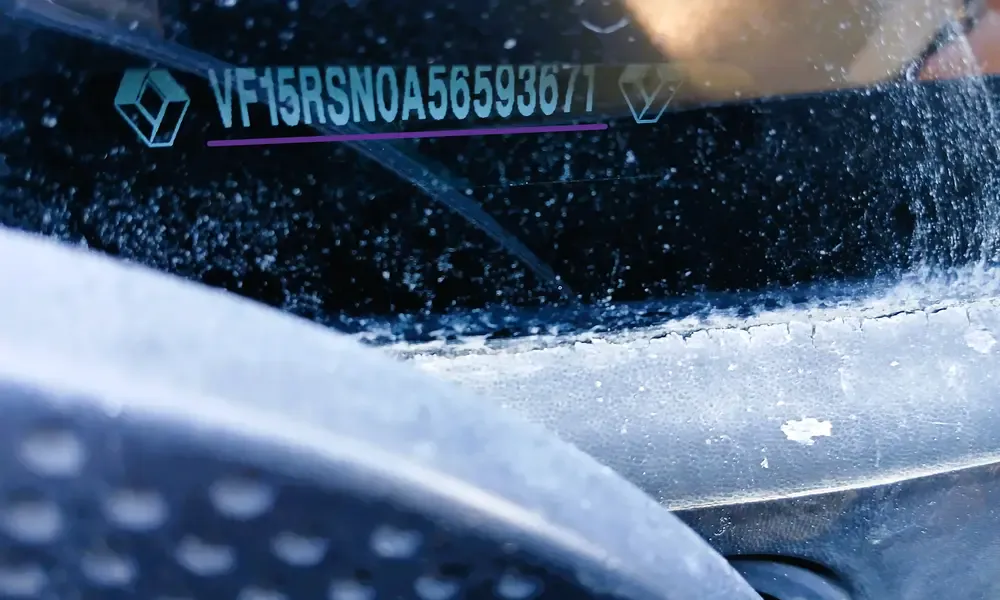
Renault Laguna VIN location on windshield for radio code retrieval

The fastest way for Laguna III with Carminat TomTom or Bose Edition where the radio is integrated into the dashboard.

  • Locate VIN: Check the bottom of your windshield or the V5C logbook. It starts with VF1.
  • Enter VIN: Our tool uses the 17-digit chassis number to query the original factory PIN.
  • Best for: Navigation units and R-Link systems that don't show a pre-code on screen.
Generate with VIN

Compatible Renault Laguna Models & Systems:

Laguna II (2001-2007): Tuner List, Update List, Cabasse Auditorium Tronic, Radiosat 6000 CD.
Laguna III (2007-2015): Carminat TomTom, Bose Energy Efficient Series, Arkamys 3D, R-Link.
Manufacturers: Philips, VDO, Bosch, Continental, and Daewoo units.
By VIN

How to Enter Renault Laguna Radio Code

After generating your 4-digit PIN, you must input it correctly into the system. The entry procedure differs depending on whether you have a Laguna II Tuner List or a Laguna III Carminat/Bose system.

Option 1: Using Radio Buttons (1-6)

Standard for 1-DIN units found in Laguna 2 (2001-2007) and basic Laguna 3 models.

1

Press Button 1 repeatedly until the first digit of your code is displayed.

2

Press Button 2 repeatedly for the second digit of your PIN.

3

Press Button 3 repeatedly for the third digit.

4

Press Button 4 repeatedly for the final digit.

To validate, press and hold Button 6 for 5-10 seconds until you hear a confirmation beep.

Option 2: Steering Wheel Stalk (Satellite)

The most common method for Laguna III and high-spec Cabasse systems.

1

Use the thumbwheel (scroll wheel) on the back of the stalk to cycle through numbers 0-9.

2

Press the bottom button (or 'source' button) to confirm the digit and move to the next slot.

3

Repeat the process for all four digits of your authentication key.

To confirm the complete code, press and hold the bottom button until the radio activates.

Is your screen showing "CODE" or "WAIT"?

If you entered the wrong PIN, Renault systems trigger a security lockout. The word "WAIT" means you must leave the radio switched ON. The lockout generally lasts 30 minutes. Do not disconnect the battery during this time, or the timer will reset to the beginning.

Troubleshooting Renault Laguna Radio Issues

Sometimes, even with the correct 4-digit PIN, your Laguna audio system might experience technical glitches. Here are the most common hardware and software issues for Laguna II and III models.

Radio Display shows "ERROR" or "WAIT"

This happens after entering the wrong code multiple times. The system locks you out to prevent theft.

The Fix: Leave the ignition and the radio ON. Do not turn it off. After 20 to 60 minutes, the screen will revert to "0000" or "CODE", allowing you to try again.
⌨️

Buttons 1-6 or Stalk Not Responding

Common on Laguna II Phase 1 units where the rubber membrane behind the buttons wears out.

The Fix: Try using the steering wheel stalk (satellite) instead. If neither works, check the fuse box in the dashboard (left side).

Correct Code is Not Accepted

If the generated PIN is rejected, your Laguna might have a replacement radio from another vehicle.

The Fix: The VIN method won't work. You must pull the radio out and use the Security Pre-code from the actual sticker on the unit.
🖥️

Laguna 3 Navigation Black Screen

On Carminat TomTom systems, the radio might stay silent with a black screen after a battery change.

The Fix: Ensure the SD card is properly inserted. If the screen is off, try entering the code "blindly" using the steering wheel stalk.

Quick Laguna Radio Checklist:

Fuse Check: 15A fuse usually labeled "Radio/Nav".

Serial Check: Letters 'I' and '1' or 'O' and '0' are often confused.

Battery: Low voltage can cause the radio to lose memory.

Antenna: If no signal, check the Fakra connector behind the unit.