Kangoo Radio Fix • Tuner List, CD & Bluetooth • Online
Renault Kangoo Stereo Code Generator
Unlock Tuner List, CD & MediaNav Touchscreen Units
If your radio is asking for a 4-digit code, our Renault Kangoo radio code calculator gives you your original PIN. Whether your commercial vehicle has a classic Tuner List / Update List stereo, a standard factory CD player, or a newer Bluetooth head unit, simply enter your 4-character precode below to restore your music.
Renault Kangoo Radio Code – by Serial Number
Enter your radio's serial number – get the code instantly.
Leave a review on Trustpilot
Renault Kangoo Radio Code – by VIN
No need to remove the radio — your code comes by email.
⚠️ VF6 = Renault Trucks
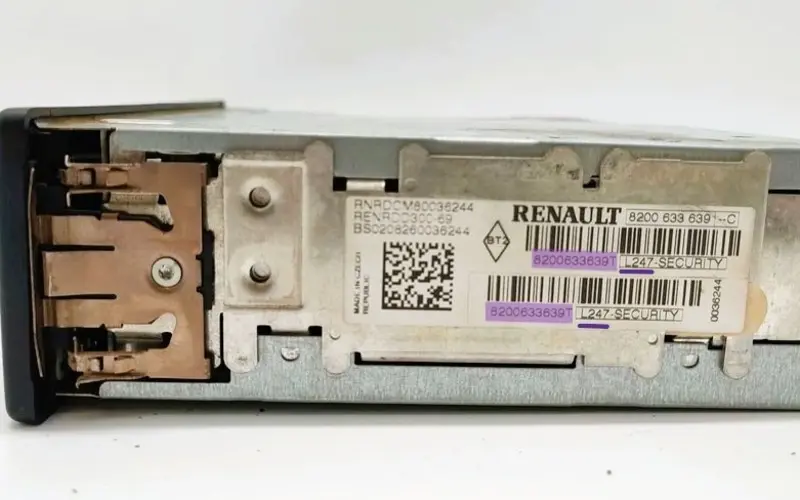
A truck VIN won't give you the radio code. You need the 16-character serial from the barcode on the radio's label. It starts with 89F, e.g. 89FKCZB210355188.
Usually a few hours.
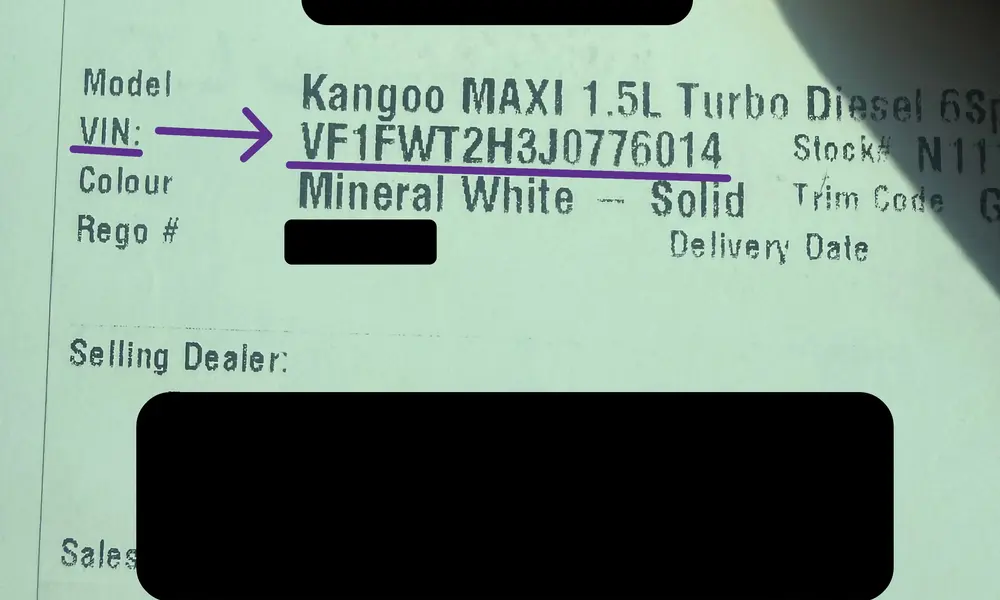
How do I find my VIN?
Renault Kangoo MediaNav Radio Code Recovery
If your Renault Kangoo touchscreen navigation system is displaying an "Authentication Key" request or is stuck on a secure PIN screen after a battery change, use one of the two methods below to get your original 4-digit security code.
Using your Vehicle Identification Number (VIN) is the easiest way to unlock the MediaNav unit. Send us your VIN and we email you the code that matches your chassis.
- Zero Dashboard Disassembly: You don't have to pop off the plastic trim or risk scratching the dashboard.
- Safe & Clean: Eliminates the risk of breaking the fragile vents surrounding the Kangoo MediaNav housing.
- Matched to your car: The code is generated from your chassis number (VIN).
This is the fallback option. By reading the physical label attached to the LG MediaNav casing, you get access to the 4-character Security Precode, which is needed to generate the unlock code.
- Works with a swapped unit: The code comes from the serial of the unit itself, so it also works on a replacement or aftermarket MediaNav.
- Instant result: once you enter the 4-character precode, the calculator shows your radio PIN immediately.
- Removal Tips: Carefully unclip the plastic frame around the screen, remove the 4 Torx screws, and slide the display unit forward.
Step-by-Step: How to Enter a Renault Kangoo Radio Code
Enter the 4-digit PIN you got from the generator above. Renault Kangoo vans come with one of two standard dashboard setups, shown below.
Option A: Front Radio Buttons
Standard layout for classic Tuner List and Update List Radio CD players using the front panel physical buttons (1 to 6).
Option B: Steering Column Stalk
Common on modern Renault Bluetooth head units, controlled via the factory steering wheel stalk controls or the central rotary dial selector.
Switch On the Audio System
Turn the vehicle ignition key to the accessory position. Push the radio power button. The display should show a blinking "CODE" or "0000". This means the radio is ready for the PIN.Input the Security PIN Code
To enter an example PIN like 4391, follow the option that matches your radio:
- Using Front Panel Radio: Tap Button 1 on the radio face until the first slot reads 4. Cycle Button 2 until the second field displays 3. Press Button 3 until you reach 9, and use Button 4 to adjust the final digit to 1.
- Using Steering Controls: Rotate the thumbwheel on the back of the steering column stalk to change the digits. Tap the bottom button on the stalk unit to lock each digit and move to the next field.
Confirm and Save Settings
When all 4 digits are showing on the display, confirm the code:
- On the radio front, press and hold Button 6 (or Button 5 on older units) for a few seconds.
- On the steering wheel remote unit, press and hold the source button on the lower end of the stalk mechanism.
The radio will beep and unlock, and your radio, CD player or Bluetooth will work again.
If you mistyped the digits, your Renault Kangoo dashboard display will show "ERROR" or "WAIT". Do not disconnect the car battery again. This safety protocol locks the stereo system on a countdown timer. Leave the radio ON with the ignition on until the countdown ends (up to 30–60 minutes). When the lock clears, the "0000" screen comes back.
Frequently Asked Questions
Everything you need to know about unlocking your Renault Kangoo radio system and retrieving your security PIN code.
Can I get my code using a serial number from a scrap yard unit?
Yes! If you swapped your broken head unit with a used Tuner List or Bluetooth player from a scrap yard, you must generate the code using the barcode serial printed on that replacement hardware label, not your vehicle's VIN.
Why does my Renault display say "ERROR" or "WAIT"?
This lock screen triggers after an incorrect entry. To clear it, leave the radio ON with the ignition on until the countdown ends (up to 30–60 minutes). The radio will then go back to the "0000" entry screen.
Can I find my precode using the radio buttons on a Bluetooth unit?
While holding buttons 1 and 6 displays the 4-character security precode on classic Radio CD Update List systems, newer Renault Bluetooth radios usually have to be taken out so you can read the barcode label on the metal casing.
Will disconnecting the battery lock the radio again?
Yes. Every time your Kangoo battery terminal is disconnected or loses current during service, the radio locks again. However, the 4-digit PIN stays the same for as long as you keep that radio.
Is the letter "O" or number "0" used in Renault precodes?
Renault security strings consist of one letter followed by three digits (e.g., X752). To avoid errors, remember that the three characters after the letter are always digits, so an O there is a zero.
Do I need specialized dealer tools to extract my Kangoo radio?
No. You can release the radio using four thin nails, stiff wire or cheap U-shaped removal keys pushed into the holes in the front panel. Any car audio shop can also take it out in under a minute.
Other Renault Models
Looking for another model? We generate radio PIN codes for these Renault models:
Still Having Trouble?
If your generated code doesn't unlock the system or you face issues reading your radio serial label, don't hesitate to reach out. Open the Live Chat widget in the bottom corner of your screen to drop us a message. We will help you get your stereo working again.