
Dacia Duster Radio Code Generator
Unlock Your Duster 1, 2 & 3 Stereo Instantly.
Locked out of your radio after changing the battery? Our Dacia Duster radio code generator gives you your official 4-digit unlock PIN right away. Simply enter your unit's security precode or serial number to unlock the screen on all MediaNav touchscreens, Daewoo models, and factory CD players (Duster 1, 2 & 3).
Duster Radio PIN Unlock
Enter your 4-character security precode (e.g., V762 or A105)
How to Find Your Dacia Duster Radio Code
If your Dacia Duster infotainment system or CD player is displaying "CODE" or "0000" after a battery change or electrical repair, you will need the original 4-digit PIN to reactivate it. Use our Dacia Duster radio code generator by retrieving your unit's specific identification data using either of the two official methods below.
Method 1: Find the Security Pre-Code (Instant Activation)
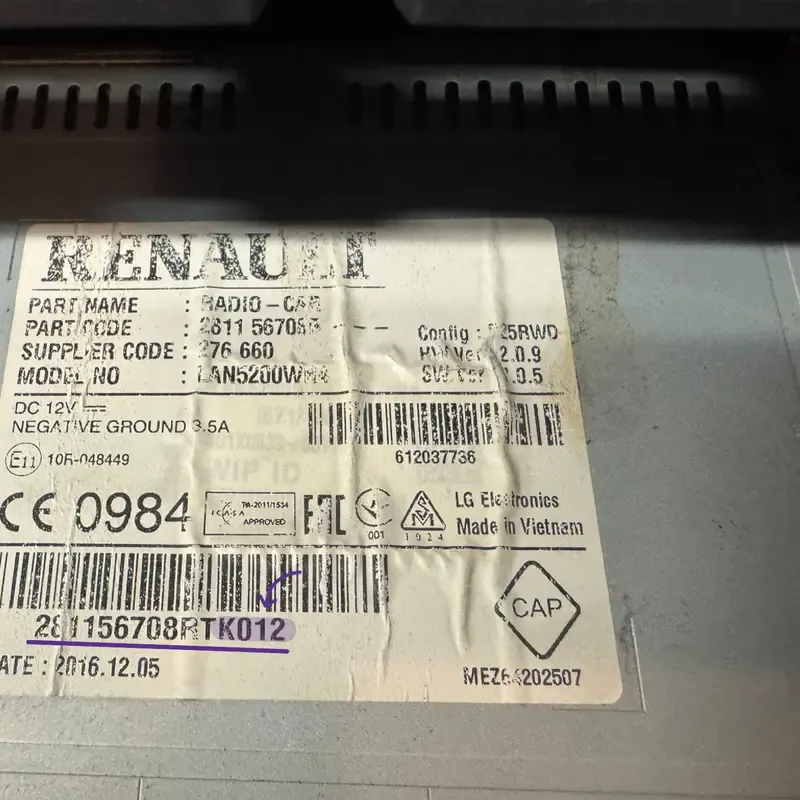
Example: The 4-character Duster pre-code located on the side casing label.
This is the fastest method for all **Duster Mk1, Mk2, and Mk3** stereos. Every factory-installed unit (including LG MediaNav touchscreens and Daewoo 2DIN Bluetooth radios) has a 4-character **Security Pre-code** printed on its chassis sticker.
- Remove the trim & unit: Unclip the plastic dashboard trim around the radio, remove the 4 Torx T20 screws, and slide the unit out. You can optionally use radio removal tools or four thin nails to help release the clips. No need to unplug the wiring harness.
- Locate the barcode sticker: Scan the white label stuck on the top, side, or back metal housing.
- Extract the Pre-Code: Look for a 4-character string consisting of **one letter and three digits** (e.g., V762 or A105). It is usually found under the barcode or right next to the word "SECURITY".
Duster Tip: If you have a classic Daewoo or Continental radio, the pre-code is almost always the last 4 characters of the main supplier serial number.
Supports: Duster MediaNav Evolution, Daewoo AGC-1220RF, Blaupunkt
Method 2: Use the Vehicle Identification Number (VIN)
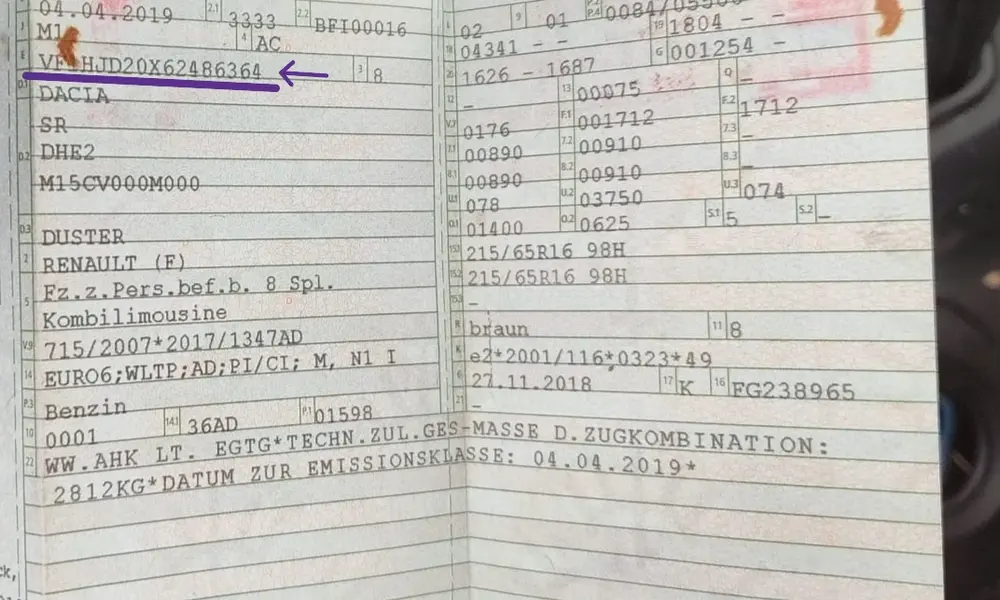
If you don't have tools or prefer not to disassemble your Duster's dashboard trim, we can pull your **Dacia Duster radio unlock code online** using your vehicle's 17-digit VIN. This works perfectly if the radio is the original unit fitted at the factory.
- Windshield Base: Look through the bottom left corner of your windshield from the outside (driver's side).
- Driver's Door B-Pillar: Open the front door and check the black manufacturing label on the frame.
- Vehicle Logbook: The 17-digit VIN is always printed on your official V5C logbook, registration certificate, or vehicle insurance documentation.
- Format: For the Dacia Duster, the vehicle identification number always begins with the manufacturer prefix UU1 or VF1.
Once you copy this identifier, our dedicated **Dacia Duster radio code by VIN** check tool cross-references the official factory database to output your original 4-digit activation PIN.
Best choice for: Touchscreen Media Display & Media Receiver
How to Enter Your Dacia Duster Radio Code
Once you've received your 4-digit activation PIN code, you will now need to enter that into your vehicle’s audio system. The method in which you will submit these codes will depend on whether your Dacia Duster has a MediaNav Touchscreen Navigation System or a Classic Factory CD Player/Stereo. Please follow these directions absolutely to unlock your radio safely.
Dacia Duster MediaNav & Media Display
Standard interface on Duster Mk2 and Mk3 generations featuring software digit keypads.
- Turn on screen: Switch on the vehicle's ignition. The display will immediately prompt you with "Authentication code required" or show 4 blank dashes.
- Type the digits: Use the digital on-screen numerical keypad to type your 4-digit code directly into the interface.
- Press OK: Verify the numbers on screen and press the virtual "OK" or "Accept" software button on the bottom right corner to submit.
Classic Continental / Daewoo Audio Units
Standard factory fitment on Dacia Duster Mk1 models using physical radio preset keys.
- First Digit: Press physical Button 1 repeatedly on the front faceplate panel until the correct first number of the PIN code is displayed.
- Remaining Digits: Use Button 2 for the second position, Button 3 for the third digit, and Button 4 for the final number.
- Save and Complete: Press and hold down Button 6 (or Button 5 on select units) for roughly 3 to 5 seconds until a sharp confirmation beep sounds.
Watch How to Type the Code on Your Screen
If you are still struggling to input your code configuration or dealing with a frozen system, follow this clear visual video walkthrough. It demonstrates how to submit the 4-digit code using hardware radio buttons step by step.
Watch Video TutorialFrequently Asked Questions
Got stuck during the recovery process? Find instant answers to the most common issues faced by Dacia Duster owners.
Yes. Every time the battery is disconnected, replaced, or your Duster suffers an electrical failure, the unit's anti-theft memory security system triggers automatically. However, once you obtain your 4-digit activation PIN from our decoder service, that code remains permanently linked to your hardware unit. You can safely reuse the exact same code in the future.
This is Dacia's built-in defense mechanism against brute-force entry. If an invalid security PIN is typed in, the stereo will temporarily lock down for a period starting at 1 minute, doubling up to 32 or 64 minutes with every consecutive failed attempt. To bypass this, you must keep the radio turned completely ON while the vehicle engine is running. The countdown will not progress if the unit is powered down.
While basic, outdated online scrapers or free mobile apps can occasionally decode older 2010–2015 Duster pre-codes (like early Blaupunkt or standard Renault-based units), they completely fail on newer models. Modern LG MediaNav Evolution, Media Display, and Continental dashboard components use strictly secure algorithms that require official manufacturer database synchronization via VIN or advanced serial string decodes to output correct keys.
Yes, absolutely. Our system fully supports all trim packages and generations of the Dacia Duster lineup—including the Mk1 (2010-2017), Mk2 (2018-2023), and the latest Mk3 models. Whether your dashboard features a classic Bluetooth knob-operated stereo or the premium 8-to-10-inch high-definition Media Nav touchscreen dashboard, our tool handles the authorization decoding safely.
Still having trouble?
Our automated system handles 99% of Dacia Duster radio code requests instantly. If your unit presents a unique hardware error or the authentication key is rejected, our specialists are ready to assist.