Renault • Instant with serial number • VIN by email
Renault Express Radio Code Generator
Get Your Unlock Code Online by VIN or Serial
Locked out of your vehicle's entertainment system after a battery change or repair? Our Renault Express radio code generator gives you a quick way to get past the "Enter Code" screen. By using the radio's security precode found on the side label, you can easily get the unique 4-digit PIN for your Renault Express unit.
Renault Express Radio Code – by Serial Number
Enter your radio's serial number – get the code instantly.
Leave a review on Trustpilot
Renault Express Radio Code – by VIN
No need to remove the radio — your code comes by email.
⚠️ VF6 = Renault Trucks
A truck VIN won't give you the radio code. You need the 16-character serial from the barcode on the radio's label. It starts with 89F, e.g. 89FKCZB210355188.
Usually a few hours.
How do I find my VIN?
How to Find Your Renault Express Radio PIN Code
If you have a Renault Express radio locked after battery replacement or fuse change, you will need a unique 4-digit PIN. To use our Renault Express radio code generator, you first need to identify your unit. Follow the two methods below to get your unlock data.
Method 1: Using the Vehicle Identification Number (VIN)
The Chassis Number (VIN) identifies your Renault Express factory specs. This works if your radio hasn't been changed since the car left the factory.
- Dashboard: Check the bottom corner of the windshield on the driver's side.
- Door Pillar: Look for a sticker on the driver's side door frame.
- Documents: Find it on your registration logbook (V5C) or insurance policy.
- Format: A 17-character string starting with VF1... (e.g., VF1R8870...).
Note: Getting a Renault Express radio code by VIN is the easiest online solution for modern models (2021+).
Recommended for original factory-installed systems
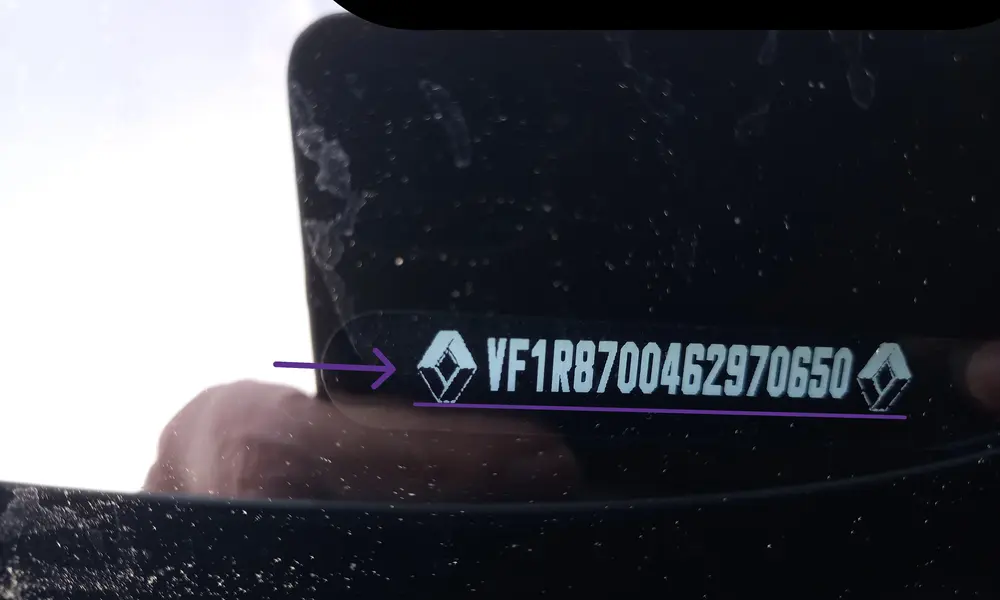
Method 2: Using the Radio Serial (Precode)
If the VIN method fails, it means your radio was likely replaced by a previous owner. You must extract the unit to find the Security Precode on the physical label.
- Remove Unit: Use radio release keys to pull the head unit forward.
- Check the Label: Look for a barcode sticker on the side or back of the radio casing.
- Identify Precode: Find the 4-character sequence (1 letter + 3 digits). It's usually after the word "SECURITY" or at the end of the long serial.
This Renault Express radio code generator by precode works even if the radio was swapped from another vehicle.
The most reliable method for all Renault units
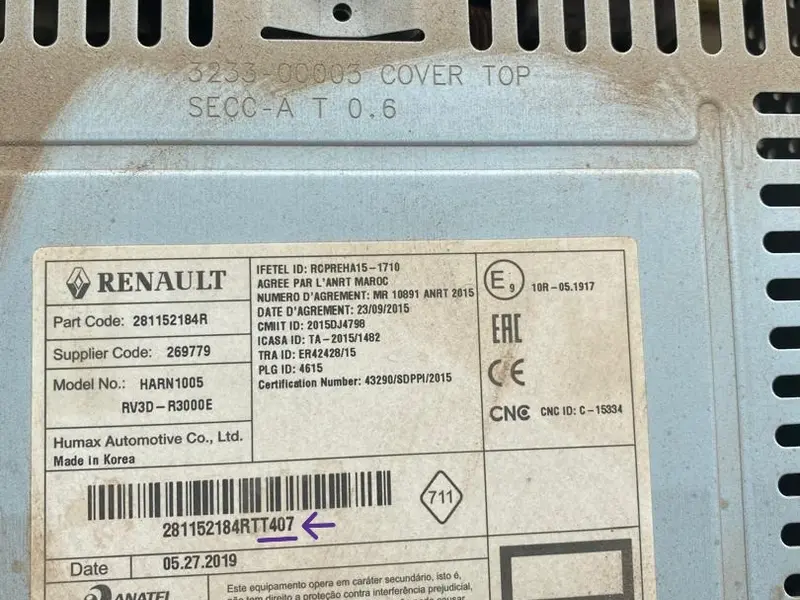
How to Enter Your Renault Express Radio Code
Depending on your trim level, you’ll get the classic button-interface radio or the modern MediaNav touchscreen. Select your method below.
Method A: Physical Buttons
For standard factory radios equipped with numbered preset buttons (1-6).
Press Button 1 repeatedly until the first digit of your code is displayed.
Repeat the process using Buttons 2, 3, and 4 for the remaining digits.
To confirm, press and hold Button 6 for a few seconds until you hear a validation beep.
Method B: Touchscreen Display
For high-trim Renault Express models featuring the large center display.
Wait for the "Authentication Key" prompt to appear on the digital screen.
Use the on-screen digital keypad to type in your 4-digit security PIN.
Tap the "OK" or "Done" button on the touchscreen to instantly reactivate the system.
Troubleshooting & Error Codes
Is your radio display showing an error? Use this guide to identify and fix the issue.
Meaning: The system has entered a temporary lockout mode due to an incorrect code entry.
Solution: Leave the radio switched ON (ignition on). Do not touch any buttons. The timer will end after 30–60 minutes.
Meaning: The radio is currently reset and waiting for the 4-digit security PIN to be entered.
Solution: Enter your code using buttons 1-4 (for classic units) or the touchscreen keypad.
Meaning: Too many failed attempts have been made. The security system is in deep lockout.
Solution: A longer waiting period is required. Keep the unit powered for at least 60 minutes without interruption.
Meaning: There is no power reaching the head unit, or the internal fuse has failed.
Solution: Check the 15A/20A radio fuse in the cabin fuse box and ensure the battery terminals are tight.