Compatible with all Ford models
Ford Radio Code Unlock: V, M, BP & TravelPilot Series
Instant online Ford radio code generator. Enter your serial number to retrieve original factory unlock codes for V-Series, M-Series, Blaupunkt, and TravelPilot.
Serial number examples
Where do I find my serial number?Type only the serial, or paste the whole label. Tap an example to see how it is recognised.
- V series
- M series
- Blaupunkt (BP)
- TravelPilot
The letter O is the digit zero. Spaces and dashes do not matter.
How to Find Your Ford Radio Serial Number
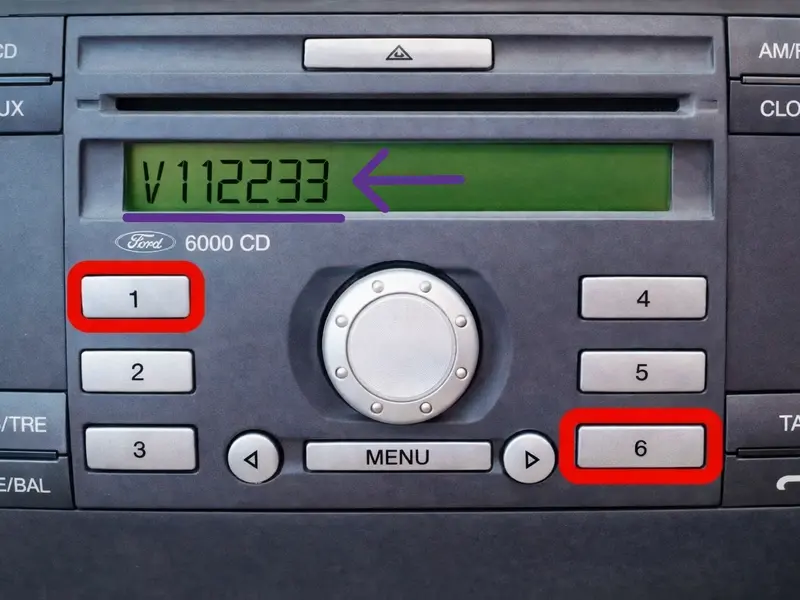
Method 1: On-Screen Display
- Turn on your radio and ensure it prompts for an unlock code.
- Press and hold preset buttons 1 and 6 together for a few seconds.
- The screen will begin scrolling through various technical details and system info.
- Watch the moving text carefully to identify your serial number format:
- Ford 6000CD / 4500: Look near the end of the text for a V or M followed by 6 digits (e.g.,
V198203). - Sony CD: Displays quickly. If you see a long string like
SOCD1X7V112233, your key is the last part:V112233.
- Ford 6000CD / 4500: Look near the end of the text for a V or M followed by 6 digits (e.g.,
- Alternative: If the 1+6 shortcut doesn't work, turn the radio off and on, then hold down buttons 2 and 6.
Method 2: Sticker Label
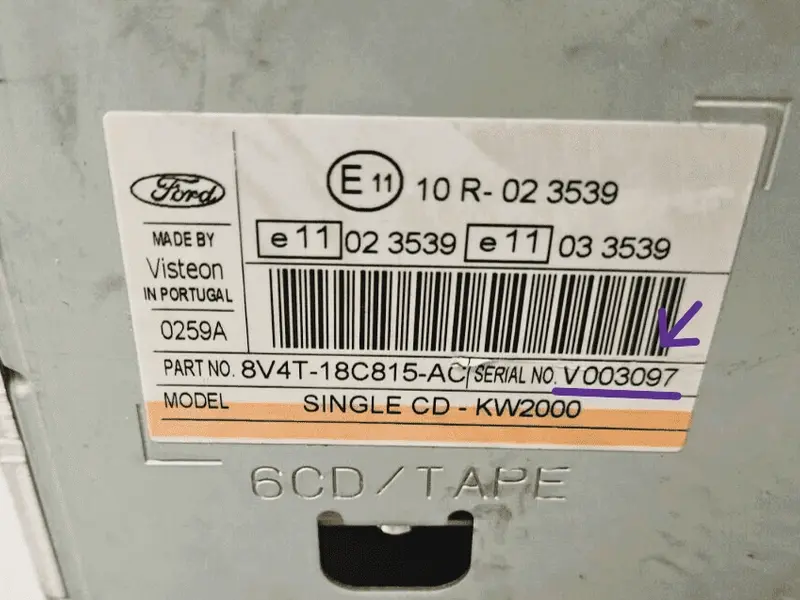
- If the buttons fail: You will need to slide the radio out slightly. Older models (1998–2004) require 2 mm round extraction tools.
- Insert standard Ford release keys into the slots. Alternative: Use small flathead screwdrivers or a rigid wire coat hanger.
- Push the tools into the slots, press gently outwards, and pull the radio forward.
- Slide the unit out just enough to see the factory sticker. Do not disconnect any wiring.
- Locate your serial number format on the label:
- V-Series / M-Series: 1 letter followed by 6 digits (e.g.,
V003097orM654321). - Blaupunkt (BP): Starts with
BP, then 4 digits, 1 letter and 7 digits (e.g.,BP1234A1234567). - TravelPilot (TP): Starts with
C7E3ForC7E3Afollowed by 12 characters (e.g.,C7E3F0761A1517427).
- V-Series / M-Series: 1 letter followed by 6 digits (e.g.,
How to Enter Your Ford Radio Code
Once you generate your 4-digit security code, follow these steps to unlock your audio unit:
- Input the 1st Digit: Press button 1 repeatedly until the correct first digit of your code appears on the screen.
- Input the 2nd Digit: Press button 2 repeatedly to cycle through and set the second digit.
- Input the 3rd Digit: Press button 3 repeatedly to set the third digit.
- Input the 4th Digit: Press button 4 repeatedly to set the final digit.
- Confirm and Unlock: Verify that the full code on the display matches your generated key, then press and hold button 5 (or the * (Asterisk) / SELECT button on Sony models) to save and activate.
Supported Ford Vehicles & Radio Models
Our generator works with European and US factory-installed Ford audio systems. Check below to ensure your vehicle and radio type are fully compatible.
Compatible Car Models
Most Popular Generations
- Ford Focus (Mk1, Mk2, Mk3)
- Ford Fiesta (Mk5, Mk6, Mk7)
- Ford Transit & Transit Custom
- Ford Mondeo (Mk3, Mk4)
- Ford C-Max / S-Max / Galaxy
- Ford Kuga
- Ford Fusion
- Ford Ranger
Other Supported Models
- Ford Ka / StreetKa
- Ford Tourneo / Tourneo Connect
- Ford B-Max (Early generations)
- Ford Puma (1997–2002) / Cougar
- Ford Escort / Orion / Sierra
- Ford Maverick / Explorer (Euro specs)
Supported Radio Systems
Audio & Navigation Units
- Ford 6000 CD
- Ford 6000 CD RDS EON
- Sony CD / MP3 / 6-CD Changer
- Sony DAB Radio (Digital Audio Broadcasting)
- TravelPilot NX / FX / EX Touchscreen
- Ford 1500 RDS
- Ford 2500
- Ford 3000 Traffic
- Ford 4000 RDS
- Ford 4500 RDS E-O-N
- Ford 5000 RDS
- Ford 5000 RDS E-O-N
- Ford 6000 AUX CD RDS E-O-N
- Ford 7000
- Blaupunkt CD30 / Bosch systems
- Ford Denso Touchscreen Navigation
Ford Radio Code & Troubleshooting FAQ
Got stuck during the unlock process? Click on any question below to find fast answers regarding Ford audio serial lookup, system errors, and generation differences.
What should I do if the generated Ford radio code does not work?
0 (Zero) for a letter O, or a number 1 (One) for a capital letter I. If the on-screen button shortcut (1+6) provided multiple numbers, you may need to pull the unit out and read the definitive serial from the physical factory sticker.What should I do if my screen shows "LOCKED 10" or "LOCKED 13"?
These messages indicate that the maximum number of incorrect anti-theft PIN attempts has been reached:
- LOCKED 10: Press and hold the 6 button for about 10 seconds while turning the radio on. This grants you 3 final entry attempts. Use them carefully with the correct code.
- LOCKED 13: This is a permanent electronic lockdown. The button shortcuts are disabled, and the unit must be taken to a specialist or a Ford dealer to be unlocked via hardware EEPROM reprogramming.