Renault Captur Radio Unlock Code:
Online Recovery by VIN or Serial.
Lost your Renault Captur radio code after a battery disconnect? Our automated system allows you to enter your pre-code or 17-digit VIN to retrieve your unique 4-digit PIN instantly. Unlock your radio without a trip to the dealership.
Captur Radio Code Generator
Enter the 4-character precode (e.g. T852)
Renault Captur Radio PIN & Authentication Key Recovery
If your Renault Captur radio is displaying "Unit Locked" or requesting an authentication key after a battery replacement, you'll need a 4-digit security PIN. To bypass the anti-theft system and reset your MediaNav or R-Link unit, follow the identification steps below to find your specific Pre-code or VIN.
Method 1: Identification via Radio Serial Sticker
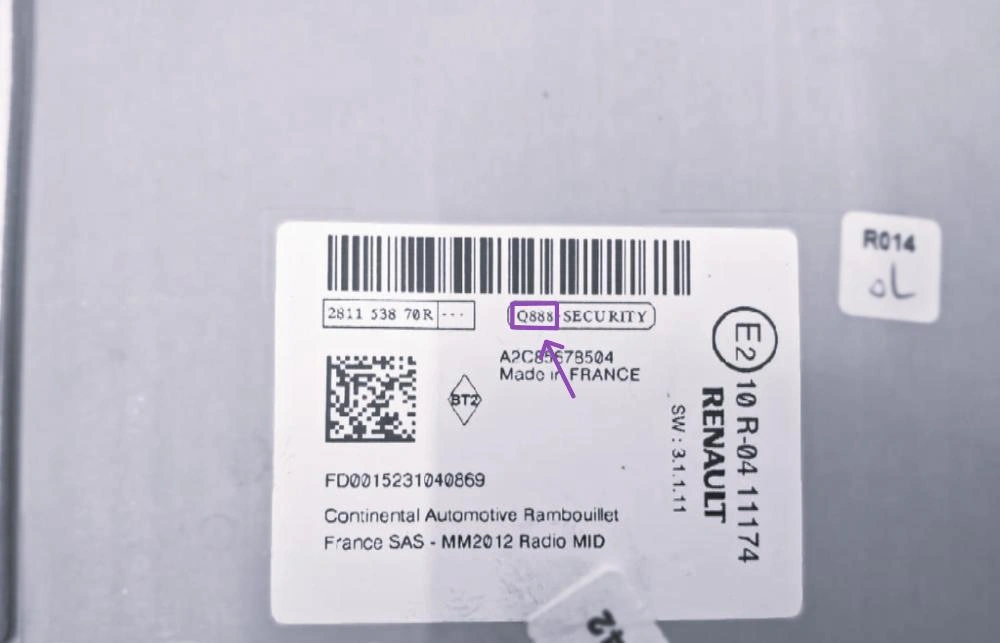
The full Renault serial is 15 characters, starting with 2811 or 8200.
This method is standard for Captur models with physical buttons. The Pre-code is a 4-character string found on the unit's identification label.
- LCD Shortcut: Turn on the ignition and hold buttons 1 and 6 for 3 seconds. The 4-digit Pre-code (e.g., Q888) will appear on the screen.
- Identify the Label: If the shortcut fails, slide the radio out. Look for a 15-digit code. Example: 281150038RTU902.
- Extract Pre-code: Look for the last 4 characters following "SECURITY" at the end of the barcode (e.g., Q888).
Note: Most Captur Phase I units (2013-2017) allow pre-code retrieval without dashboard disassembly using the 1+6 shortcut.
Works for: Tuner List, Update List & non-touch systems
Method 2: Unlock via 17-Digit VIN Number
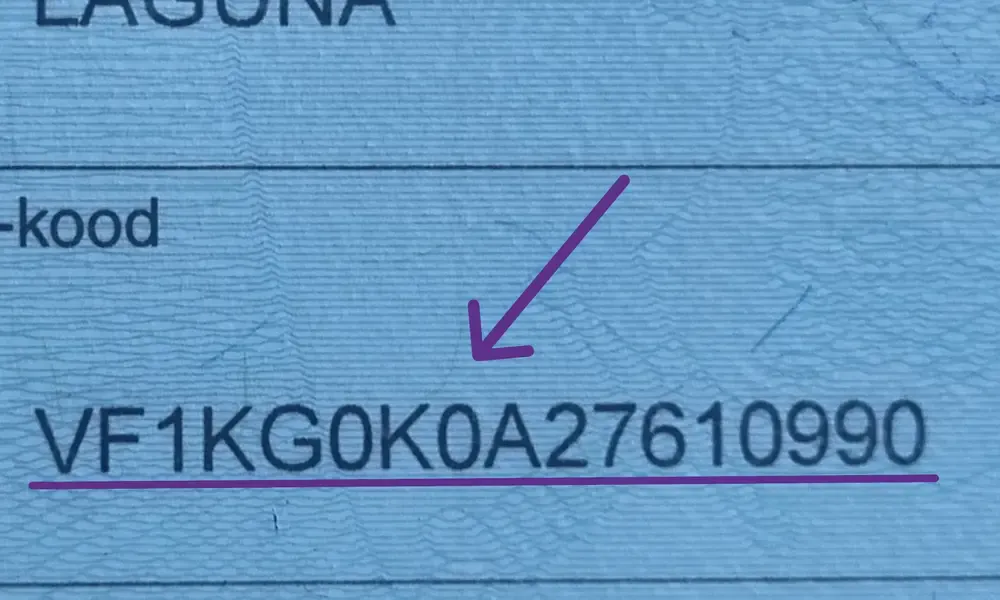
Find your 17-character VIN on the windshield or registration docs.
If your Captur is equipped with an LG MediaNav or R-Link Evolution touchscreen, the button shortcut will not work. In this case, the VIN recovery is the only safe option.
- Windshield Location: Look at the lower corner of the windshield on the driver's side.
- Logbook: Your 17-character chassis number is listed on your V5C or registration papers.
- Format: Ensure the VIN starts with the Renault manufacturer prefix VF1.
- No Removal: This method pulls the original factory PIN directly from the Renault database without risking damage to the dashboard trim.
Required for: MediaNav, R-Link & Bose Touchscreens
How to Enter Your Renault Captur Code
Once you have your 4-digit code, follow these steps to unlock the system. The process is different depending on whether you have a MediaNav touchscreen or a standard radio with physical buttons.
MediaNav & R-Link (Touchscreen)

The digital keypad appears automatically when the unit is locked.
- Step 1: Turn on the ignition. The "Authentication Key" screen will pop up.
- Step 2: Type your 4-digit PIN using the on-screen numerical keypad.
- Step 3: Press "OK" or "Done" on the display to confirm.
Standard Radio (Physical Buttons)
Use the numbered buttons 1, 2, 3, and 4 located on the front panel to enter the PIN:
- 1st Digit: Press Button 1 repeatedly until the first number is correct.
- 2nd Digit: Press Button 2 repeatedly for the second number.
- 3rd Digit: Press Button 3 for the third digit.
- 4th Digit: Press Button 4 for the last digit.
- TO CONFIRM: Press and HOLD Button 6 for about 5 seconds. You will hear a loud beep when the radio unlocks.
Renault Captur Radio Issues: Common Problems & Solutions
If your 4-digit PIN isn't working or your screen is completely frozen, you're not alone. Most Renault Captur infotainment systems (especially the MediaNav Evolution) face these specific software locks. Here is how to fix them.
1. "Unit Locked" Message & Countdown
This happens when the wrong Renault authentication key has been entered too many times. It’s a security measure to prevent theft bypass.
- The Solution: You cannot bypass this timer by disconnecting the battery (it actually resets the timer). You must leave the ignition ON and the radio powered up.
- Waiting Times: The lock starts at 1 minute, then 2, 4, 8, 16, and finally 32 minutes.
- Important: Do not start and stop the engine during this time. Use a battery charger or keep the engine idling to prevent the car's "Eco Mode" from cutting the power.
2. Radio Code Not Accepted
If you are 100% sure the PIN is correct but the radio still rejects it, the issue is usually related to hardware swaps.
- Check the Serial: If you bought the car second-hand, the radio unit might have been replaced. In this case, the VIN method won't work because the radio serial doesn't match the car's chassis.
- Verification: Pull the radio out and check the sticker. If the Pre-code on the label gives you a different PIN than the VIN, the physical label is the one that counts.
3. MediaNav Frozen on Logo or Black Screen
A common fault in Captur Phase I models is the MediaNav boot loop. The screen gets stuck on the Renault logo and won't let you enter the code.
- Software Crash: This is often caused by a corrupted internal memory (iNAND).
- The "Hard Reset" Trick: Disconnect the negative terminal of the car battery for 10 minutes. Reconnect and see if the keypad appears.
- Firmware Update: If the unit starts, immediately update to the latest version via Renault Media Nav Toolbox to prevent future crashes.
Still having trouble?
Our automated system handles 99% of requests instantly. If your Captur radio (MediaNav or R-Link) presents a unique hardware error or code rejection, our team is ready to assist.