Trafic Specialist • Instant with serial number • VIN by email
Unlock Your Renault Trafic Radio Code
Restore audio to your Renault Trafic II or III. Enter your security precode found on the radio's label to generate your 4-digit unlock PIN instantly.
Renault Trafic Radio Code – by Serial Number
Enter your radio's serial number – get the code instantly.
Leave a review on Trustpilot
Renault Trafic Radio Code – by VIN
No need to remove the radio — your code comes by email.
⚠️ VF6 = Renault Trucks
A truck VIN won't give you the radio code. You need the 16-character serial from the barcode on the radio's label. It starts with 89F, e.g. 89FKCZB210355188.
Usually a few hours.
How do I find my VIN?
How to Find Your Renault Trafic Radio Serial or VIN
Depending on your Trafic generation and head unit type, there are two distinct ways to recover your unlock PIN. Follow the technical guide below for your specific van setup.
Option 1: The Security Precode
For Renault Trafic II (2001-2014) equipped with standard cassette or CD systems like the Tuner List or Update List, you can get your 4-digit code using the Security Precode—a 4-character token (one letter followed by three digits) printed directly on the hardware label.
- Slide the unit slightly out using radio release keys to view the side casing sticker.
- Locate the barcode near the sequence starting with 2811, 8200, or RENR on your Tuner List / Update List unit.
- Example: Look for the word "SECURITY" or the last 4 characters of the barcode (e.g., E426).
Note: The physical extraction method is the absolute fallback if your van has had a radio swap from another model in the past.
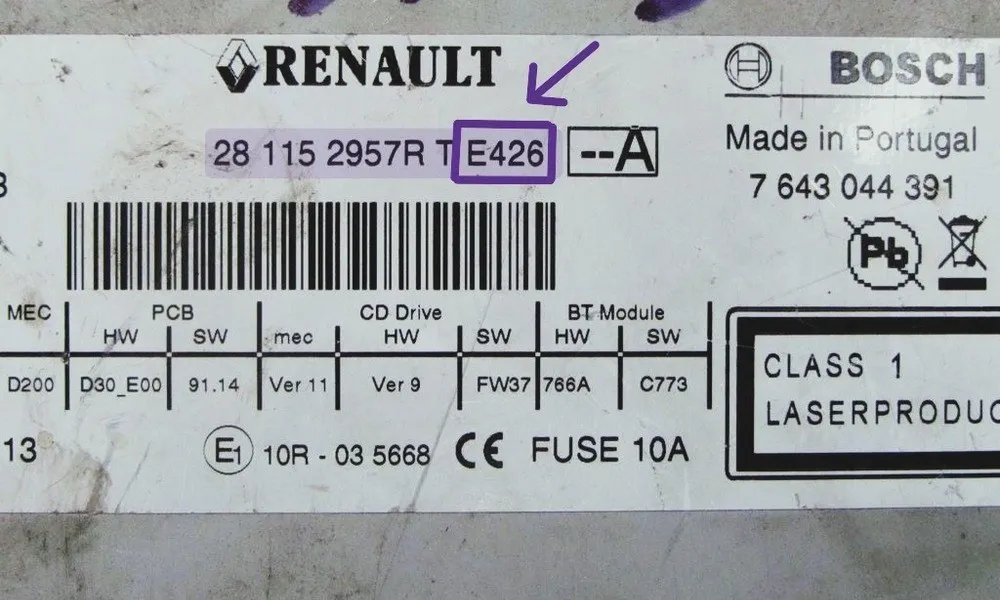 Example of Trafic Radio Label with Precode highlighted
Option 2: The 17-Digit VIN Number
If your Renault Trafic III (2014-2026) is equipped with a MediaNav Evolution, R-Link, or modern Bluetooth stereo, extracting the unit is complex. The safest way to unlock the screen is via your 17-character VIN string.
- Door Pillar: Open the driver's door and look at the black identification label on the B-pillar frame.
- Windshield: View the lower left corner of the front glass from outside.
- Chassis Logs: Check your vehicle registration logbook (V5C) for the code starting with VF1.
Important: Touchscreen MediaNav units do not support key shortcuts. Requesting the code by VIN is the cleanest way to unlock them without risking damage to the dash trim panels.
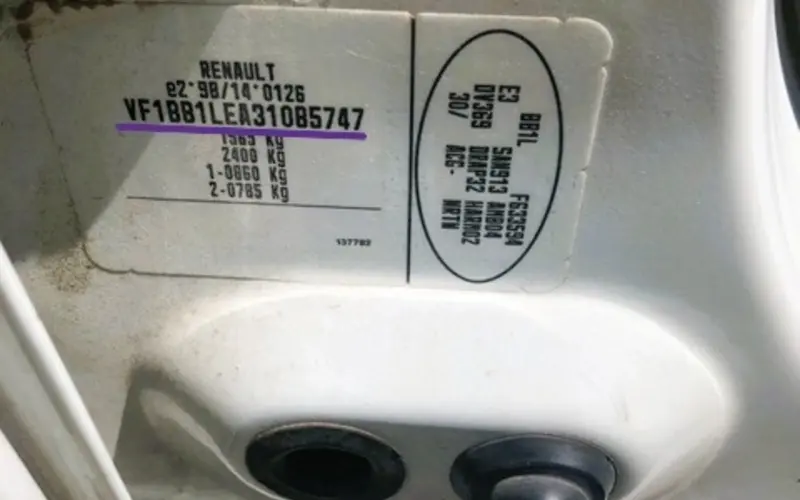 VIN number identification plate on the Trafic B-pillar
How to Enter Your Renault Trafic Radio Code
Once you have your 4-digit Renault radio code, the entry method depends on the unit installed in your van. Whether you’re driving a Trafic II with a standard CD player or a Trafic III with a MediaNav touchscreen, here is how to enter the code and restore your audio.
Standard Radio (Physical Buttons)
Common on Renault Trafic (2001-2014). You don't have a dedicated "Enter" button, so you must use the preset keys:
- Button 1: Press repeatedly until the first digit is correct.
- Button 2: Press repeatedly for the second digit.
- Button 3: Press repeatedly for the third digit.
- Button 4: Press repeatedly for the fourth digit.
- To Confirm: Press and hold Button 6 for a few seconds. A beep will signal the radio is unlocked.
MediaNav & R-Link Touchscreens
On newer Renault Trafic III models, the system will automatically display a numeric keypad when it detects a power loss.
- Type the 4-digit PIN directly onto the touchscreen.
- Verify the numbers match your security card or generated code.
- Tap "OK" or "Accept".
- The system will initialize and return to the main menu instantly.
If you entered a wrong code, the system locks for security. You must leave the ignition ON. The wait time starts at 1 minute and doubles with every failed attempt.
Common Renault Trafic Radio Issues
What does "WAIT" on the display mean?
It means too many wrong codes were entered. The radio is temporarily locked. You must leave the ignition ON and wait. The timer won't countdown if the radio is off. It starts at 1 minute and can go up to 32 or 64 minutes.
Can I get my code for free from a Renault dealer?
Sometimes, but it’s a hassle. Most dealers will ask you to book an appointment and bring the vehicle logbook (V5C) and ID. They often charge for the service. We provide the same factory code online.
My radio is completely dead (no "CODE" prompt).
Check the 15A fuse. On most Trafic II models, the fuse box is under the dashboard on the driver’s side. On Trafic III, check the glovebox area. If the fuse is fine, the unit might have an internal hardware fault.
Will disconnecting the battery reset the "WAIT" timer?
No. In fact, it might restart the timer. The only way to clear the "WAIT" message is to leave the unit powered on until it asks for the code again.
Supported Renault Trafic Audio Units
Our generator works with many of the head units installed in the Renault Trafic range from 2001 to 2026.