Dacia Sandero & Stepway Radio Code:
Get Your 4-Digit Unlock PIN Online.
Is your Dacia Sandero radio asking for a code after a battery change or disconnect?. Our Dacia Sandero radio code generator works with all Sandero and Stepway generations — including models with the standard button-operated radio (Phase 1, Phase 2, and facelift versions). Just enter the precode displayed on your radio screen and get your Sandero unlock code in seconds.
Dacia Sandero & Stepway Radio Code Generator
Enter the 4-character precode shown on your radio display (e.g. A105)
How to Find Your Dacia Sandero & Stepway Radio PIN Code
You can generate your radio unlock PIN with the "pre-code" (a 4-character code consisting of 1 letter and 3 digits, e.g., V123) or using the vehicle's VIN number. Here are the two simple methods to find it in less than 5 minutes.
Method 1: Radio Serial Number (On-Screen or Label)
If you want your unlock code **right now**, this is the most reliable way. You get your pre-code instantly on your screen or from the sticker label on the back of the radio.
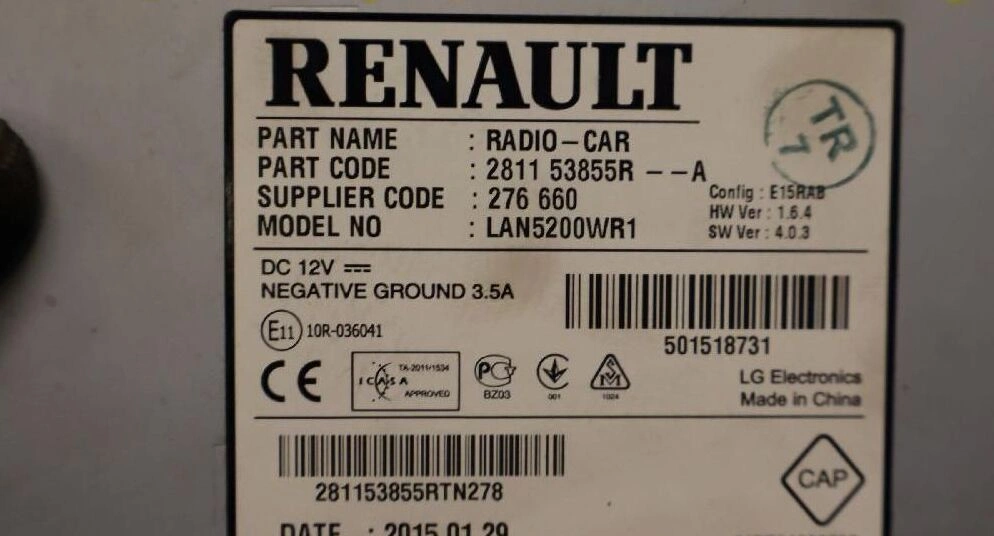
[Image: Pre-code security sticker location on the back of Dacia radio]- Press and hold buttons 1 and 6 simultaneously on your radio dashboard. For many models, the pre-code will display directly on the screen.
- If the screen doesn't show it, slide the radio unit out using standard release keys or 4 small nails inserted into the side holes.
- Check the white barcode label on the casing. Look for the word SECURITY or the last 4 characters of the main serial number.
- You need **1 letter followed by 3 numbers** (Real examples: N278, T492, V881).
Method 2: Vehicle VIN Number (No Tools Required)
If you don't want to remove the radio or worry about scratching your dashboard plastics, this is the cleanest choice. **No tools needed**, just use your car documents.
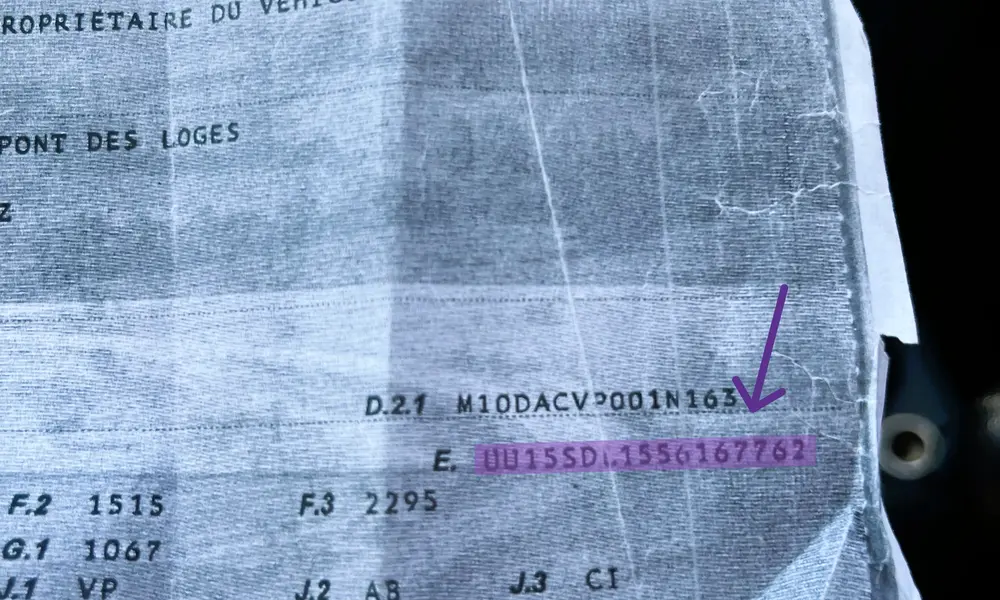
[Image: Where to find Dacia VIN number on logbook or lower windscreen]- Check your vehicle registration document (Logbook / V5C) or look at the bottom base of the passenger side windscreen from the outside.
- Copy your 17-character Vehicle Identification Number (VIN). For Dacia models, this code always begins with UU1.
- Use this VIN to match your vehicle's factory build configuration and extract the original radio PIN tied to your car from the manufacturer database.
- Note: This method only works if you are still using the original factory radio unit your car was delivered with.
Important note before entering your code: If you have already entered a wrong code multiple times, your screen might display "LOCK" or show a countdown timer (e.g., 10 min, 30 min). Leave the car ignition on and keep the radio powered up. Wait until the timer hits zero to safely enter your correct generated PIN.
How to Enter Dacia Radio Code
Once you have generated your 4-digit Dacia security PIN unlock code, follow these exact instruction steps to type it into your car radio. This method works for all standard factory-installed stereo head units.
Watch How to Enter Dacia Radio Code in 30 Seconds
Prefer visual instructions? Watch this quick step-by-step YouTube short video demonstrating exactly how to input the security pre-code PIN on your Dacia unit dashboard controller.
Dacia Stereo System PIN Code Entry Procedure
Follow these instructions carefully to insert your security code. You will use the physical dashboard preset numbers 1, 2, 3, and 4 to cycle through digits, and button 6 to validate the config log data.
Frequently Asked Questions About Dacia Radio Unlock Codes
Find instant answers to the most common issues regarding lost Dacia radio codes, pre-code security serial numbers, and unexpected stereo unit dashboard errors.
How can I get my Dacia radio code for free?
You can sometimes find your original Dacia radio security PIN code for free inside your vehicle's original maintenance book or warranty documents packet, usually labeled as "C.A.R." (Code Autoradio). If you bought the vehicle secondhand and the documentation packet is missing, you will need to use our online database generator tool to extract the factory recovery PIN code using your radio’s security pre-code serial number or vehicle VIN.
What does the "LOCK" or countdown timer on my Dacia screen mean?
If your car stereo display shows "LOCK", "WAIT", or a countdown screen timer like "10 MIN" or "30 MIN", it means that a wrong code configuration was entered multiple times. This is an anti-theft security lockout system. To bypass this screen, you must leave your vehicle ignition key switched on and keep the dashboard radio powered active. Do not turn it off. Once the timer hits 00:00, the "0000 CODE" slot input screen will appear automatically, allowing you to type in the correct generated master PIN.
Can I find my Dacia security pre-code without removing the radio unit?
Yes, on a large majority of older classic factory stereo player systems, you can retrieve the security precode directly on-screen. Simply turn on the device unit, then press and hold down the dashboard buttons 1 and 6 together for a few seconds. The screen data will refresh and display a code string. Look for the last 4 alphanumeric characters (e.g., V392 or T105). If this command line shortcut doesn't display anything, you will have to slide out the media device unit to read the white barcode serial label on the casing block.
Will disconnecting my car battery lock my Dacia radio again?
Yes, every single time you disconnect the vehicle's 12V battery terminal for maintenance or if the battery power runs completely dead, the car security system will reset. Once power is restored, the radio head unit dashboard display will ask you to enter the 4-digit unlock security PIN code again. We highly recommend saving your generated Dacia code link sheet or writing down your code in a safe location for future recovery needs.
Why is the code generator tool saying my pre-code is invalid?
A standard valid Dacia radio security precode must always consist of exactly one letter followed by three numeric digits (Examples: A123, Z987, K456). If you type in a longer code layout, symbols, or numbers from the wrong serial barcode block line, the software engine will reject the string sequence data log. Double-check the label on your radio casing and look specifically for the word "SECURITY" or check the final digits at the end of the long main serial string.
Still having trouble unlocking your stereo?
Our automated online software database handles 99% of Dacia radio code requests instantly. If your car dashboard unit presents a unique internal hardware error, an altered serial display, or the decoded authentication key is rejected by the panel system, our vehicle electronics specialists are ready to assist.