Renault • Instant with serial number • VIN by email
Renault Clio Radio Unlock Code:
By VIN or Serial Number.
Lost your Renault Clio radio code after a battery disconnect? Our automated system allows you to enter your precode or 17-character VIN to get your unique 4-digit PIN (instantly with the precode, by email with the VIN). Works for all generations — Clio 2, Clio 3, Clio 4, and Clio 5 — including MediaNav and Tuner List units.
Renault Clio Radio Code — by Serial Number
Enter your radio's serial number — get the code instantly.
Leave a review on Trustpilot
Renault Clio Radio Code — by VIN
No need to remove the radio — your code comes by email.
⚠️ VF6 = Renault Trucks
A truck VIN won't give you the radio code. You need the 16-character serial from the barcode on the radio's label. It starts with 89F, e.g. 89FKCZB210355188.
Usually a few hours.
How do I find my VIN?
Step-by-Step Guide: How to Find Your Renault Clio Radio Serial or VIN
Lost your 4-digit security code after a battery change? Whether you drive a Renault Clio 2, 3, 4, or 5, follow this detailed guide to retrieve your authentic unlock code using the VIN method or the Radio Serial (Precode).
Option 1: Using the Radio Precode (Serial Number)
The Renault Clio radio precode is the last 4 characters of the radio serial number. It always starts with a letter followed by three digits (e.g., A123, V456, S999).
- Digital Method (Screen): Turn on the radio and hold buttons 1 and 6 for a few seconds. This works on most Clio 2 Tuner List and Clio 3 Update List units. The precode will flash briefly on the display.
- Physical Method (Label): If the screen is dead or locked, use radio removal tools to slide the unit out. Look for a barcode sticker on the casing. The code is found under the heading 'Security' or as the last 4 characters of the long serial number (e.g., 281154879RTT982).
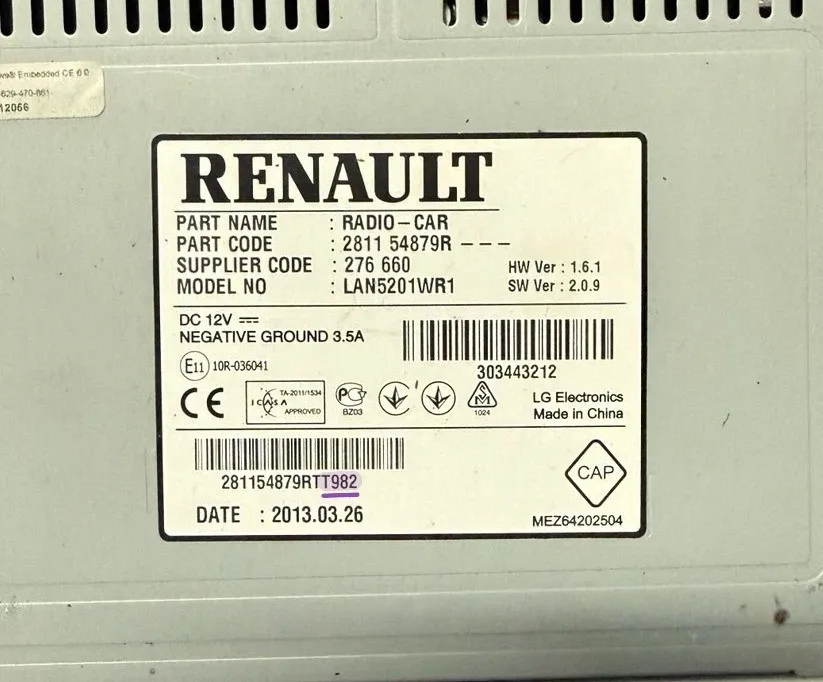
Example: The 'Security' code is located at the end of the barcode.
Option 2: Using the VIN Number (No Removal)
The VIN (Vehicle Identification Number) method is the best solution for Clio 4 and Clio 5 owners with MediaNav or R-Link touchscreens. This allows you to get the code without removing any dashboard panels.
- Check the Windshield: Look at the lower-left corner of your windshield (driver's side). You will see a 17-character string starting with 'VF1'. This is your unique chassis number.
- Check the Door Pillar: Open the driver’s door and check the black sticker on the B-pillar. The VIN is printed clearly there.
- Official Documents: You can find the VIN on your V5C Logbook, Insurance Certificate, or the service history book. Tip: Ensure you copy all 17 characters correctly to avoid errors.

Example: Find your 17-character VIN on the windshield or registration papers.
How to Enter Your Renault Clio Radio Code: Step-by-Step Instructions
Received your 4-digit unlock code? Great! Now follow these specific steps for your unit type. Incorrect attempts may lead to a "Unit Locked" or "WAIT" message, so be careful!
Method 1: Radios with Physical Buttons (1-6)
Use the numeric keys 1, 2, 3, and 4 on your dashboard to enter the digits. This is the standard procedure for Tuner List, Update List, and Cabasse units found in Clio 2 and Clio 3.
- Digit 1: Press Button 1 repeatedly until the first digit of your code appears.
- Digit 2: Press Button 2 repeatedly for the second digit.
- Digit 3: Press Button 3 repeatedly for the third digit.
- Digit 4: Press Button 4 repeatedly for the fourth digit.
- To Confirm: Press and hold Button 6 (or Button 5 on some models) for a few seconds until you hear a beep.
Method 2: MediaNav & R-Link Touchscreens
Modern Renault MediaNav Evolution systems (standard in Clio 4 and Clio 5) will automatically prompt you with a digital keypad on the screen:
- Simply type your 4-digit PIN code directly on the screen using the virtual keyboard.
- Once the 4 digits are entered, press the "OK" or "Accept" button on the display.
- If the "Authenticate" button is greyed out, re-check that you have entered all 4 digits correctly.
Faq
Renault Clio Radio Code Recovery
How to fix Renault Clio radio "WAIT" or "ERROR" message after entering the wrong code?
How to find the Renault Clio 4 radio code without removing the MediaNav touchscreen?
How to find the Renault Clio radio precode using buttons 1 and 6?
Where is the security precode on a Renault Clio radio barcode sticker?
Where is the Renault Clio radio code in car documents?
Other Renault Models
Looking for a different Renault model? We generate radio unlock PIN codes for these Renault models:
Still Having Trouble?
If your generated code doesn't unlock the system or you face issues reading your radio serial label, don't hesitate to reach out. Open the Live Chat widget in the bottom corner of your screen to drop us a message. We will help you get your stereo working again.