Compatible with Transit, Custom & Connect
Ford Transit Radio Code – Instant 6000 CD RDS & Sony
Instant online Ford Transit radio code generator. Enter your serial number below to get your original 4-digit factory unlock code for 6000 CD RDS EON, Sony, and navigation systems if your screen radio is locked out.
Serial number examples
Where do I find my serial number?Type only the serial, or paste the whole label. Tap an example to see how it is recognised.
- V series
- M series
- Blaupunkt (BP)
- TravelPilot
The letter O is the digit zero. Spaces and dashes do not matter.
How to Find Your Ford Transit Radio Serial Number
Before you can calculate your security PIN, you need to locate the unique serial number of your audio unit. Follow the two primary tactical methods below to find it.
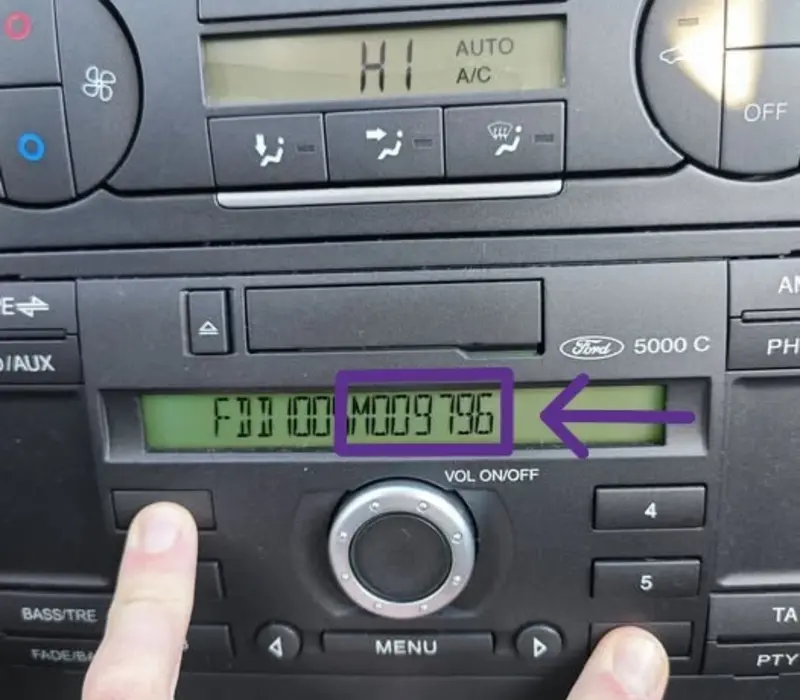
Method 1: Hold Buttons 1 & 6 (On-Screen)
- Turn on your Ford Transit audio deck dashboard.
- Press and hold down buttons 1 and 6 simultaneously for a few seconds.
- The screen will cycle through technical configurations and manufacturing data streams.
- Look closely toward the end of the sequence for a serial number starting with V or M followed by 6 digits (e.g., V123456 or M123456).
- Alternative: If nothing shows up, turn off the deck, turn it back on, and try holding buttons 2 and 6 instead.
Method 2: Check the Label (Radio Removal)
- If the on-screen digital combination fails, you must pull the stereo housing out from the central dash container.
- Insert standard Ford radio release keys or use trim tools to unclip the surrounding dash panel.
- Gently pull the unit forward to slide the metal casing straight out of the dashboard.
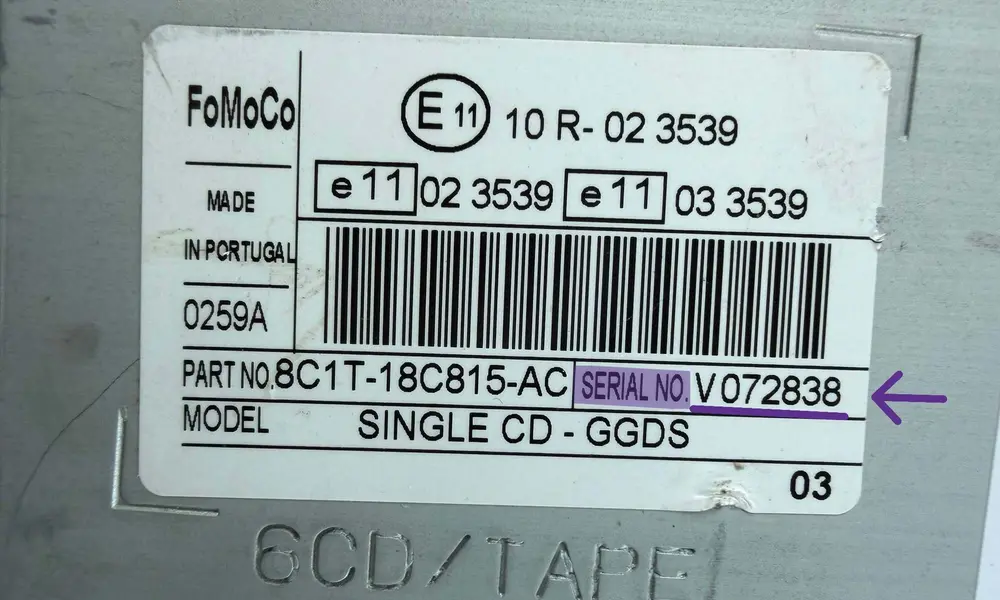
- Locate the white printed label sticker or engraved stamping on the top, side, or back plate.
- The serial number is printed clearly next to the barcode (e.g., Serial No. V123456).
Serial Layout Formats depending on unit type:
- V/M Series (6000 CD RDS EON / Sony): Marked clearly as SERIAL NO. VXXXXXX.
- Blaupunkt Units: Look for a number that starts with BP, then 4 digits, 1 letter and 7 digits (e.g., BP1234A1234567), stamped into the metal or printed on the sticker.
- TravelPilot (C7 System): Look for a longer code starting precisely with C7E3... followed by 13 digits/letters.
How to Enter Your Ford Transit Radio Code
If you have generated the code, you should then input this code through the audio unit panel. If your Transit is equipped with either a standard CD deck, old RDS system, or the Sony screen, then use the corresponding layout instructions provided below.
6000 CD & RDS Systems Most Common
- Ensure the dashboard displays CODE, ENTER CODE, or ----.
- Press button 1 repeatedly until the first digit of your code appears on the screen.
- Press button 2 repeatedly to enter the second digit.
- Press button 3 and button 4 in the same manner for the final two digits.
- To confirm and unlock, press and hold down button 5 for a few seconds until the radio starts playing.
Ford Sony Stereos Premium Audio
- When the prompt shows up, use the central square navigation pad or the numerical keys 0-9 to type the 4 digits directly.
- Once the correct code is visible on the display, press the * (Asterisk) key, the # (Hashtag) button, or the central TA / OK control to validate.
TravelPilot Systems Navigation Unit
- Turn on the master screen console and wait for the security pin block screen.
- Use the circular rotary dial to scroll through the digits on the display interface.
- Press down the rotary knob to select each digit of the security string.
- Once the full code is displayed, scroll to highlight OK or Return on the screen and push the dial to activate.
Avoid Radio Lock Out (LOCKED 10 / LOCKED 13)
Ford Transit stereos give you exactly 10 initial attempts to enter the safe PIN code. If you type an incorrect code 10 times, the dashboard screen will display LOCKED 10.
How to bypass LOCKED 10: Press and hold down button 6 while the radio is on. This will grant you 3 final extra attempts.
CRITICAL WARNING: If you fail all 13 attempts, the system shows LOCKED 13. At this stage, the audio unit is permanently shut down and cannot be unlocked online by any software generator—it requires a physical trip to a Ford dealership or electronics repair shop.
Frequently Asked Questions
Quick answers about Ford Transit radio codes, serial layouts, and system lockouts.
Why does my Ford Transit radio request a security code?
The audio unit requests a 4-digit security code as an anti-theft safety measure whenever the main vehicle battery is disconnected, replaced, or completely drained of voltage.
Is this generator compatible with Transit Custom and Connect?
Yes. Our decoding system covers all Ford Transit, Transit Custom, and Transit Connect units, including 6000 CD, Sony, 4500 RDS, and TravelPilot models.
How to find the Transit serial without removing the radio?
On most 6000 CD and Sony models, hold buttons 1 and 6 simultaneously for a few seconds. The screen will scroll through technical logs; watch for a string starting with V or M.
What happens if my Transit displays "LOCKED 10"?
It means 10 incorrect attempts have been logged. Press and hold button 6 for a few seconds to reset the counter and get 3 final attempts to enter the correct PIN.
How to fix a "LOCKED 13" error status?
LOCKED 13 is a permanent hardware security state. Software tools cannot bypass this. The unit must be taken to a specialized car electronics lab to manually reset the EEPROM memory chip.