Compatible with C-Max, S-Max & Galaxy
Ford C-Max, S-Max & Galaxy Radio Code Generator
Get your Ford radio code online for C-Max, S-Max, and Galaxy models. Supports 6000 CD, Sony, TravelPilot, and RDS audio systems across all generations.
Serial number examples
Where do I find my serial number?Type only the serial, or paste the whole label. Tap an example to see how it is recognised.
- V series
- M series
- Blaupunkt (BP)
- TravelPilot
The letter O is the digit zero. Spaces and dashes do not matter.
How to Find Your C-Max, S-Max & Galaxy Radio Serial Number
To retrieve the 4-digit security code required to unlock your dashboard unit, you need to identify your stereo's unique serial number using one of the following methods.
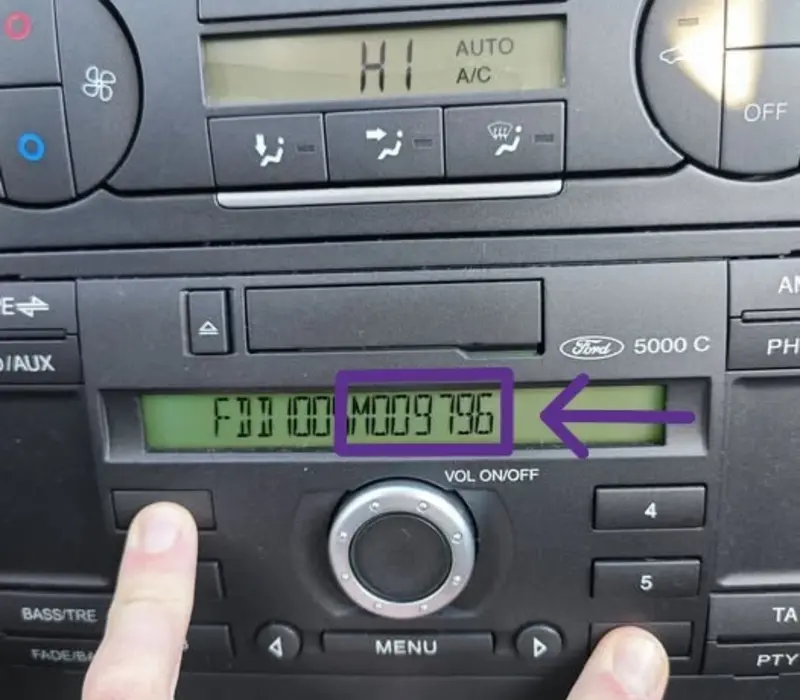
Method 1: Hold Buttons 1 & 6 (On-Screen)
- Turn on your Ford dashboard radio unit (works best on 6000 CD and Sony audio units).
- Press and hold buttons 1 and 6 simultaneously for a few seconds.
- The screen will display technical details, software versions, and build configurations.
- Look closely at the scrolling text near the end for a serial string starting with V or M followed by 6 digits (e.g., V123456 or M009796).
- Alternative shortcut: If the screen does not cycle through information, try holding buttons 2 and 6 instead.
Method 2: Check the Label (Stereo Removal)
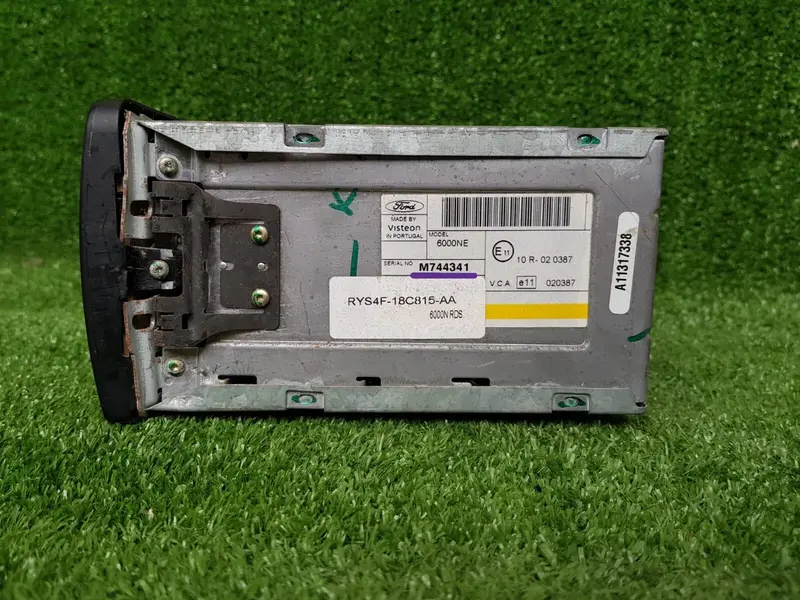
- If the button combination does not work or you have a TravelPilot or Blaupunkt unit, the radio must be removed.
- Insert 4 standard radio extraction keys into the release slots located on the corners of the radio unit.
- Apply slight outward pressure to release the clips and slide the head unit out from the center console.
- Locate the printed white label or the engraved serial stamped into the metal casing.
- The serial number is printed near the barcode (e.g., Serial No. V123456, M744341, or a Blaupunkt code like BP1234A1234567).
Serial Layout Formats by Model for C-Max, S-Max & Galaxy:
- V-Series & M-Series (6000 CD & Sony): The standard serial layout used across C-Max, S-Max, and Galaxy ranges. Appears as SERIAL NO. V123456 or M123456.
- Blaupunkt Systems: Stamped directly into the side of the metal chassis. Starts with BP, then 4 digits, 1 letter and 7 digits (e.g., BP1234A1234567).
- TravelPilot Navigation Systems: Premium factory navigation screens display a longer serial code starting with C7E3... followed by 13 alphanumeric characters.
How to Enter Your Ford Radio Code
Once you have generated your 4-digit PIN code, follow these simple instructions to enter it into your Ford C-Max, S-Max, or Galaxy sound system.
Does Your Screen Say "WAIT 30", "LOCKED 10", or "LOCKED 13"?
If wrong codes were entered previously, the radio locks temporarily. Leave the radio turned ON continuously for 30–60 minutes to clear the timer back to the entry prompt. Do not attempt random codes if it displays LOCKED 10, as 13 wrong attempts permanently locks the stereo.
Ford C-Max, S-Max & Galaxy Radio Code FAQ
Everything you need to know about retrieving and entering your security code.
How can I get my Ford C-Max, S-Max or Galaxy radio code for free?
How do I get the radio serial number using buttons 1 & 6?
V019283). If nothing happens, try holding buttons 2 and 6.Why does my Ford stereo display "WAIT" or "LOCKED"?
CODE - - - -.