
Instant codes for Clio, Megane, Scenic, and Laguna.
Unlock Renault Tuner List & Update List Radio Code Online
Lost your Renault radio PIN after a battery change? Whether your car is equipped with the classic Philips Tuner List or the newer VDO Update List head unit, we can help you retrieve your original 4-digit activation code in minutes. No need to visit a dealership or pay expensive fees—our automated system generates Renault codes based on your radio's unique security pre-code.
Renault Tuner List & Update List Radio Code
Enter the 4-character precode (e.g. A105)
Happy? Help us with a review! 😄
REVIEW US ON TRUSTPILOT ★★★★★
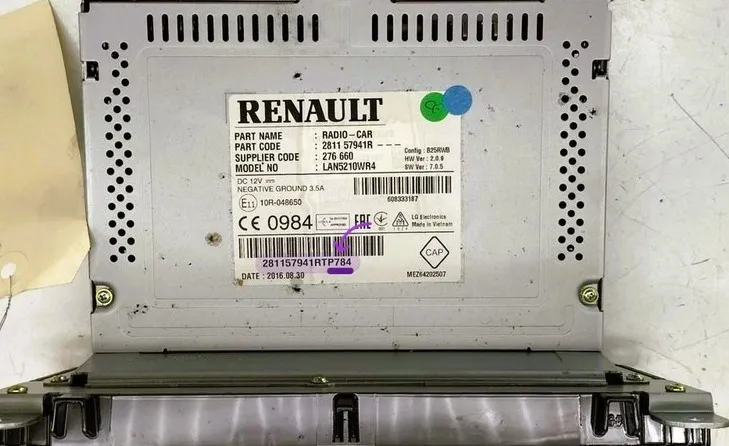
How to Find the Security Pre-code (Sticker Method)
For Tuner List and Update List units where digital shortcuts don't work, follow these steps to locate your 4-character code on the radio's physical label.
Extract the Radio: Use standard U-shape removal keys 🛒 to safely pull the unit out of the dashboard without damaging the trim.
Locate the Label: Once the unit is out, find the white barcode sticker located on the right side or at the back of the metal casing.
Identify Pre-code: Look for the string ending in 1 letter and 3 digits (e.g., Z123). It is usually found next to the word 'SECURITY'.
Compatible Renault Models (Tuner List & Update List)
* Works for all VDO / Renault models with a separate or built-in display produced between 2000 and 2012.
How to Enter Your Renault Radio Code
Follow these exact steps to unlock your Tuner List or Update List head unit.
Using Dashboard Buttons
Standard for Renault Tuner List radios with numbered buttons 1-6.
Press Button 1 repeatedly until the first digit of your code is correct.
Press Button 2 repeatedly for the second digit.
Press Button 3 repeatedly for the third digit.
Press Button 4 repeatedly for the fourth digit.
TO VALIDATE: Press and hold Button 6 for 5-10 seconds until the radio beeps and starts.
Steering Wheel Controls
Common for Renault Update List units using the stalk behind the wheel.
Rotate the Thumbwheel (scroll wheel) to select the first digit.
Press the Bottom Button on the stalk to confirm and move to the next digit.
Repeat this for all 4 digits of your Renault security code.
TO VALIDATE: Press and hold the Bottom Button (or the 'Mute' button depending on model) until the music starts.
Renault Tuner List & Update List
How to find the Renault radio pre-code without removing the unit?
For most Tuner List and Update List models, you can display the pre-code on the screen by pressing and holding buttons 1 and 6 simultaneously. The code (one letter and three digits) will appear after a few seconds.
What is the difference between Tuner List and Update List?
Tuner List was used on older Renault models (approx. 2000-2005) and does not support MP3. Update List is the newer version, often found in face-lifted models, and usually has the “Update List” logo printed on the bottom right of the faceplate. Both use the same 4-digit security system.
My radio is stuck on "ERROR" or "WAIT" – how to reset?
This happens after entering an incorrect <strong>Renault radio code</strong>. To reset it, you must leave the radio turned ON (with the ignition on) for 30 to 60 minutes. The display will eventually return to “0000”.
Can I get my Renault radio code for free?
While some online calculators exist, many are outdated or contain malware. Our professional Renault radio code generator provides 100% accurate, official codes instantly based on your serial number (Pre-code).
Which Renault models are supported?
Our decoding service covers the entire range, including Clio, Megane, Scenic, Laguna, Kangoo, Master, and Trafic equipped with Philips, VDO, or Continental head units.
Radiocodeauto.com is a leading provider of secure radio activation codes for all major car brands. Whether you lost your code or changed your battery, we provide automated radio decoding solutions with 24/7 support and instant email delivery.
Get your car radio unlock code by serial number. Fast, reliable, and 100% guaranteed to work.
Pages
Copyright © 2026 Radiocodeauto.com. All Rights Reserved.