Dacia • Instant with serial number • VIN by email
Dacia Radio Code Generator Online
Instant Unlock Codes by VIN or Serial Number
Battery changed and now your radio is locked? Enter your Dacia radio serial number or VIN below to get your original 4-digit PIN code: instantly with the serial number, by email with the VIN.
Dacia Radio Code – by Serial Number
Enter your radio's serial number – get the code instantly.
Leave a review on Trustpilot
Dacia Radio Code – by VIN
No need to remove the radio — your code comes by email.
⚠️ VF6 = Renault Trucks
A truck VIN won't give you the radio code. You need the 16-character serial from the barcode on the radio's label. It starts with 89F, e.g. 89FKCZB210355188.
Usually a few hours.
How do I find my VIN?
How to Find Your Dacia Radio Code
If your Dacia radio is displaying "CODE" or "0000" after a battery change, you’ll need a 4-digit PIN to reactivate it. To use our Dacia radio code generator, you first need to identify your unit's specific identification numbers. Follow the two methods below to retrieve the data required to unlock your radio.
Method 1: Using the Radio Serial Number (The "Precode")
This is the most reliable method for all Dacia models, including the Duster, Sandero, Logan, and Lodgy. Every Dacia radio has a "Security Code" or "Precode" printed on a sticker.
- Remove the radio: Use radio removal tools (or four thin nails) to gently pull the unit out. You don’t need to disconnect the wires.
- Locate the sticker: Look for a label on the top, side, or back of the metal casing.
- Identify the Precode: Look for a code starting with a letter followed by 3 digits (e.g., V123). It’s often at the end of a long barcode or labeled as "Security."
Tip: Using a Dacia radio code generator by serial number is the fastest way to get your code instantly without visiting a dealership.
Supports: Blaupunkt, LG, Daewoo, and Continental

Example: The 'Precode' is usually found on the side or back sticker.
Method 2: Using the Vehicle Identification Number (VIN)
If you cannot remove the radio, we can retrieve your Dacia radio unlock code online using your vehicle’s VIN. This works specifically for original, factory-installed units.
- Windshield: Look at the bottom corner of the driver’s side windshield.
- Door Pillar: Check the sticker on the driver’s side door frame.
- Registration Documents: The VIN is always listed on your vehicle's logbook (V5C) or insurance papers.
- What it looks like: A unique 17-character string. For Dacia, it typically starts with UU1 or VF1.
Once you have this number, our Dacia radio code by VIN service sends your original PIN to your email.
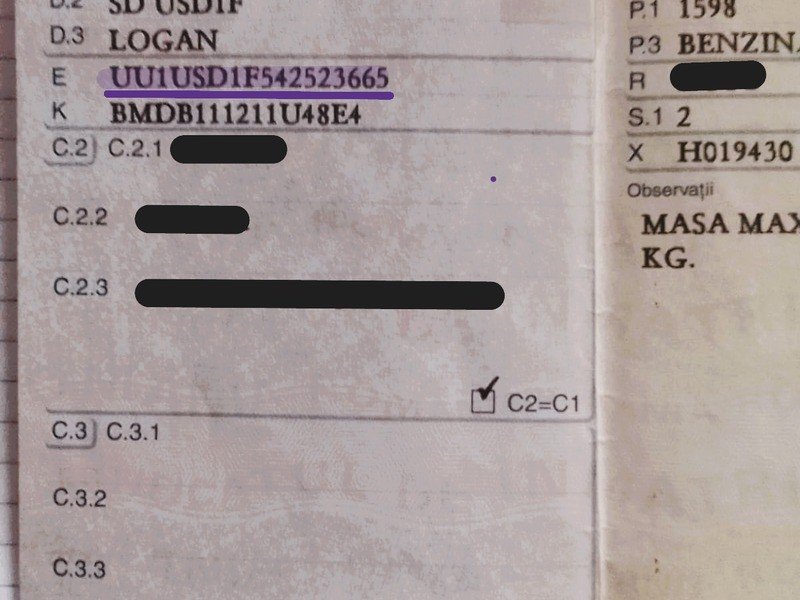
Find your 17-character Dacia VIN on the dashboard or registration docs.
Supported Models & Units
Our Dacia radio code generator works with all factory-installed audio and navigation systems. Whether you have a classic CD player or a modern touchscreen interface, we can recover your PIN.
Supported Radio Units
- MediaNav 1.x / Evolution / Linux (Touchscreen Navigation)
- Daewoo AGC-1220RF / AGC-0060RF (2DIN Bluetooth Radios)
- Continental / Humax Units (Standard 1DIN & 2DIN Players)
- Dacia Tuner List & Update List (Classic Logan 1 & Sandero 1)
Radio Brands
Unlock codes for units made by the car audio brands found across Dacia generations:
Supported Dacia Models
How to Enter Your Dacia Radio Code: A Step-by-Step Guide
Once you have recovered your 4-digit PIN using our Dacia radio code generator, you must input it correctly to unlock the unit. Depending on your model (Duster, Logan, Sandero, or Lodgy), follow the specific method for your dashboard system.
For Standard Radios (Physical Buttons)
This method is for classic Dacia units (Blaupunkt, LG, or Daewoo) that have a small monochrome screen and numbered buttons (1 to 6).
- Turn on the ignition: The radio should display "0000" or "CODE".
- Input the first digit: Press Button 1 repeatedly until the first digit of your PIN appears.
- Input the second digit: Press Button 2 repeatedly for the second digit.
- Input the third digit: Press Button 3 repeatedly for the third digit.
- Input the fourth digit: Press Button 4 repeatedly for the fourth digit.
- Confirm the code: Once the screen shows your correct 4-digit PIN, press and hold Button 6 for a few seconds until you hear a confirmation beep.
For MediaNav Touchscreen Systems
This applies to 2012–2026 Dacia models equipped with the large touchscreen navigation (MediaNav, MediaNav Evolution, or Media Display).
- Power on the unit: The screen will display the message "Enter Authentication Key".
- Use the digital keypad: A numeric keypad will appear on the screen. Tap the 4 digits of your Dacia radio unlock code.
- Validate: After typing the last digit, tap the "OK" or "Done" button on the touchscreen.
- Instant Access: The system will immediately unlock and return to the home screen or radio station.
Troubleshooting: Why is my Dacia Radio Code not working?
If you followed the steps above and the radio is still locked, check these common issues:
This happens if the wrong code was entered multiple times. You must leave the radio turned ON for the duration of the countdown (usually 30–60 minutes). Do not turn off the engine or the radio, or the timer will reset.
Double-check your Dacia radio precode. Ensure you didn't mistake a "5" for an "S" or an "0" for an "O" on the sticker.
If the radio was swapped from another car, the Dacia VIN method might not work. In this case, always use the Radio Serial Number found on the casing sticker.
Need a visual guide?
Watch our step-by-step video on how to find and enter your Dacia radio code.
Dacia Radio Code List: Common Precode Examples
Searching for a specific Dacia radio PIN? Below is a partial list of radio serial numbers (Precodes) and their corresponding unlock codes. This Dacia radio code list helps you verify the format of your security data.
| Radio Precode (Serial) | Unlock PIN (Code) | Status |
|---|---|---|
| A100 | 0070 | Verified |
| A101 | 0041 | Verified |
| A102 | 0012 | Verified |
| A103 | 0082 | Verified |
| A104 | 0053 | Verified |
| A105 | 0024 | Verified |
| A106 | 0094 | Verified |
| A107 | 0065 | Verified |
| A108 | 0036 | Verified |
| A109 | 0007 | Verified |
| A110 | 0077 | Verified |
| A111 | 0048 | Verified |
| A112 | 0019 | Verified |
| A113 | 0089 | Verified |
| A114 | 0050 | Verified |
| A115 | 0021 | Verified |
| A116 | 0091 | Verified |
| A117 | 0062 | Verified |
| A118 | 0033 | Verified |
| A119 | 0004 | Verified |
Don't see your code in the list?
The table above shows only a fraction of the possible Dacia security codes. There are over 10,000 possible combinations for Dacia and Renault audio units (Blaupunkt, LG, Daewoo, Continental). If your precode starts with any letter from A to Z followed by 3 digits, our generator can retrieve it instantly.
Common Issues: Fixing Dacia Radio Errors
Sometimes, getting your Dacia radio code is only half the battle. If your screen is frozen or showing a countdown, here is how to fix the most common MediaNav and radio problems.
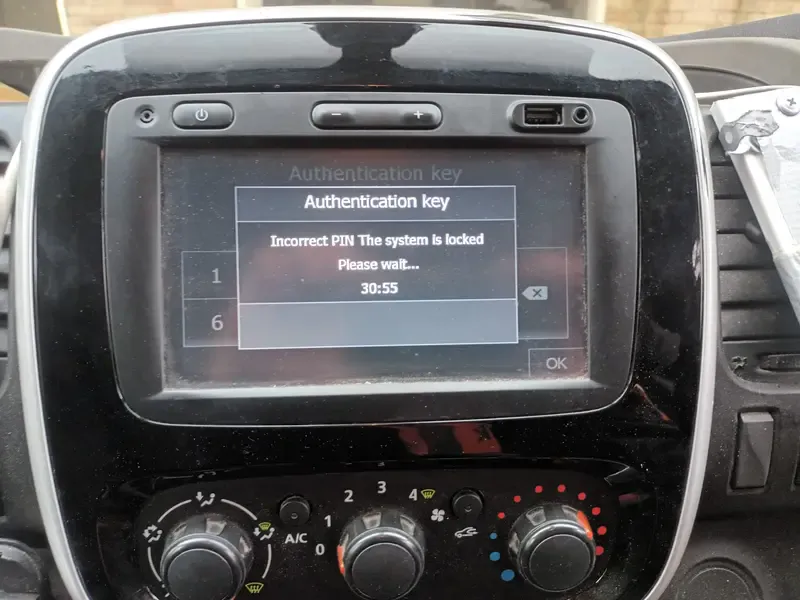
"Please Wait 30 Minutes" (or more)
If your Dacia MediaNav displays a countdown like "Please wait 30 min", it means the wrong PIN was entered too many times.
- The Fix: You must leave the radio and the ignition turned ON.
- Crucial: Do not turn off the engine or the unit, or the timer will reset to the beginning.
- Wait Time: The more wrong attempts you make, the longer the wait (up to several hours).
Radio showing "0000" but won't let me type
This usually happens if the system is still processing a previous attempt. Try pressing and holding the Power button for 10 seconds to force a reboot of the MediaNav system.
"Unit Locked" - Permanent Lock
After 10-12 incorrect attempts, some Dacia radios may lock permanently. If your screen says "Locked" and no timer appears, you might need a specialist to reset the EEPROM chip manually.
Serial Number not found?
If our Dacia radio code generator doesn't recognize your serial, ensure you are reading the Precode correctly (last 4 characters of the barcode, e.g., V123).
Faq