
RadioCodeAuto

Scenic Specialist Instant PIN 100% Guaranteed

Renault Scenic Radio Unlock Code:
Online Recovery by VIN or Serial.

Lost your Renault Scenic radio code after a battery disconnect? Our automated system allows you to enter your pre-code or 17-digit VIN to retrieve your unique 4-digit PIN instantly. Get back to your music in seconds without a trip to the dealership.

Scenic Radio Code Generator

Enter the 4-character precode (e.g. A105)

How to Find Your Renault Scenic Radio Code

If your Renault Scenic infotainment system is stuck on the "CODE" or "0000" screen after a battery change, you'll need a 4-digit security PIN to unlock it. To use our Renault radio code generator, follow the two simple methods below to retrieve your unit's identification data.

Supporting all Scenic generations. If your radio unit looks different or you have another model, check our main Renault Radio Code page.

Method 1: Using the Radio Pre-Code (Serial Number)
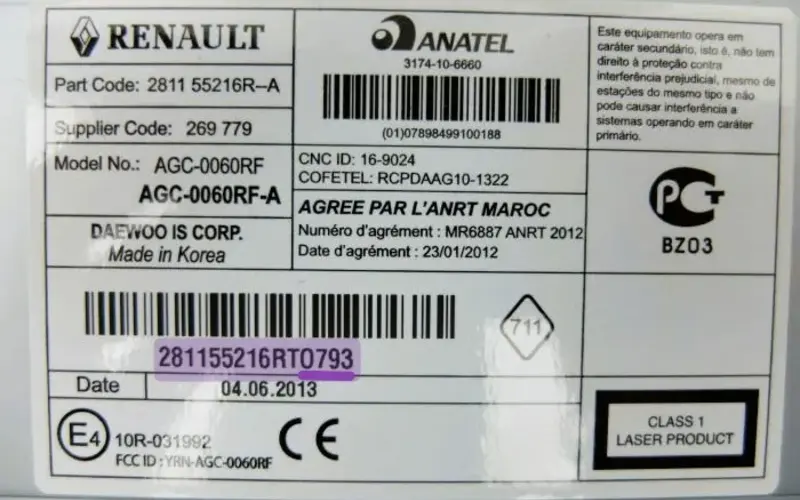
Renault Scenic radio serial number sticker showing pre-code security

The 'Pre-code' is a letter and three digits (e.g., V105) found on the label.

This is the fastest method for classic Renault Scenic models. Every factory radio has a security label on its casing that contains the Pre-Code.

  • Shortcut (No removal): Turn on the radio and press buttons 1 and 6 simultaneously for 3 seconds. The pre-code should appear on the screen.
  • Physical Check: If the shortcut doesn't work, use removal tools to pull the radio out.
  • Locate the Pre-Code: Look for a 4-character code labeled as "SECURITY" or found at the end of the long barcode (e.g., O793).

SEO Tip: A Renault Scenic radio code generator works instantly if you have this 4-digit Pre-Code.

Example: 281156708RT O793-SECURITY
Get Code by Serial

Supports: Update List, Tuner List, and Cabasse systems

NEW FEATURE

Method 2: Using the Vehicle Identification Number (VIN)
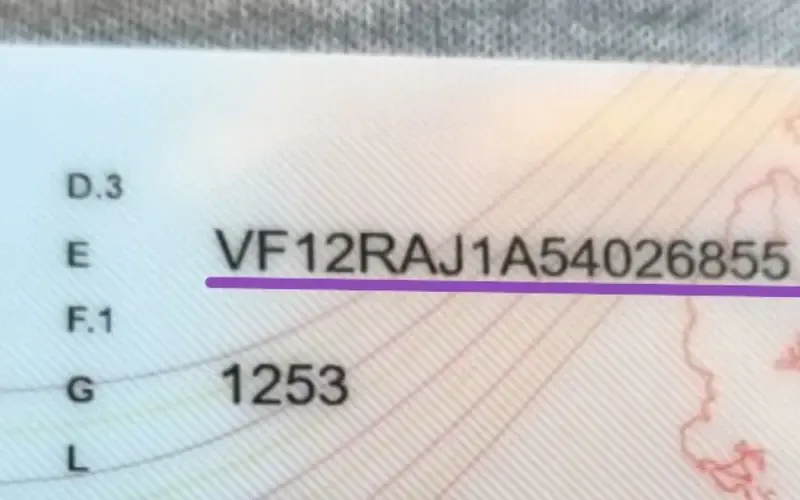
Renault Scenic VIN location on the windshield

Find your 17-digit Renault VIN on the dashboard or car documents.

If you have a Renault Scenic MediaNav (touchscreen) or simply cannot remove the unit, we can retrieve your code using the vehicle's VIN. This method works for all factory-installed systems.

  • Windshield: Check the lower corner of the driver's side windshield.
  • Door Pillar: Look for the manufacturer's plate on the right-side door frame.
  • Registration: Your VIN is listed on your vehicle's logbook (V5C), insurance, or service history.
  • The Format: It is a 17-digit string that starts with VF1.

Our Renault Scenic radio code by VIN service connects to the factory database to find your original PIN without any manual labor.

Example VIN: VF12RAJ1AXXXXXXXXX
Get Code by VIN Online

Recommended for: MediaNav, R-Link & Touchscreens

By VIN

How to Enter Your Renault Scenic Radio Code

Once you have retrieved your 4-digit PIN, follow these steps to input it correctly. Depending on your Scenic's year and trim level, you will use either the radio preset buttons or the steering wheel stalks.

Option A

Using Steering Wheel Stalks

This is the most common method for Scenic II and III. It's fast and prevents wear on the radio buttons.

  • Select Digits: Use the thumbwheel (rotary dial) on the back of the stalk to change the flashing digit.
  • Confirm Digit: Press the bottom button (or the "OK" button on the stalk) to move to the next position.
  • Final Validation: Once all 4 digits are correct (e.g., 1-2-3-4), press and hold the bottom button for 5-10 seconds until you hear a confirmation beep.
Option B

Using Radio Preset Buttons

Ideal for "Update List" or "Tuner List" units where the steering stalk might be unresponsive.

  • Button 1: Press repeatedly until the 1st digit is correct.
  • Button 2: Press repeatedly until the 2nd digit is correct.
  • Button 3: Press repeatedly until the 3rd digit is correct.
  • Button 4: Press repeatedly until the 4th digit is correct.
  • Activation: Press and hold Button 6 (or Button 5 on some models) for 5 seconds to unlock the system.
⚠️
Locked on "ERROR" or "WAIT"? If you entered the wrong code, the radio will lock itself. This process typically takes at least 30 minutes to reset. You must leave the ignition ON and the radio powered during this entire time. Do not turn off the car, or the timer will restart from zero.

Common Renault Scenic Radio Issues

Sometimes, retrieving or entering the code isn't the only challenge. Here are the most frequent problems Renault Scenic owners and how to solve them.

1. Display Stuck on "WAIT" or "ERROR"

This happens after multiple failed attempts. The system enters a security lockout mode to prevent theft attempts.

  • The Fix: Leave the ignition ON (contactul pus) and the radio powered for exactly 30 to 60 minutes.
  • Crucial: Do not turn off the engine or the radio, as the internal timer will reset to zero.
  • Once the timer expires, the "0000" or "CODE" prompt will reappear automatically.

2. Buttons 1 & 6 Don't Show the Code

On some Scenic models (especially newer ones or Cabasse Auditorium systems), the 1+6 shortcut is disabled.

  • The Fix: You must physically remove the radio using ISO release keys.
  • Check the side or back of the unit for a sticker with a 15-digit serial number or a 4-character Security Code (e.g., Q123).
  • If the label is missing, use our VIN retrieval service mentioned in the first section.

3. Radio Shows "CAN CHECK" Message

This is a communication error between the radio and the car's computer (ECU), often seen after a deep battery drain.

  • Check Wiring: Ensure the connectors at the back of the radio are firmly plugged in.
  • Reset: Disconnect the negative battery terminal for 10 minutes, then reconnect and try the code again.
  • Compatibility: If you replaced the radio with one from another Scenic, it may need "pairing" via a diagnostic tool (OBD2).
FAQ

Renault Scenic Radio Code: Common Questions

1. How do I find my Renault Scenic radio Pre-code?

The fastest way is to hold buttons 1 and 6 on your radio for a few seconds until the Pre-code (one letter and three digits) appears on the display. If this shortcut doesn’t work, you must remove the radio using ISO keys to find the “Security” code on the manufacturer’s sticker.

This lockout occurs after entering the wrong code multiple times. To reset it, leave the ignition and radio turned ON for at least 30 to 60 minutes without interruption. Once the timer expires, the “0000” or “CODE” prompt will automatically return.

Yes, if you cannot remove the unit, your 17-digit VIN can be used to retrieve the original factory PIN. This method is the best option for MediaNav touchscreens or R-Link systems where physical serial numbers are harder to access.

Use the thumbwheel on the back of the steering stalk to cycle through digits. Press the bottom button to confirm each number and move to the next. Once the full code is entered, press and hold the bottom button for 5 seconds until you hear a confirmation beep.

Renault Scenic units feature an anti-theft system that triggers whenever power is disconnected. A battery change or a blown fuse resets the unit, requiring you to enter the unique 4-digit security PIN to reactivate the audio system.