
RadioCodeAuto

MASTER EXPERT • 2026 DATABASE • INSTANT UNLOCK

Renault Master Radio Code Generator.

Generate your radio code for Master II Anatel, Master III Visteon RO13 and MediaNav systems. Enter your security pre-code below for an instant factory PIN.

Unlock Radio Now

Enter the 4-character pre-code found on your label

OFFICIAL TECHNICAL GUIDE

Renault Master By Serial Or VIN

If your Renault Master audio system is asking for a code after a battery change or repair, you have two professional recovery options. Whether you have a Master II, III, or IV, this guide covers every technical detail for a 100% success rate.

FASTEST • INSTANT

Identify via Security Pre-code
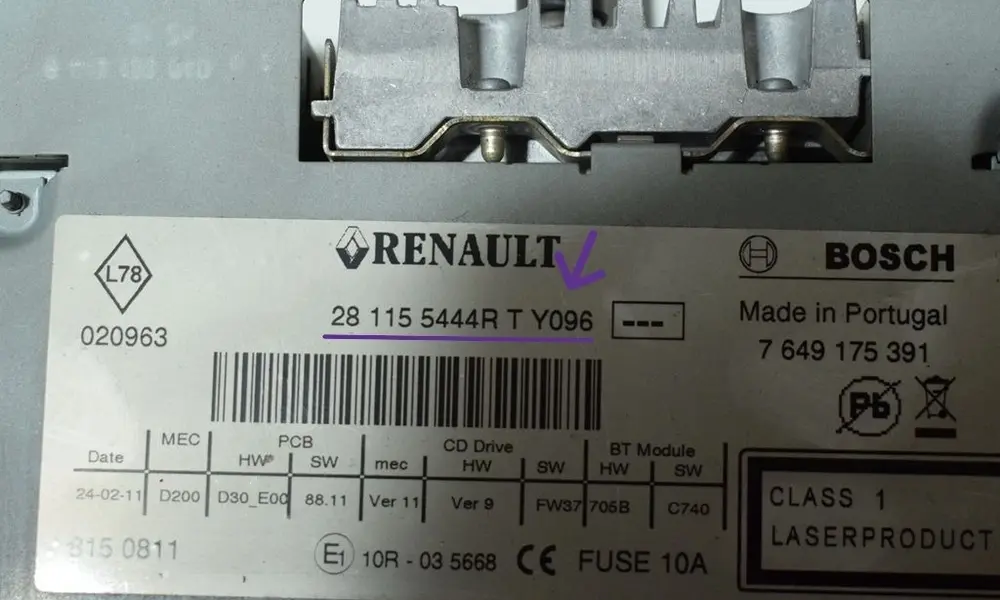
Renault Master radio label showing security pre-code
Radio Label Location
Technical Identification:

The pre-code is the 4-character string (1 letter & 3 digits) required for instant unlocking.

Master 3 (Visteon): Part: 281113253R Y096
Master 2 (Anatel): SECURITY Y096
Barcode End: 281150038RT Y096
How to get it without removal:
  • Turn on the radio (Display shows "0000" or "CODE").
  • Hold buttons 1 and 6 for 3-5 seconds.
  • The Pre-code will appear on the display (e.g., Y096).
  • Note: On Visteon RO13 units, if 1+6 fails, the label on the back is the only source.
Generate Instant Code ↑
PREMIUM • 30-60 MIN WAIT

Identify via VIN (Chassis)
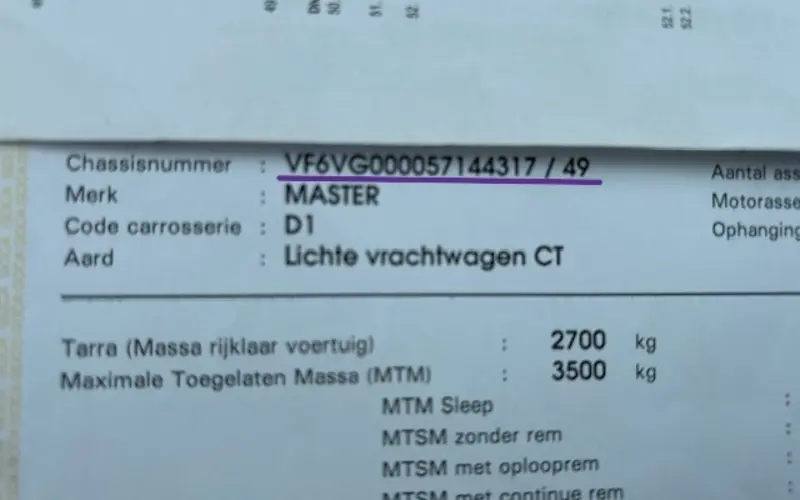
Renault Master VIN location on official V5C registration
Chassis Number Location
VIN Formats (17 Characters):

Essential for R-Link and MediaNav touchscreen units where the pre-code is not visible.

Master II: VF1ED4SH... (Anatel)
Master III: VF1VB000... (Visteon)
Master IV: VF1MA000... (New Gen)
Where to find the VIN:
  • Passenger Door Step: Stamped directly into the metal frame under the floor mat.
  • Registration Document: Check your V5C (UK) or Carte Grise (FR).
  • Windshield: Lower-left corner of the front glass, visible from the outside.
Unlock by VIN Number →

Supported Renault Master Models & Audio Systems

GenerationYearsStandard Audio UnitsNavigation / Multimedia
Master II1998 - 2010Tuner List, Update List, AnatelCarminat Navigation
Master III2010 - 2019Visteon RO13, Classic CD/USBMediaNav, R-Link Evolution
Master IV2019 - 2026DAB+ Digital Radio, ContinentalOpenR Link, Easy Link
Supported Manufacturers: VisteonAnatelPhilipsBoschContinentalLGHumax
By VIN

How to Enter Renault Master Radio Code

After generating your 4-digit PIN, you must input it correctly into the unit to restore audio. The Renault Master radio code entry procedure differs slightly depending on whether you have a Master II Tuner List or a newer Master III Radiosat/Bluetooth system.

Option 1: Using Radio Buttons (1-6)

Standard for 1-DIN units found in Renault Master 2 (1998-2010) and basic Master 3 vans.

1

Press Button 1 repeatedly until the first digit of your Master code is displayed.

2

Press Button 2 repeatedly for the second digit of your van's radio PIN.

3

Press Button 3 for the third digit and Button 4 for the final digit.

To validate the code, press and hold Button 6 for 5-10 seconds until you hear a beep.

Option 2: Steering Wheel Stalk (Satellite)

The most common method for Master III and high-spec systems with Bluetooth.

1

Use the thumbwheel (scroll wheel) on the back of the stalk to cycle through numbers 0-9.

2

Press the bottom button (or 'source') to confirm the digit and move to the next slot.

3

Repeat the process for all four digits of your Renault authentication key.

To confirm the complete code, press and hold the bottom button until the radio activates.

Is your screen showing "CODE" or "WAIT"?

If you entered the wrong PIN, Renault Master systems trigger a security lockout. The word "WAIT" means you must leave the radio switched ON. The lockout generally lasts between 30 to 60 minutes. Do not disconnect the battery during this time, or the timer will reset to the beginning.