
Dacia Logan Radio Code Generator
Recover your lost Dacia Logan radio code in seconds. Enter your unit's 4-character security precode or serial number below to instantly generate the official factory unlock PIN for any MediaNav touchscreen, Daewoo, or Blaupunkt stereo across all Logan 1, 2, and MCV models.
Logan Radio Unlock
Enter the 4-digit security precode (e.g., V762 or A105)
How to Find Your Dacia Logan Radio PIN Code
If your Dacia Logan media deck, classic Daewoo player, or touchscreen LG MediaNav system is locked displaying "CODE" or a countdown timer after a battery replacement, You can instantly bypass the lockout using our Dacia Logan radio code generator. First, pick one of the two official tracking methods below to identify your stereo's original factory profile.
Method 1: Find the Logan Radio Code by VIN
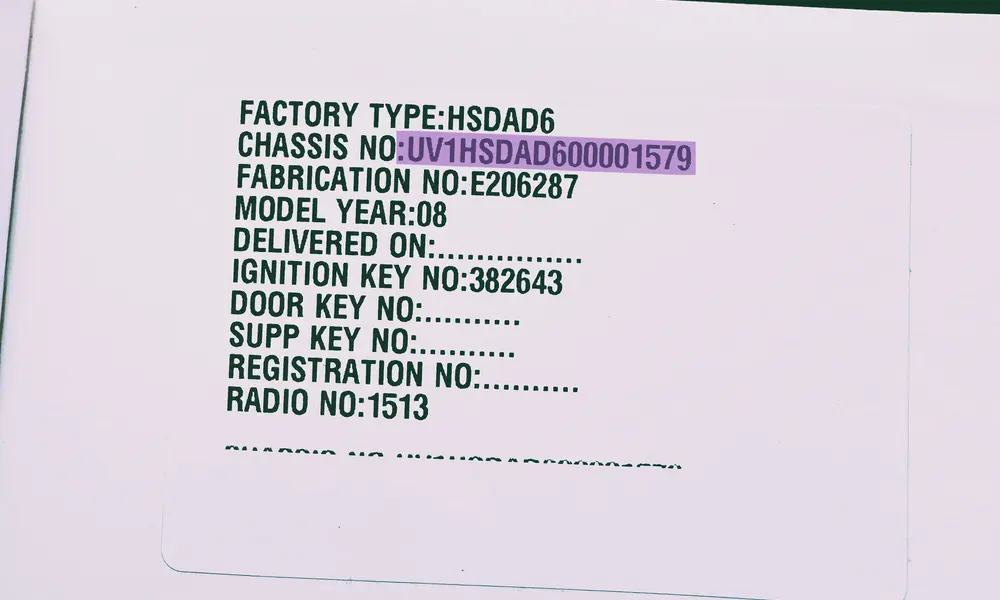
Example: The 17-digit vehicle identification number printed on your official registration papers or logbook.
The simplest path to generate your original radio code without pulling apart your dashboard trim is utilizing the 17-character Vehicle Identification Number (VIN). This layout works across all Logan 1, Logan 2, and MCV models, provided the radio is the native unit mounted during vehicle assembly.
- Passenger Side B-Pillar: Open the front passenger door and look at the lower frame pillar. You'll find a black or silver structured sticker containing the technical data.
- Windshield Lower Margin: Look from the outside through the lower corner of the front windscreen on the driver's side.
- Vehicle Registration Papers: Check your official registration certificate, insurance invoice, or physical logbook where the identity code is listed.
- Prefix Validation: For any Dacia Logan chassis, the sequence invariably starts with the international manufacturer prefixes UU1 or VF1.
Perfect for: Factory Touchscreen Media Nav, Media Display & Logan MCV
Method 2: Find the 4-Digit Security Pre-Code
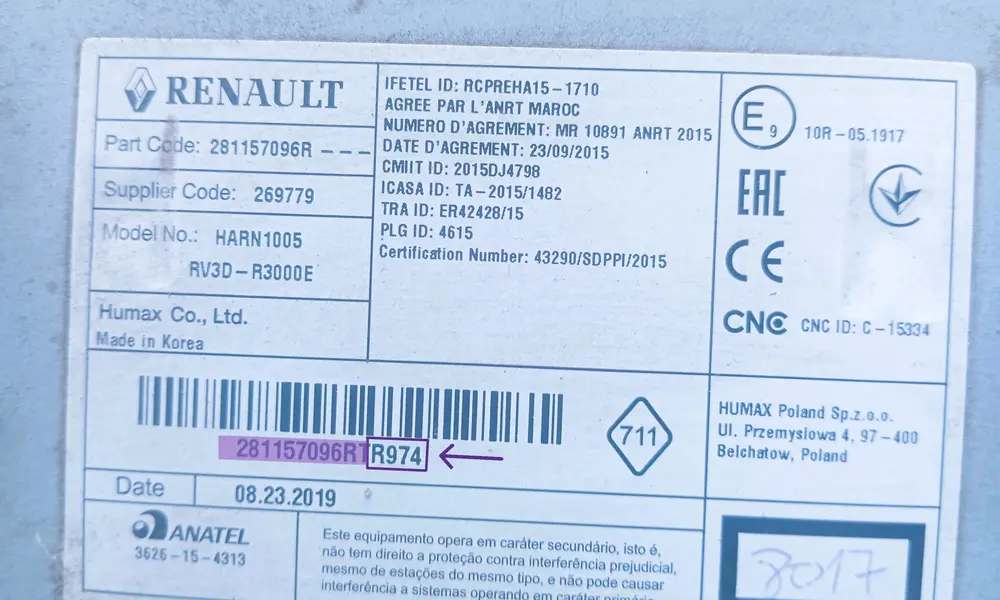
Example: The barcode label on the metal casing containing the security identifier.
If the chassis identification method isn't available, you can uncover the authentication data directly from the stereo unit's enclosure. Once you note this parameter, you can type it straight into our live online generator to see your security PIN instantly.
- Remove the Control Faceplate: Gently pop off the plastic dashboard console surrounding the media slot using a non-marring tool. Undo the retaining screws holding the deck structure.
- Extract the Audio Unit: Slide the radio module forward out of its rail enclosure. You don't need to detach any rear wiring configurations.
- Find the Precode Key: Scan the label stuck on the sheet metal. Look for a code made of one letter followed by three numbers (e.g., V762, A105). It lives under the main barcode index or near the "SECURITY" text segment.
Logan Tech Tip: On early Blaupunkt, Daewoo AGC-1220RF, or Continental audio housings, the required pre-code is simply the last four digits of the extended factory serial number string.
Supports: Logan Phase 1 Blaupunkt CD, Phase 2 MediaNav Evolution, Daewoo 2-DIN
How to Enter the Radio Code on a Dacia Logan
Once you have retrieved your 4-digit authentication PIN, you need to input it correctly into your dashboard system. Depending on your Dacia Logan generation (Phase 1, Phase 2, or MCV), you will either use the physical stereo buttons or the touchscreen interface. Follow the official breakdown steps below to unlock your media deck safely.
Standard CD Players & Daewoo Radios
Fits: Logan Phase 1 (2004-2012) & Phase 2 Standard Facelift Decks
Classic factory head units do not have a direct confirmation button. Instead, you must use the preset station keys 1 through 4 to cycle through the digits, and button 6 to validate the entry:
- First Digit: Press button 1 repeatedly until the correct first number of your security code appears on the display panel.
- Second Digit: Press button 2 repeatedly to cycle to your second code digit.
- Third Digit: Press button 3 sequentially to input the third character.
- Fourth Digit: Press button 4 repeatedly until the final number is set.
- Validation: Once the screen displays your complete 4-digit code (e.g., 5312), press and hold button 6 (or the central dial button on some Blaupunkt variants) for 3 to 5 seconds. A continuous confirmation beep will sound, and your tuner functions will activate.
LG MediaNav Touchscreen Systems
Fits: Dacia Logan 2, Logan 3 & Logan MCV Evolution Displays
Modern infotainment system dashboards streamline the authorization sequence through an interactive on-screen virtual matrix layout:
- Turn your ignition key to the accessory position to power up the screen.
- The system will automatically initialize and display the warning message: "Authentication required. Please enter security code."
- Tap the digits directly on the digital keypad overlay. If you make a typo mistake, use the backspace symbol on the lower layout to delete.
- Double-check that the code perfectly matches your generated credentials.
- Tap the green "OK" or "Accept" soft-key on the screen. The device will immediately load the main homepage interface.
Dacia Logan "CODE ERROR" System Cooldown Penalty
If you enter an incorrect combination sequence, the stereo will display "ERROR" or "WAIT" and freeze completely. Every consecutive false attempt exponentially increases the active cooling system penalty timer. The sequence starts at a 1-minute delay, moving to 2, 4, 8, 16, 32 minutes, up to a maximum 24-hour lock. To reset this countdown frame, you must leave the ignition turned ON and the radio powered up. Do not disconnect the battery terminal during a freeze penalty, as this resets the internal clock and loops the waiting tier.
Still having trouble?
Our automated system handles 99% of Dacia Logan radio code requests instantly. If your unit presents a unique hardware error or the authentication key is rejected, our specialists are ready to assist.