
Dacia Dokker Radio Code Generator:
Unlock Your CD Player or Bluetooth Stereo.
Radio displaying "CODE" after a battery replacement? Use our fast Dacia Dokker radio code generator to unlock your system. It works perfectly for the classic Radio CD and the Dacia Plug & Radio Bluetooth stereo—Enter your 4-character pre-code to get your PIN online.
Dokker Code Calculator
Enter the 4-character precode (e.g. A123)
How to Get Your Dacia Dokker Radio Code
If your Dacia Dokker Radio CD or Plug & Radio Bluetooth stereo displays a "CODE" prompt after a battery change, you need a 4-digit PIN to restore functions. You can retrieve this code using either your vehicle's VIN or the radio's hardware serial number.
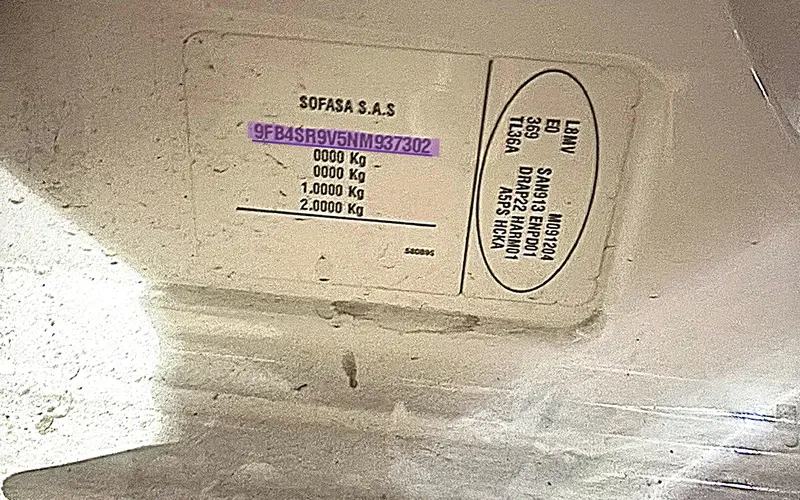
Using the Vehicle Identification Number (VIN) is the most convenient choice for factory-installed systems. This method cross-references official manufacturer database records to retrieve the exact 4-digit security PIN assigned to your vehicle during assembly, completely bypassing the need for manual work.
- Zero tools required: You do not need to remove the stereo or handle any internal dashboard wiring.
- Preserves interior trim: Eliminates the risk of scratching plastic panels or breaking delicate dashboard clips.
- Official build history match: Directly queries factory records using the unique car chassis number.
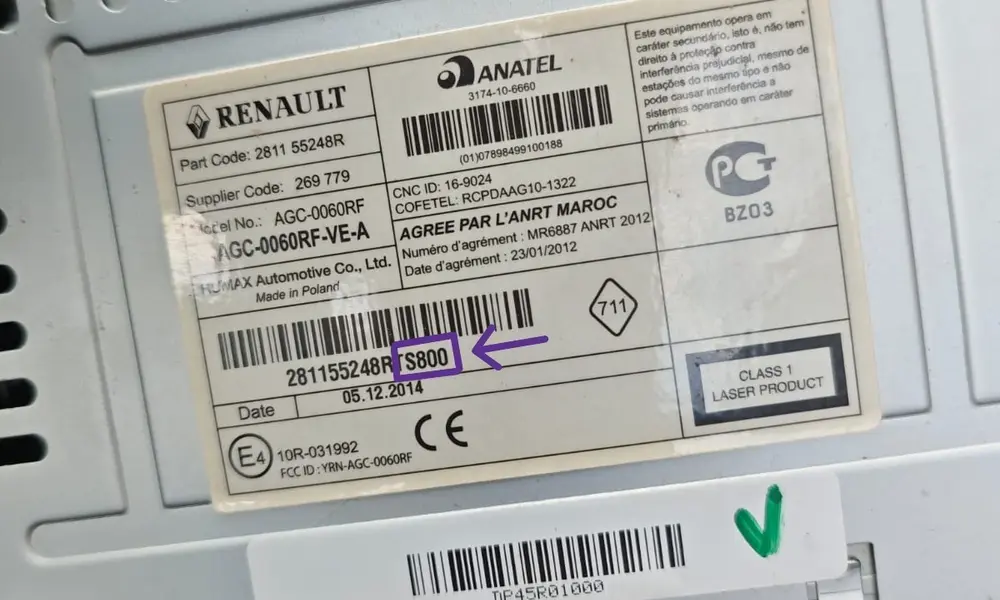
The serial number method is the most accurate approach. While you must pull the unit from the dashboard, it is the fastest option because our tool calculates and outputs the code on this page immediately.
- 100% Reliable: Decodes the physical hardware directly, working even if the stereo was swapped.
- Instant Result: The generator processes the pre-code and delivers your PIN in seconds.
- To prevent dashboard scratches, you can purchase these optional radio removal keys on eBay.
How to Enter Dacia Dokker Radio Code
Once you have successfully retrieved your 4-digit security PIN, you must input it correctly into your stereo unit to restore audio functionality. This guide applies directly to the factory-installed button-operated Dacia Radio CD and Plug & Radio Bluetooth stereo systems. Follow the specific button input sequence below.
Dacia Radio CD & Bluetooth Input Steps
- Turn on the vehicle ignition and switch on your Dacia stereo unit.
- The display screen should prompt with 0000 or CODE.
- Press Button 1 repeatedly until the first digit of your security PIN appears.
- Press Button 2 repeatedly to set the second digit.
- Press Button 3 repeatedly to set the third digit.
- Press Button 4 repeatedly to set the fourth digit.
- To confirm and activate, press and hold Button 6 (or Button 5 on alternative radio faceplates) for 3 to 5 seconds until you hear an audible confirmation beep.
Be extremely careful when entering your security code! If you enter an incorrect PIN, your Dacia Dokker stereo will display "ERROR" or "CODE LOCK" and temporarily freeze. To prevent theft attempts, the system uses an exponential lockout delay. The first wrong attempt locks the radio for 1 minute, the second for 2 minutes, and it doubles with every subsequent failure (up to 32 or 64 minutes). During this lockout period, you must leave the radio turned ON and wait for the countdown timer to hit 00:00 before making another attempt.
Frequently Asked Questions
Everything you need to know about unlocking your Dacia Dokker radio system and retrieving your security PIN code.
You can find your Dacia radio code for free by checking your original vehicle warranty booklet or vehicle delivery documents, where it is often noted as "C.A.R." (Code Auto Radio). Alternatively, some official dealerships may provide the code free of charge if you present physical proof of vehicle ownership.
The 4-character pre-code (consisting of one letter and three numbers, e.g., V284) is printed on the barcode sticker label located on the physical casing of the radio unit. To view it, you must temporarily slide the unit out of the dashboard using standard radio release keys.
This status indicates that an incorrect 4-digit PIN was entered. Dacia audio systems use an automatic protection delay that temporarily freezes the unit after a failed entry. To reset this screen, you must leave the stereo powered on with the vehicle ignition active until the timer counts down and allows a fresh entry attempt.
Yes. Every time the power supply is completely cut off due to a battery replacement, jump-start, or electrical repair, the digital anti-theft security system resets. The stereo will prompt you for the same 4-digit master unlock PIN once power is restored, so it is highly recommended to save your code.
Yes, generating a code by VIN is fully supported for original, factory-fitted stereos. The VIN configuration queries the manufacturer build database to find the security PIN linked to your chassis number. However, if the radio unit was replaced by a previous owner, the VIN code will not work, and you must use the physical serial number instead.
Ready to Decode Your Radio?
Scroll back to our automated processing engine at the top of this page to calculate your 4-digit security PIN instantly.
Back to Code GeneratorLooking for a Different Model?
Stuck? Contact Live Support
If your radio configuration is unique, or if the generated security PIN does not clear the lock screen, our support team is ready to help you manually decode the unit.