
How to Find Your Dacia Lodgy Radio Serial Number or VIN
Before using our calculator, you need to locate your audio system's unique identification markers. Refer to the following two official manufacturer methods:
Method 1
The Radio Serial Label Method
The best place to locate your 4-digit pre-code is on the radio unit itself. This can be on any kind of radio from traditional CD/MP3 Bluetooth stereos to LG MediaNav / Evolution touchscreen displays.
- Standard Radios: Try pressing and holding buttons 1 and 6 simultaneously. On classic button units, the pre-code often prints directly on the LCD.
-
Audio Unit Removal: If your screen doesn't show it, use standard radio release keys to slide the unit forward from the dashboard console.Need Removal Tools? You can get a cheap set of professional radio removal keys on Amazon to extract the unit safely without scratching your dashboard. Find Tools on Amazon
- Where it is located: The white barcode sticker is permanently glued onto the **top metal casing**, the **side panel**, or directly on the **rear cooling block**.
-
Full Serial Examples: Look for an alphanumeric string on the label.
• Model 1:
281154332RTR982
• Model 2:BARCODE: 281152140RTX714 - How to extract the Pre-code: Find the Security section or look at the end of the barcode. It is always **one letter and three digits** (e.g.
X714).
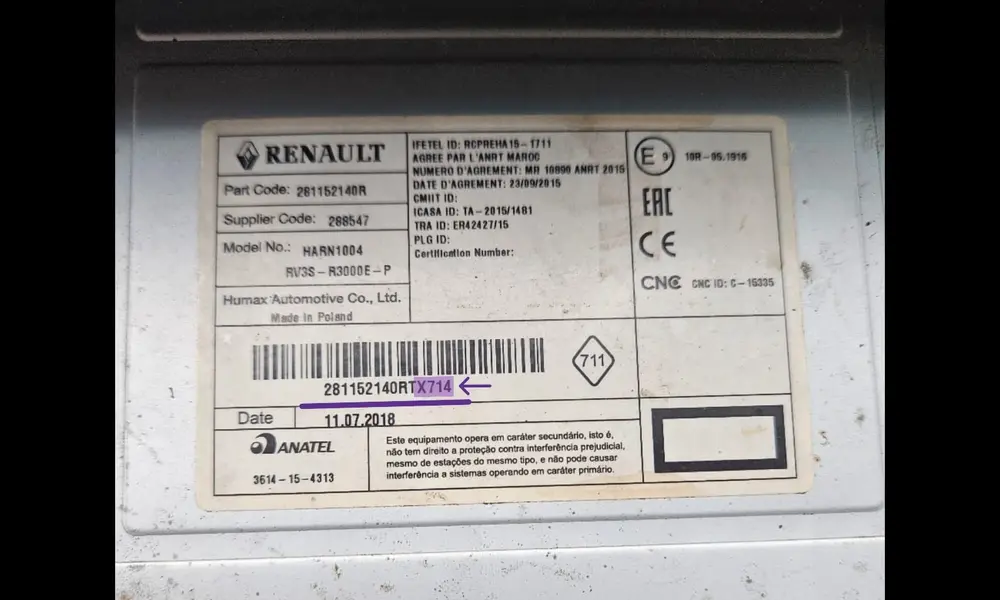 Diagram: Barcode security string location on the back of Lodgy stereos.
Method 2
The Vehicle Identification Number (VIN) Method
In case you have the OE, OEM unit fitted in the car and don't wish to remove the unit from the dashboard, then you can make use of the VIN. It's a 17-character chassis number. This works for every Lodgy Stepway or standard Lodgy model.
- Where it is located (Primary): Open the front passenger door. Look at the bottom base of the B-pillar door frame (white manufacturer sticker / plate).
- Alternative Locations: You can also find the VIN stamped on the **lower corner of the windshield** or printed on your **vehicle registration document (Talon)**.
-
Full VIN Examples: Dacia chassis numbers consist of 17 characters starting with
UU1. • Example 1:UU1JS0A64H1234567
• Example 2:UU1KSD956G7890123 - Our engine can automatically extract the pre-code and calculate the PIN directly using this 17-character string.
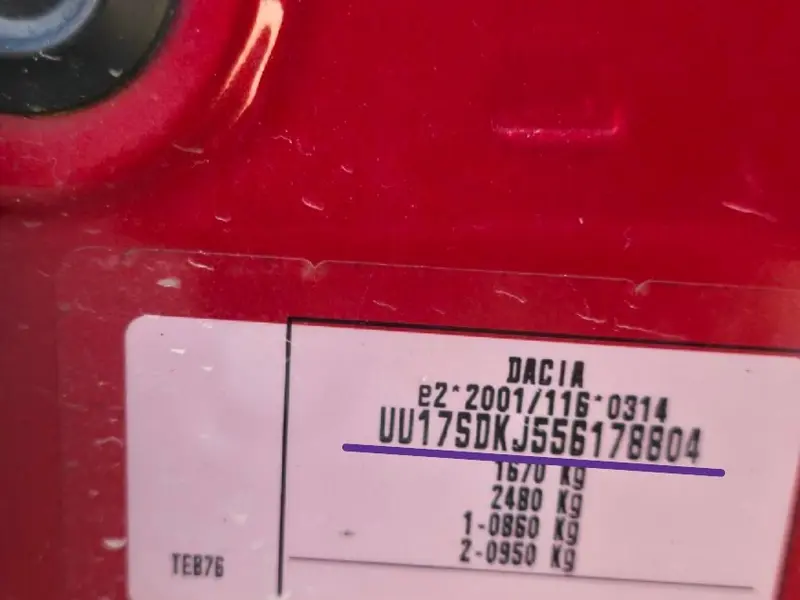 Reference: White manufacturer plate location on the passenger B-pillar chassis.
Using a MediaNav Touchscreen? Button shortcuts (like 1&6) are completely disabled on LG navigation displays. To bypass the system lock without removing your screen using trim keys, we highly recommend using Method 2 (VIN Unlock) to pull the factory PIN online. Alternatively, you can slide out the module to inspect the security sticker or read our dedicated Dacia MediaNav Radio Code Generator.