Ford Stereo Unlock System
Ford 6000 CD RDS EON Radio Code
Get your original factory unlock code for Ford 6000 CD RDS EON units installed across Fiesta, Transit, Focus, Galaxy, Mondeo and more. Find your 6-digit serial number to get started.
How to Find Your Serial Number
How to Find Your Serial Number
To get your factory unlock code, you need to locate the unique serial number printed on the radio's side casing label.
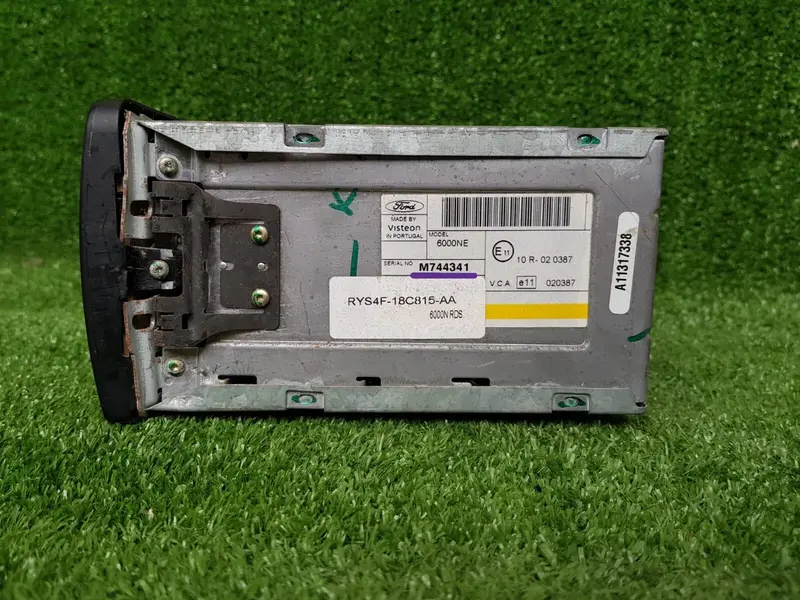
How to Remove the Radio & Read the Serial
- Remove the Head Unit: Insert four Ford radio removal keys into the small release slots located at each of the four corners of your 6000 CD RDS EON stereo. Push them in until they click, then pull gently to slide the unit out of the dashboard housing.
- Locate the Sticker Label: Once the stereo is pulled out, look at the metal casing on either the left, right, or top side. You will find a white barcode sticker attached by the manufacturer.
- Identify the Serial Number: Look closely at the printed characters near the barcode. The serial number always starts with either the letter M or the letter V, followed by exactly 6 digits (for example: M123456 or V098765).
Compatible Ford Vehicles with 6000 CD RDS EON
The 6000 CD RDS EON audio unit was factory-fitted across several popular Ford models. Check your vehicle below:
Ford Fiesta 2002 – 2012
Fitted in Fiesta Mk6 and Mk7 hatchbacks using the standard 6000 CD RDS EON stereo system.
Ford Transit 2006 – 2014
Standard dashboard audio unit for Transit Mk7 commercial vans and work trucks.
Ford Focus 2004 – 2011
Installed across Focus Mk2 and Mk2.5 models requiring standard radio unlock codes.
Ford Galaxy 2006 – 2015
Integrated into large family MPV center consoles utilizing factory 6000 CD head units.
Ford Mondeo 2003 – 2014
Found in Mondeo Mk3 and Mk4 dash layouts featuring the RDS EON audio architecture.
Note: Regardless of which vehicle model you drive, as long as your dashboard unit is the 6000 CD RDS EON stereo, extracting the serial number will allow you to generate your correct unlock code.