
RadioCodeAuto

Compatible with all Ford models

Ford Radio Code Unlock: V, M, BP & TravelPilot Series

Instant online Ford radio code generator. Enter your serial number to retrieve original factory unlock codes for V-Series, M-Series, Blaupunkt, and TravelPilot.

Ford Radio Code

Select type and enter the 6-digit serial number

Notice: BP and TravelPilot codes are processed manually by our technician. Your code will be sent directly to your email usually in 15-30 minutes, but maximum 24h.

YOUR CODE IS:
----

Happy? Help us with a review! πŸ˜„

REVIEW US ON TRUSTPILOT β˜…β˜…β˜…β˜…β˜…

How to Find Your Ford Radio Serial Number

Method 1: On-Screen Display

  • Turn on your radio and ensure it prompts for an unlock code.
  • Press and hold preset buttons 1 and 6 together for 3 to 5 seconds.
  • The screen will begin scrolling through various technical details and system info.
  • Watch the moving text carefully to identify your serial number format:
    • Ford 6000CD / 4500: Look near the end of the text for a V or M followed by 6 digits (e.g., V198203).
    • Sony CD: Displays quickly. If you see a long string like SOCD1X7V112233, your key is the last part: V112233.
  • Alternative: If the 1+6 shortcut doesn't work, turn the radio off and on, then hold down buttons 2 and 6.
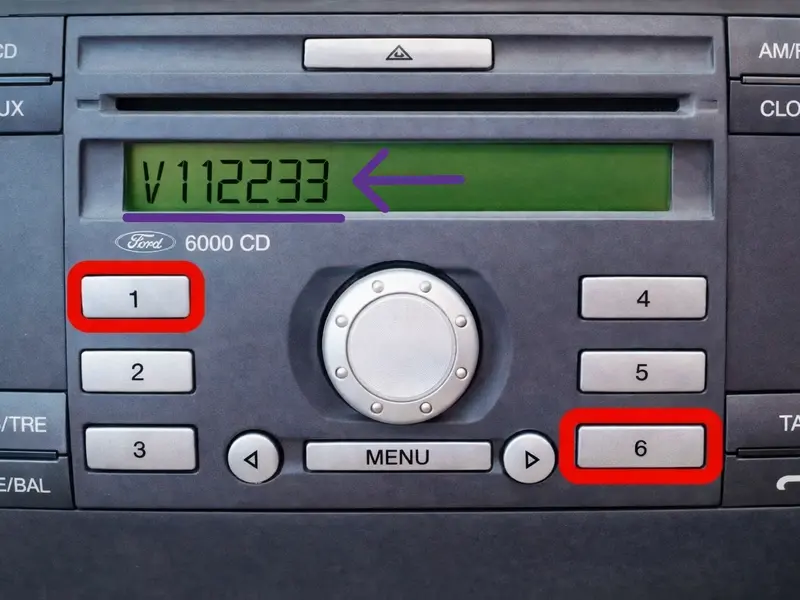
Find Ford radio serial number on screen using buttons 1 and 6 shortcut
Use On-Screen Serial

Method 2: Sticker Label

  • If the buttons fail: You will need to slide the radio out slightly. Older models (1998–2004) require 2 mm round extraction tools.
  • Insert standard Ford release keys into the slots. Alternative: Use small flathead screwdrivers or a rigid wire coat hanger.
  • Push the tools into the slots, press gently outwards, and pull the radio forward.
  • Slide the unit out just enough to see the factory sticker. Do not disconnect any wiring.
  • Locate your serial number format on the label:
    • V-Series / M-Series: 1 letter followed by 6 digits (e.g., V003097 or M654321).
    • Blaupunkt (BP): A 12-digit number starting with the digit 7 (e.g., 7643318310).
    • TravelPilot (TP): Starts with the static prefix C7E3F followed by 12 alphanumeric characters.
Tip: A partial removal is more than enough to read the label. There is no need to unplug any cables from the back.
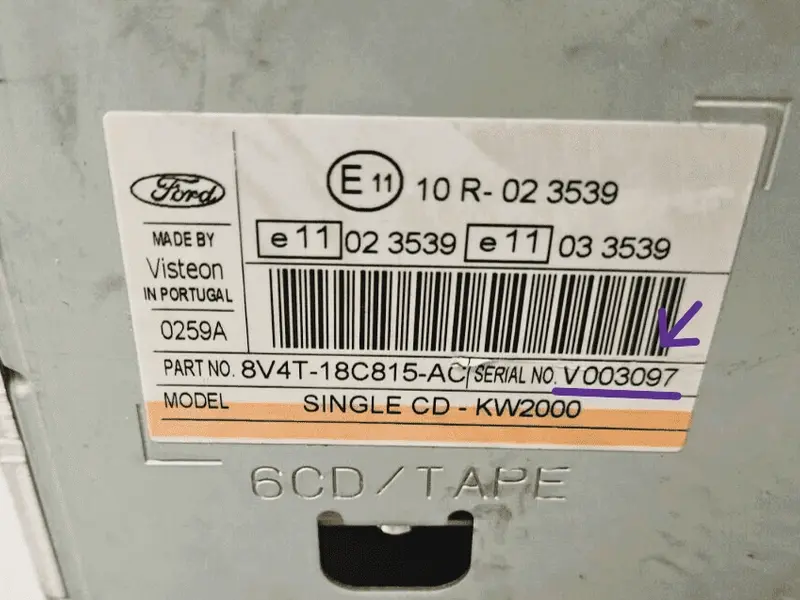
Ford radio serial number location on the factory sticker label V M Blaupunkt and TravelPilot series
Use Sticker Label Serial

How to Enter Your Ford Radio Code

Once you generate your 4-digit security code, follow these steps to unlock your audio unit:

  • Input the 1st Digit: Press button 1 repeatedly until the correct first digit of your code appears on the screen.
  • Input the 2nd Digit: Press button 2 repeatedly to cycle through and set the second digit.
  • Input the 3rd Digit: Press button 3 repeatedly to set the third digit.
  • Input the 4th Digit: Press button 4 repeatedly to set the final digit.
  • Confirm and Unlock: Verify that the full code on the display matches your generated key, then press and hold button 5 (or the * (Asterisk) / SELECT button on Sony models) to save and activate.
Important Warning: You only have 10 standard attempts. If you input a wrong code too many times, your screen will display "LOCKED 10" or "LOCKED 13", rendering the radio permanently disabled without specialist tools.

Supported Ford Vehicles & Radio Models

Our database coverage is over 99% for European and US factory-installed Ford audio systems. Check below to ensure your vehicle and radio type are fully compatible.

πŸš—

Compatible Car Models

Most Popular Generations

  • βœ“ Ford Focus (Mk1, Mk2, Mk3)
  • βœ“ Ford Fiesta (Mk5, Mk6, Mk7)
  • βœ“ Ford Transit & Transit Custom
  • βœ“ Ford Mondeo (Mk3, Mk4)
  • βœ“ Ford C-Max / S-Max / Galaxy
  • βœ“ Ford Kuga, Fusion & Ranger

Other Supported Models

  • β€’ Ford Ka / StreetKa
  • β€’ Ford Tourneo / Tourneo Connect
  • β€’ Ford B-Max (Early generations)
  • β€’ Ford Puma (1997–2002) / Cougar
  • β€’ Ford Escort / Orion / Sierra
  • β€’ Ford Maverick / Explorer (Euro specs)
πŸ“»

Supported Radio Systems

Audio & Navigation Units

  • βœ“ Ford 6000 CD (Oval & Square shapes)
  • βœ“ Ford 4500 RDS E-O-N / 5000 RDS / 7000
  • βœ“ Sony CD / MP3 / 6-CD Changer
  • βœ“ Sony DAB Radio (Digital Audio Broadcasting)
  • βœ“ TravelPilot EX / FX / NX Touchscreen
  • βœ“ Blaupunkt CD30 / Bosch systems
  • βœ“ Ford Denso Touchscreen Navigation

Ford Radio Code & Troubleshooting FAQ

Got stuck during the unlock process? Click on any question below to find fast answers regarding Ford audio serial lookup, system errors, and generation differences.

What should I do if the generated Ford radio code does not work? +
If the code is rejected, it is almost always due to a serial number typographical error. Ford radio keys are mathematically tied to the serial code. Double-check your entry for common visual mix-ups: ensure you didn't mistake a number 0 (Zero) for a letter O, or a number 1 (One) for a capital letter I. If the on-screen button shortcut (1+6) provided multiple numbers, you may need to pull the unit out and read the definitive serial from the physical factory sticker.
What should I do if my screen shows "LOCKED 10" or "LOCKED 13"? +

These messages indicate that the maximum number of incorrect anti-theft PIN attempts has been reached:

  • β€’ LOCKED 10: Press and hold the 6 button for about 10 seconds while turning the radio on. This grants you 3 final entry attempts. Use them carefully with the correct code.
  • β€’ LOCKED 13: This is a permanent electronic lockdown. The button shortcuts are disabled, and the unit must be taken to a specialist or a Ford dealer to be unlocked via hardware EEPROM reprogramming.
What is the difference between Ford M-Series and V-Series serial numbers? +
The single letter prefix determines the internal generation database of your audio unit. M-Series units (e.g., M123456) were predominantly manufactured before 2007 by Ford or Visteon. V-Series units (e.g., V123456) represent newer, more secure firmware profiles introduced after 2007. Our system seamlessly decodes both types instantly.
Why does my Ford radio ask for a code suddenly? +
The factory dashboard audio system includes an integrated anti-theft defense system. Whenever the electrical current is completely disruptedβ€”such as during a dead car battery replacement, a blown fuse, or alternator maintenanceβ€”the radio automatically resets and locks itself down until the authorized 4-digit key is verified.
Does this tool support Sony DAB and TravelPilot navigation systems? +
Yes. Premium dashboard builds featuring Sony CD MP3 or touch-screen Blaupunkt TravelPilot navigation units follow the exact same security framework. Their serial codes usually begin with letters like SOCD, BP, or BP-V. You can extract the code easily using physical removal keys to access the factory sticker label on the rear casing.
πŸ’¬
Live Chat Active Avg. response: < 5 mins