Ford Fiesta Stereo Recovery
Ford Fiesta Radio Code Generator
Recover the original security code for your Ford Fiesta stereo system. This online Ford Fiesta radio code generator calculates the factory unlock PIN codes for 4500 RDS, 6000 CD, Blaupunkt, TravelPilot, and Sony audio radio units using your stereo serial number.
Serial number examples
Where do I find my serial number?Type only the serial, or paste the whole label. Tap an example to see how it is recognised.
- V series
- M series
- Blaupunkt (BP)
- TravelPilot
The letter O is the digit zero. Spaces and dashes do not matter.
How to Find Your Ford Fiesta Radio Serial Number
Before you can calculate your security PIN, you need to locate the unique serial number of your audio unit. Follow the two primary tactical methods below to find it.
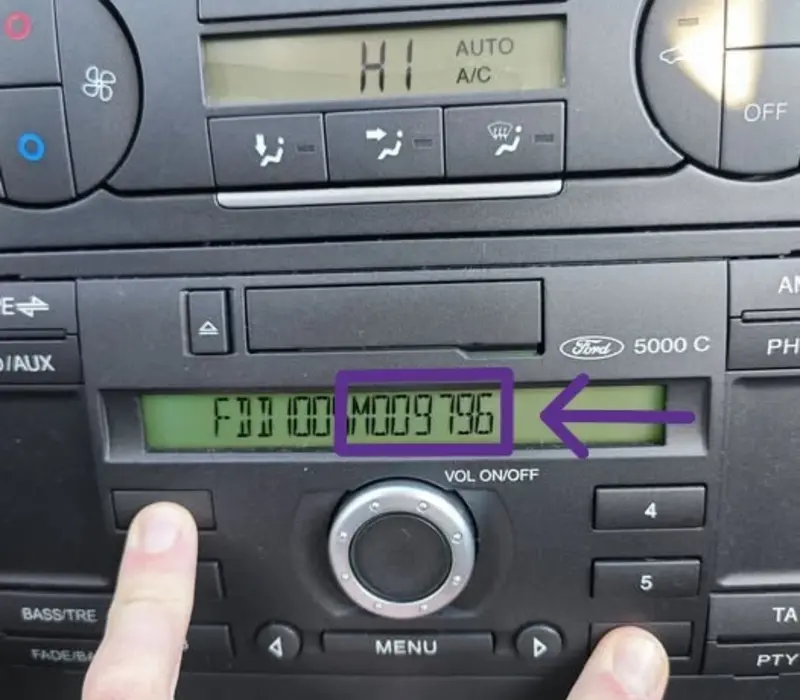
Method 1: Hold Buttons 1 & 6 (On-Screen)
- Turn on your Ford Fiesta audio deck dashboard.
- Press and hold down buttons 1 and 6 simultaneously for a few seconds.
- The screen will cycle through technical configurations and manufacturing data streams.
- Look closely toward the end of the sequence for a serial number starting with V or M followed by 6 digits (e.g., V123456 or M123456).
- Alternative: If nothing shows up, turn off the deck, turn it back on, and try holding buttons 2 and 6 instead.
Method 2: Check the Label (Radio Removal)
- If the on-screen digital combination fails, you must pull the stereo housing out from the central dash container.
- Insert standard Ford radio release keys into the 4 slots located on the faceplate corners until they click.
- Gently pull the keys outward to slide the metal unit casing straight out of the dashboard.
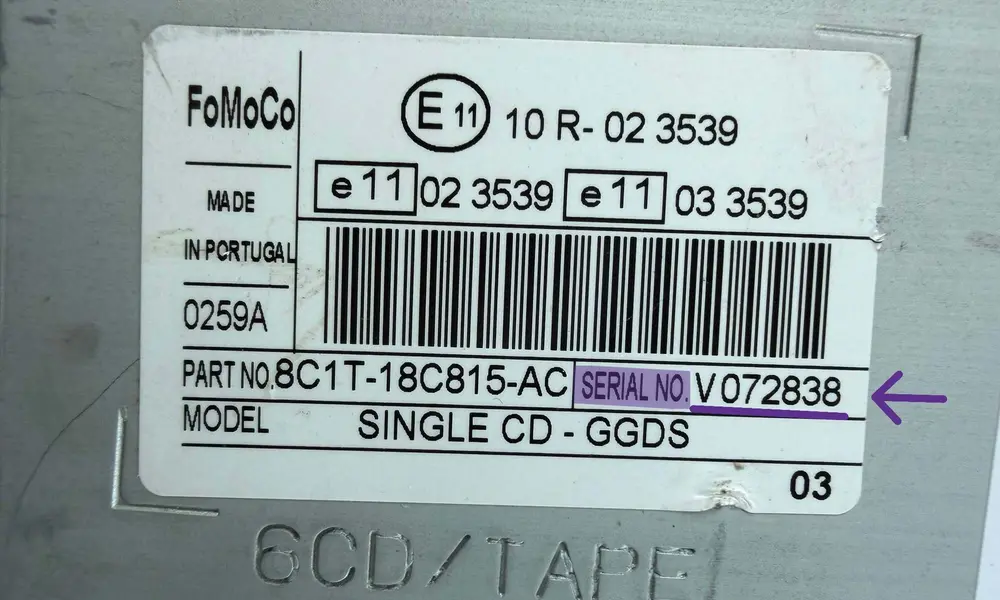
- Locate the white printed label sticker or engraved stamping on the top, side, or back plate.
- The serial number is printed clearly next to the barcode (e.g., Serial No. V123456).
Serial Layout Formats depending on unit type:
- V/M Series (6000 CD RDS EON / Sony): Marked clearly as SERIAL NO. VXXXXXX.
- Blaupunkt Units: Look for a number that starts with BP, then 4 digits, 1 letter and 7 digits (e.g., BP1234A1234567), stamped into the metal or printed on the sticker.
- TravelPilot (C7 System): Look for a longer code starting with C7E3F... or C7E3A..., followed by 12 digits/letters.
How to Enter Your Ford Fiesta Radio Code
Once you have generated your 4-digit unlock code, follow these steps to input it into your radio unit correctly.
Turn On the Ignition
Insert your key and switch on the dashboard ignition. Turn on your radio unit. The digital screen should immediately display "CODE", "ENTER CODE", or show - - - - lines.
Input the 4-Digit PIN
Use the preset station keys 1, 2, 3, and 4 on your dashboard interface to enter the sequence digits:
• Press button 1 repeatedly until the 1st digit of your code appears.
• Press button 2 repeatedly until the 2nd digit of your code appears.
• Press button 3 repeatedly until the 3rd digit of your code appears.
• Press button 4 repeatedly until the 4th digit of your code appears.
Confirm and Unlock
Verify that the numbers displayed match your generated security code perfectly. Once verified, press and hold down button 5 (or the * (asterisk) / Select key on some Sony models) for a few seconds to submit.
Avoid the Permanent "LOCKED13" State
Do not guess your code blindly. You only have 10 standard entry attempts. If you fail 10 times, the dashboard will display "LOCKED10". Attempting an incorrect code 13 times will lock the unit permanently ("LOCKED13"), making it completely unrecoverable via software calculations.
Frequently Asked Questions
Quick, straight-to-the-point answers about Ford Fiesta radio codes, serial layouts, and system lockouts.
Why does my Ford Fiesta radio prompt for a security code?
The unit requests a 4-digit security code as an anti-theft safety measure whenever the main vehicle battery is disconnected, replaced, or completely drained of voltage.
How do I find the serial number without extracting the unit?
Turn on the deck, then press and hold buttons 1 and 6 simultaneously. Read the technical configuration log on the dashboard screen and look for a serial starting with V or M (e.g., *V123456*).
Can I find my Ford Fiesta unlock PIN code for free?
Check your original vehicle documentation pack, owner's manual folder, or the glovebox walls for a security card sticker. If missing, the PIN must be calculated using your unique radio serial code.
What happens if I get a "LOCKED 10" status on my display?
It means 10 wrong code attempts were entered. Press and hold button 6 for a few seconds to reset the internal counter and get 3 final attempts. Be careful: failing these will cause permanent lockdown.
How can I bypass or fix a "LOCKED 13" error code?
LOCKED 13 is a total hardware lockdown. Software tools or button combinations cannot bypass it. The audio deck must be removed and taken to a car electronics lab to manually reset the EEPROM memory chip.