Ford Mondeo Mk2, Mk3 & Mk4 Compatibility
Ford Mondeo Radio Code Unlock
Get your original factory Ford Mondeo radio code instantly. Unlock 4000 RDS, 5000 RDS, 6000 RDS EON, 6000 CD, Sony, and TravelPilot navigation systems for all Mondeo generations.
Serial number examples
Where do I find my serial number?Type only the serial, or paste the whole label. Tap an example to see how it is recognised.
- V series
- M series
- Blaupunkt (BP)
- TravelPilot
The letter O is the digit zero. Spaces and dashes do not matter.
How to Find Your Ford Mondeo Radio Serial Number
To calculate your official unlock code, you need the unique serial number of your stereo unit. Choose one of the two quick methods below to locate it.
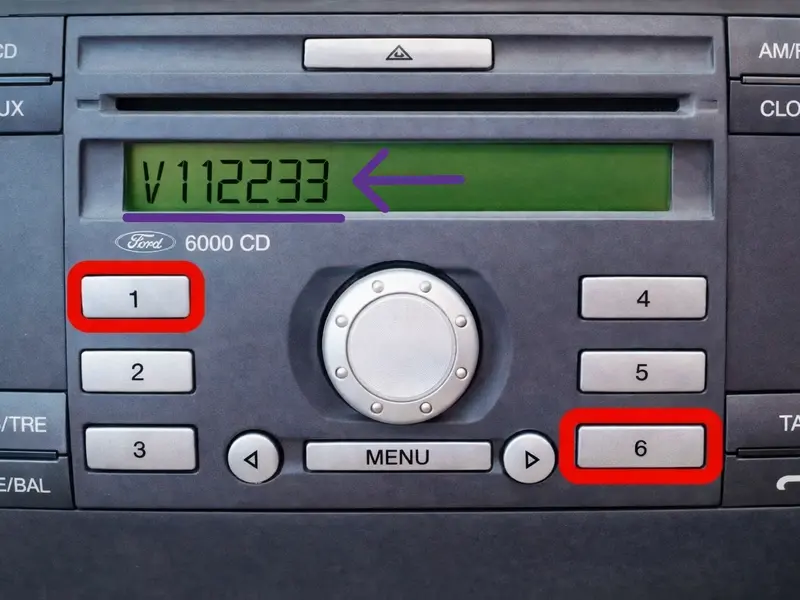
1. On-Screen Button Combination (1 & 6)
On most Ford Mondeo models, you can reveal the serial number directly on the display without pulling the radio out of the dashboard.
- Turn on the radio ignition.
- Press and hold preset buttons 1 and 6 together for a few seconds.
- If nothing appears, try holding buttons 2 and 6.
- The screen will cycle through system data. Look for a code starting with V or M followed by 6 digits (e.g.,
V123456orM654321).
2. Check the Sticker on the Radio Box
If the button shortcut does not display your serial number, or if you have a TravelPilot navigation system, the code is printed on the unit's sticker.
- Insert 4 radio removal keys into the slot corners of your Mondeo stereo.
- Apply light outward pressure on the keys and slide the radio towards you.
- Locate the printed white label or engraved code on the side metal casing.
- Identify your serial prefix: Vxxxxxx, Mxxxxxx, BPxxxx... (4 digits, 1 letter, 7 digits), or
C7E3F.../C7E3A...(TravelPilot).
BP, then 4 digits, 1 letter and 7 digits (e.g., BP1234A1234567), while TravelPilot serials start with C7E3F or C7E3A.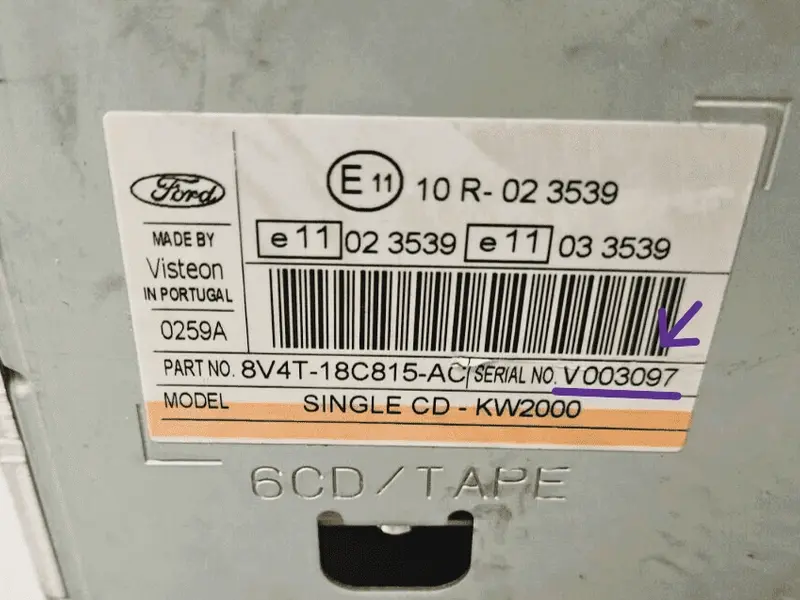
Ford Mondeo Radio Types by Generation
Ford Mondeo Mk2 (1996 – 2000)
- Popular Models: 4000 RDS, 5000 RDS, 6000 CD (1.5 DIN format).
- Serial Types: Exclusively M-Series (e.g., M123456).
- Removal: Requires 2 U-shaped extraction keys.
Ford Mondeo Mk3 (2000 – 2007)
- Popular Models: 6000 CD, Sony CD/6-CD, Denso Touchscreen, TravelPilot EX/FX.
- Serial Types: M-Series (early models) and V-Series or Blaupunkt/TravelPilot (facelift).
- Removal: 1 & 6 shortcut works on most 6000CD models.
Ford Mondeo Mk4 (2007 – 2014)
- Popular Models: Sony, Ford 6000 CD Oval, Blaupunkt NX / FX Touchscreen.
- Serial Types: Predominantly V-Series (e.g., V012345) and TravelPilot.
- Removal: Requires unclip of the dash trim to access Torx screws.
How to Enter Your Ford Mondeo Radio Code
Once you have obtained your 4-digit security code, follow these quick steps to enter the PIN and unlock your Ford Mondeo stereo.
Ford 6000 CD & 4500 RDS Units
For standard Ford Mondeo stereos with physical preset buttons 1 to 6 (e.g. Example code: 4821):
- Switch on the ignition and turn on the radio unit until
CODEor0000appears. - Press button 1 repeatedly until the 1st digit shows 4.
- Press button 2 repeatedly until the 2nd digit shows 8.
- Press button 3 repeatedly until the 3rd digit shows 2.
- Press button 4 repeatedly until the 4th digit shows 1.
- To submit the code, press and hold button 5 (or button 6 on select models) until you hear a beep and the radio unlocks.
Sony CD & Touchscreen Navigation
For Sony stereos or TravelPilot FX / NX Touchscreen units in Mondeo Mk3 & Mk4:
- Turn on the radio ignition. The display will show
ENTER CODEwith keypads or blank spaces. - Sony Keypad Units: Directly press digits 0-9 on the keypad to type your 4-digit code, then press the * button or OK / SELECT.
- Touchscreen Units: Use the touch screen numerical keypad to tap your 4 digits directly.
- Press the on-screen OK or central rotary dial to confirm.
Radio Lockout Message Support
If your screen displays something other than the standard code entry prompt, check these common conditions:
LOCKED 10 or LOCKED 13
Too many incorrect attempts were made. LOCKED 10: Press and hold preset button 6 while turning the unit on to get 3 final attempts. LOCKED 13: The radio is permanently locked and requires main dealer servicing.
WAIT 30 / WAIT 60
A countdown timer triggered by entering invalid codes. Leave the ignition and stereo switched ON continuously for 30 to 60 minutes until the timer expires and CODE reappears.
CODE AGAIN / INCORRECT
The code entered does not match the serial number. Double-check your serial number prefix (V, M, BP, or C7) to ensure you generate the correct security PIN.
Frequently Asked Questions
Quick answers about unlocking your Ford Mondeo radio code.
Q. Can I get my Ford Mondeo radio code for free?
Free online generators usually only support older M-Series codes. For V-Series and Touchscreen units, official database access is required. Beware of "free" scam software that downloads malware—our service shows the unlock code for your serial number instantly, right on this page.
Q. How do I find the serial number without removing the radio?
Turn on the unit and hold buttons 1 & 6 (or 2 & 6) for a few seconds. The serial number starting with V or M will scroll across the screen on 6000 CD and Sony stereos.
Q. Why does my Ford Mondeo radio ask for a code?
Ford stereos activate an anti-theft security lock whenever power is lost—such as changing the car battery, blown fuses, or disconnected wiring. Entering your 4-digit PIN restores normal operation instantly.
Q. What should I do if the screen says "LOCKED" or "WAIT"?
If it displays WAIT, keep the ignition ON for up to 60 minutes until the timer resets. If it displays LOCKED 10, hold button 6 while turning the radio ON for 3 final code attempts.
Q. Will this code work permanently for my radio?
Yes. Your generated 4-digit code is the original factory PIN tied directly to your stereo's serial number. You can use this same code every time your battery is disconnected in the future.