Compatible with Ford Kuga stereos
Ford Kuga Radio Code Generator
Instant online Ford Kuga radio code generator. Enter your serial number to retrieve original factory unlock codes for V-Series, M-Series, Blaupunkt, and TravelPilot navigation systems.
Serial number examples
Where do I find my serial number?Type only the serial, or paste the whole label. Tap an example to see how it is recognised.
- V series
- M series
- Blaupunkt (BP)
- TravelPilot
The letter O is the digit zero. Spaces and dashes do not matter.
How to Find Your Ford Kuga Radio Serial Number
Before using our unlock generator, you need to locate your unit's unique serial number. Depending on your Ford Kuga model year and audio unit (6000 CD, Sony, or TravelPilot), follow one of the two quick methods below.
Display Shortcut (6000 CD & Sony)
For standard Ford Kuga 6000 CD and single-CD Sony radio systems, you can easily retrieve the serial number directly on the screen using button combinations.
- Turn key to position II (Ignition ON) and power on your stereo.
- Press and hold preset buttons 1 and 6 together for a few seconds.
- If nothing happens, release and hold buttons 2 and 6 simultaneously.
- The screen will cycle through system information. Look for a serial starting with V or M followed by 6 digits.
V112233 (V-Series Instant Unlock)
M123456 (M-Series Instant Unlock)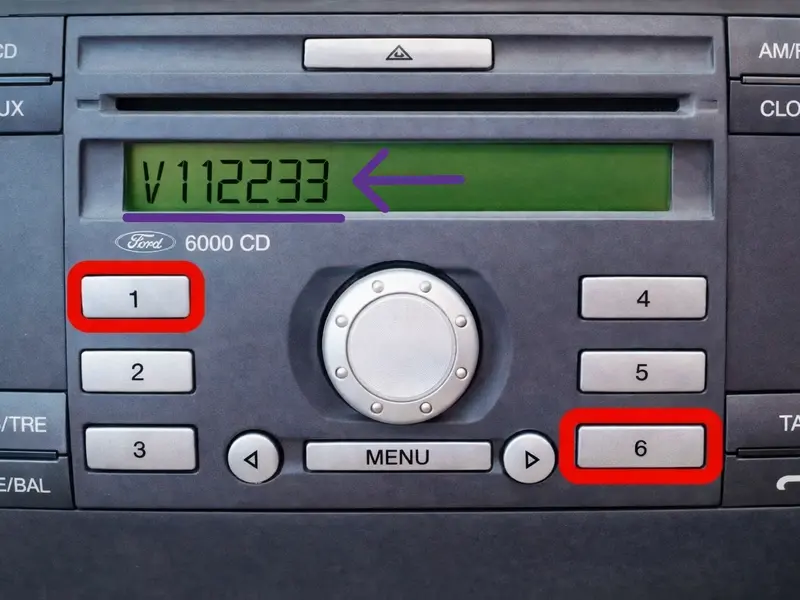
Radio Label Check (TravelPilot & Sony Touch)
If your Ford Kuga is equipped with a Blaupunkt TravelPilot FX / NX touchscreen navigation unit or if the screen shortcut fails on your Sony unit, you must remove the radio to read the sticker label on the metal chassis.
- Unclip the plastic trim surrounding the center console carefully using plastic pry tools.
- Unscrew the 4 Torx mounting screws (or insert 4 Ford radio release keys into the corner slots).
- Pull the radio unit forward to access the rear/side casing.
- Locate the printed label with the barcode and serial number engraved into the metal.
SOCD1X7V012345 (Use V012345 for Sony)
BP1234A1234567 (Blaupunkt)
C7E3F0672A4344865 (17 characters for TravelPilot)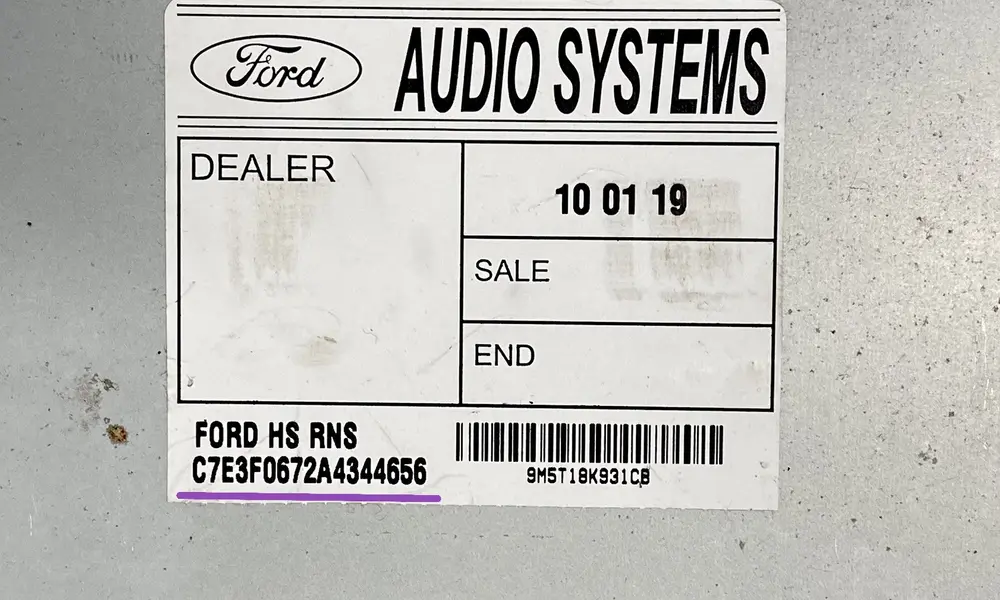
How to Enter Your Ford Kuga Radio Code
Select your stereo model below and follow the quick step-by-step instructions to unlock your Ford Kuga audio system.
Ford 6000 CD System
- Switch on the ignition and turn on the radio unit.
- Wait for "CODE" or "----" to appear on screen.
- Press button 1 repeatedly until the 1st digit appears.
- Press buttons 2, 3 and 4 in turn to enter the remaining digits.
- Press button 5 to confirm and unlock your stereo.
Sony CD / DAB Radio
- Turn on the vehicle ignition and audio system.
- The display should show "ENTER CODE".
- Use the preset keypad (0-9) to enter your 4-digit code directly.
- Once entered, press the * (Asterisk) or OK key.
- Your Sony unit will instantly unmute and restore audio.
TravelPilot FX / NX / MCA
- Power on the ignition to illuminate the navigation screen.
- Use the rotary dial / joystick to highlight numbers.
- Press the dial to select each digit of your security code.
- Scroll and select the on-screen "OK" box.
- Press the rotary knob one last time to save and unlock.
Important Notice: "WAIT" or "LOCKED 10 / 13" Messages
If your Ford Kuga display shows "WAIT 30", leave the radio powered on for 30 minutes until the timer clears. If it says "LOCKED 13", the maximum incorrect attempts have been reached and the radio must be reset manually by an auto electrician.
Frequently Asked Questions
Everything you need to know about unlocking your Ford Kuga radio code.