Ford Fusion Stereo Unlock
Ford Fusion Radio Code Generator
Get your original factory unlock code for Ford Fusion 6000 CD, 4500 RDS EON, and Sony units. Select your series (V or M), enter the 6-digit serial number, and generate your unlock stereo code.
Serial number examples
Where do I find my serial number?Type only the serial, or paste the whole label. Tap an example to see how it is recognised.
- V series
- M series
- Blaupunkt (BP)
- TravelPilot
The letter O is the digit zero. Spaces and dashes do not matter.
How to Find Your Ford Fusion Serial Number
You need your radio's 6-digit serial number (prefixed with V or M) to generate the unlock code. Follow Method 1 first as it doesn't require tools.
On-Screen Serial (6000 CD)
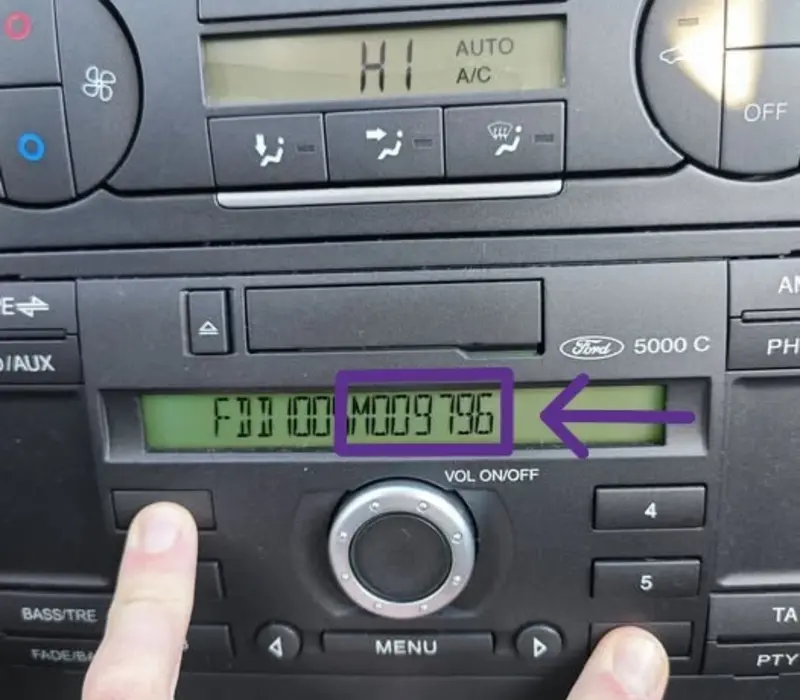
On most Ford 6000 CD models installed in Ford Fusion, you can display the serial number directly on the screen using preset buttons.
- Turn on your radio and make sure it displays CODE or LOCKED.
- Press and hold buttons 1 and 6 together for a few seconds.
- If nothing happens, try pressing and holding buttons 2 and 6.
- The screen will cycle through information. Look for a code starting with V or M followed by 6 digits (e.g., V123456 or M009796).
Printed Sticker Label (4500 RDS / 6000 CD)
If the button shortcut doesn't show the serial (common on 4500 RDS EON units), you'll need to remove the stereo to read the side sticker.
- Insert Ford Radio Removal Keys into the 4 corner release slots of the stereo.
- Push keys inward until they click, then pull gently to slide the unit out.
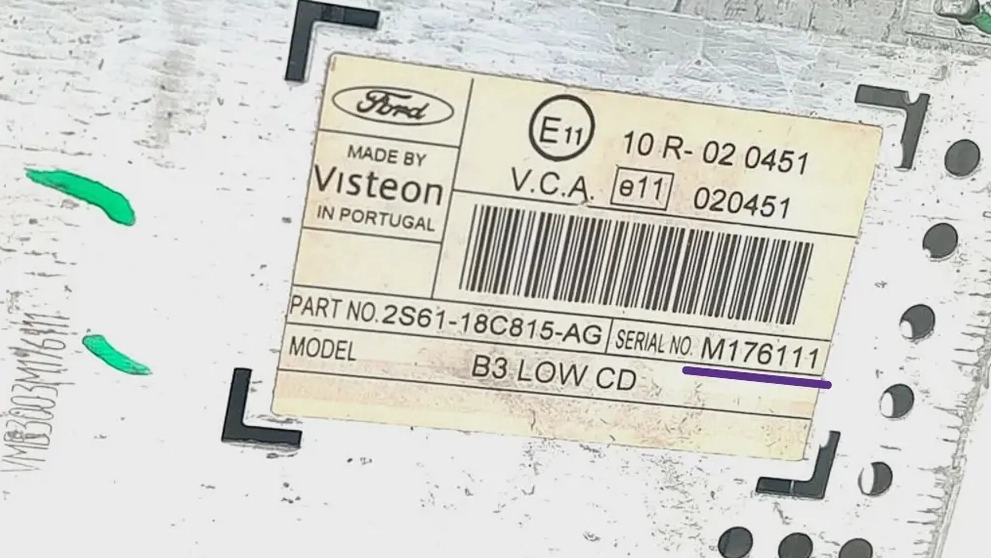
- Locate the white printed barcode sticker on the metal side casing.
- Find the serial number: it starts with V or M + 6 digits (e.g., M176111 or V001234).
How to Enter Ford Fusion Radio Code
Follow these step-by-step instructions to input your 4-digit key code into your Ford Fusion stereo head unit and restore sound instantly.
Ford 6000 CD Stereo
Entering the security PIN on a standard single/double DIN Ford 6000 CD player using preset buttons 1 to 5:
-
1Turn on the ignition switch and switch on your Ford 6000 CD unit. The display should read CODE or 0000.
-
2Press Button 1 repeatedly until the 1st digit of your key code appears on screen.
-
3Press Button 2 repeatedly until the 2nd digit of your key code is set correctly.
-
4Press Button 3 for the 3rd digit and Button 4 for the 4th digit.
-
5Once your 4-digit code is shown, press Button 5 to submit and unlock the radio.
Ford 4500 RDS EON Cassette / CD
Instructions for inputting the anti-theft unlock code on older triple-high Ford 4500 RDS EON factory head units:
-
1Turn key to ACCESSORY position and power on the 4500 RDS EON stereo. Ensure CODE ---- is displayed.
-
2Repeatedly press preset Button 1 to adjust the first digit of your unlock key code.
-
3Use preset Button 2 for the second digit, Button 3 for the third, and Button 4 for the fourth digit.
-
4Verify that the screen displays the correct 4-digit security code.
-
5Press Button 5 or the SELECT / RDS button to enter the code and unlock your audio unit.
Radio Showing "LOCKED 10", "LOCKED 13", or "WAIT"?
If your Ford Fusion radio shows WAIT 30, leave the radio powered on for 30 minutes until the timer resets to enter code. If it displays LOCKED 10, press and hold button 6 while turning on the stereo for 3 final attempts. If it displays LOCKED 13, the unit has exceeded maximum attempts and requires a full dealer mainboard reset.
Ford Radio Code & Troubleshooting FAQ
Everything you need to know about unlocking your Ford Fusion audio system quickly and safely.
Can I get my Ford Fusion radio code for free?
Some standard serials can indeed be calculated for free depending on the model, but many require database queries. Maintaining live API servers and accessing official Ford security databases involves operational costs. You can test your serial number in our generator above to see if your unit qualifies for free decoding or instant lookup.
Where can I find my stereo serial number?
On most 6000 CD models, hold preset buttons 1 & 6 together to display the serial directly on screen. For 4500 RDS EON models, insert removal keys into the four slots to pull the unit out and read the printed code on the side barcode sticker.
What is the difference between V-Series and M-Series?
M-Series codes belong to older Ford sound systems, while V-Series applies to newer models. Both types use a 6-digit serial number format (e.g., V123456 or M123456) and are fully supported by our database.
Why does my radio ask for a code after a battery change?
Ford stereos feature built-in anti-theft security. Whenever power supply is cut off (such as during battery replacement or blown fuses), the stereo automatically locks down until the valid 4-digit key code is provided.
What happens if I enter the wrong code?
3 wrong entries trigger a 30-minute lockout displayed as WAIT. 10 invalid attempts show LOCKED 10. Reaching 13 attempts (LOCKED 13) permanently disables the head unit software, requiring physical dealer intervention.